8-How_to_ask_for_help-2-Asking_for_help_on_the_forums
中英文对照学习,效果更佳!
原课程链接:https://huggingface.co/course/chapter8/3?fw=pt
Asking for help on the forums
在论坛上寻求帮助



在工作室实验室的可乐公开赛中提问
The Hugging Face forums are a great place to get help from the open source team and wider Hugging Face community. Here’s what the main page looks like on any given day:
Hugging Face论坛是一个从开源团队和更广泛的Hugging Face社区获得帮助的好地方。下面是主页在任何一天的样子:
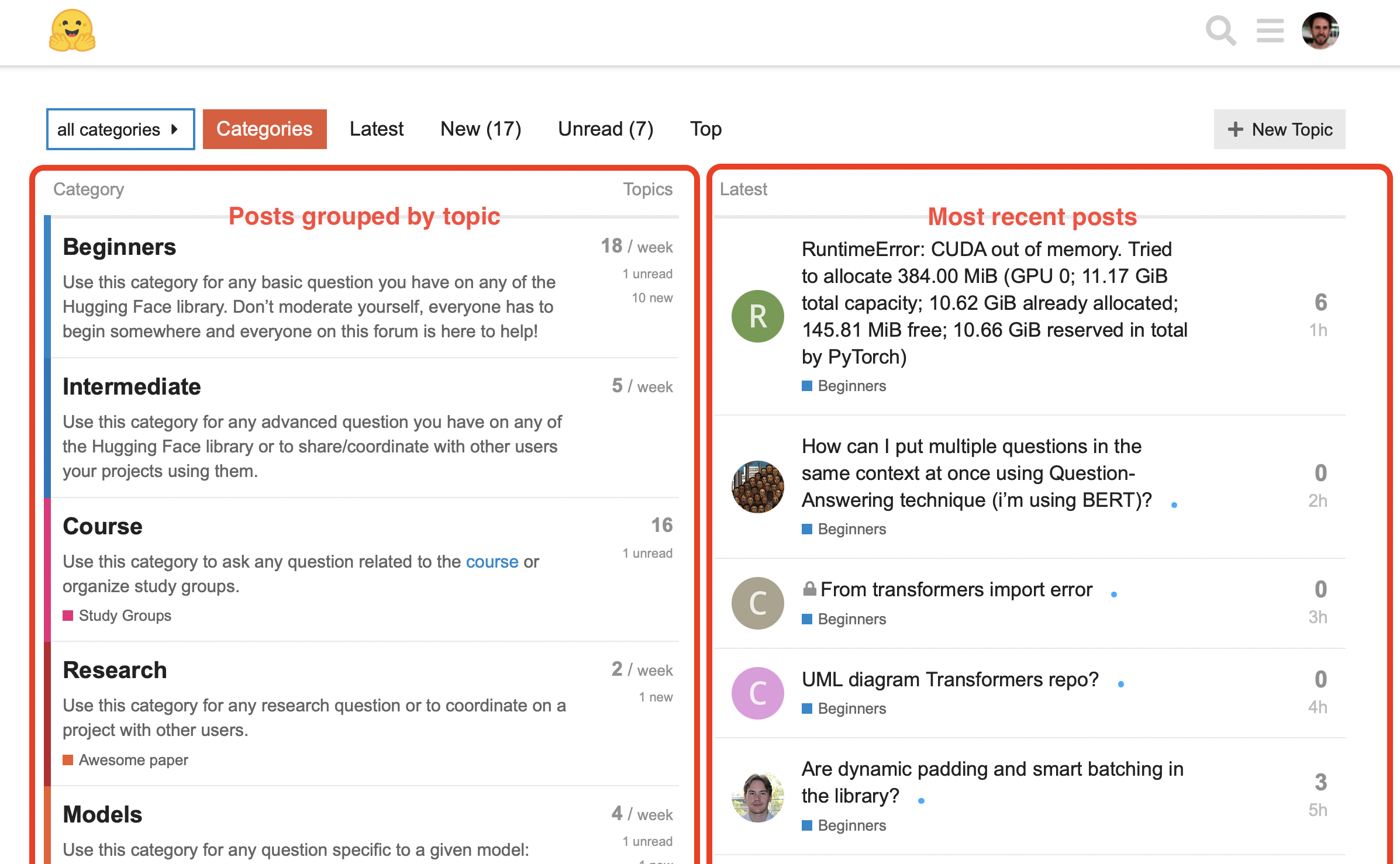
On the lefthand side you can see all the categories that the various topics are grouped into, while the righthand side shows the most recent topics. A topic is a post that contains a title, category, and description; it’s quite similar to the GitHub issues format that we saw when creating our own dataset in [Chapter 5]. As the name suggests, the Beginners category is primarily intended for people just starting out with the Hugging Face libraries and ecosystem. Any question on any of the libraries is welcome there, be it to debug some code or to ask for help about how to do something. (That said, if your question concerns one library in particular, you should probably head to the corresponding library category on the forum.)
Hugging Face论坛。在左侧,您可以看到不同主题分组的所有类别,而右侧则显示最新的主题。主题是包含标题、类别和描述的帖子;它与我们在第五章创建自己的数据集时看到的GitHub Issues格式非常相似。顾名思义,初学者类别主要面向那些刚刚开始接触Hugging Face库和生态系统的人。任何关于任何库的问题都是受欢迎的,无论是调试一些代码还是请求有关如何做某事的帮助。(也就是说,如果您的问题特别涉及一个库,您可能应该转到论坛上相应的库类别。)
Similarly, the Intermediate and Research categories are for more advanced questions, for example about the libraries or some cool new NLP research that you’d like to discuss.
同样,中级和研究类别是针对更高级的问题,例如,关于图书馆或您想要讨论的一些很酷的新NLP研究。
And naturally, we should also mention the Course category, where you can ask any questions you have that are related to the Hugging Face course!
当然,我们也应该提到课程类别,在那里你可以问任何与Hugging Face课程有关的问题!
Once you have selected a category, you’ll be ready to write your first topic. You can find some guidelines in the forum on how to do this, and in this section we’ll take a look at some features that make up a good topic.
一旦你选择了一个类别,你就可以准备写你的第一个主题了。您可以在论坛中找到一些如何做到这一点的指南,在这一节中,我们将看看构成一个很好的主题的一些功能。
Writing a good forum post
写好论坛帖子
As a running example, let’s suppose that we’re trying to generate embeddings from Wikipedia articles to create a custom search engine. As usual, we load the tokenizer and model as follows:
作为一个正在运行的例子,让我们假设我们正在尝试从Wikipedia文章中生成嵌入,以创建一个定制的搜索引擎。像往常一样,我们加载令牌器和模型,如下所示:
1 | |
Now suppose we try to embed a whole section of the Wikipedia article on Transformers (the franchise, not the library!):
现在假设我们试着在维基百科上嵌入一整段关于《Transformer》的文章(是《Transformer》系列,而不是《图书馆》!):
1 | |
1 | |
Uh-oh, we’ve hit a problem — and the error message is far more cryptic than the ones we saw in section 2! We can’t make head or tails of the full traceback, so we decide to turn to the Hugging Face forums for help. How might we craft the topic?
啊-哦,我们遇到了一个问题–错误消息比我们在第2节中看到的要神秘得多!我们无法理解完整的追溯,所以我们决定向Hugging Face论坛寻求帮助。我们该如何构思这个话题呢?
To get started, we need to click the “New Topic” button at the upper-right corner (note that to create a topic, we’ll need to be logged in):
要开始,我们需要点击右上角的“新建主题”按钮(请注意,要创建主题,我们需要登录):

This brings up a writing interface where we can input the title of our topic, select a category, and draft the content:
创建新的论坛主题。这会弹出一个写作界面,在这里我们可以输入话题的标题,选择一个类别,然后起草内容:
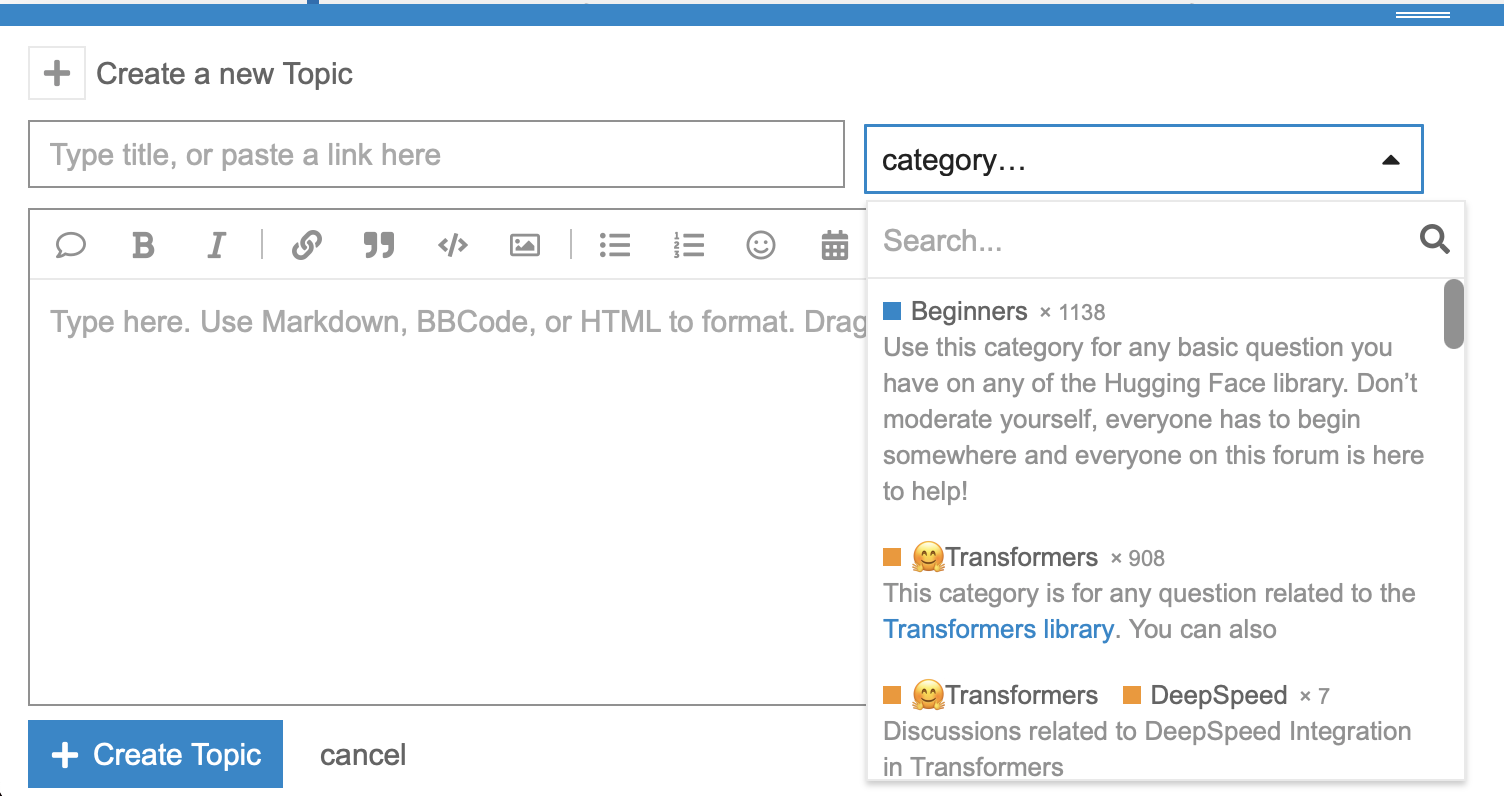
Since the error seems to be exclusively about 🤗 Transformers, we’ll select this for the category. Our first attempt at explaining the problem might look something like this:
用于创建论坛主题的界面。由于该错误似乎只与🤗Transformer有关,因此我们将为类别选择此选项。我们解释这个问题的第一次尝试可能是这样的:
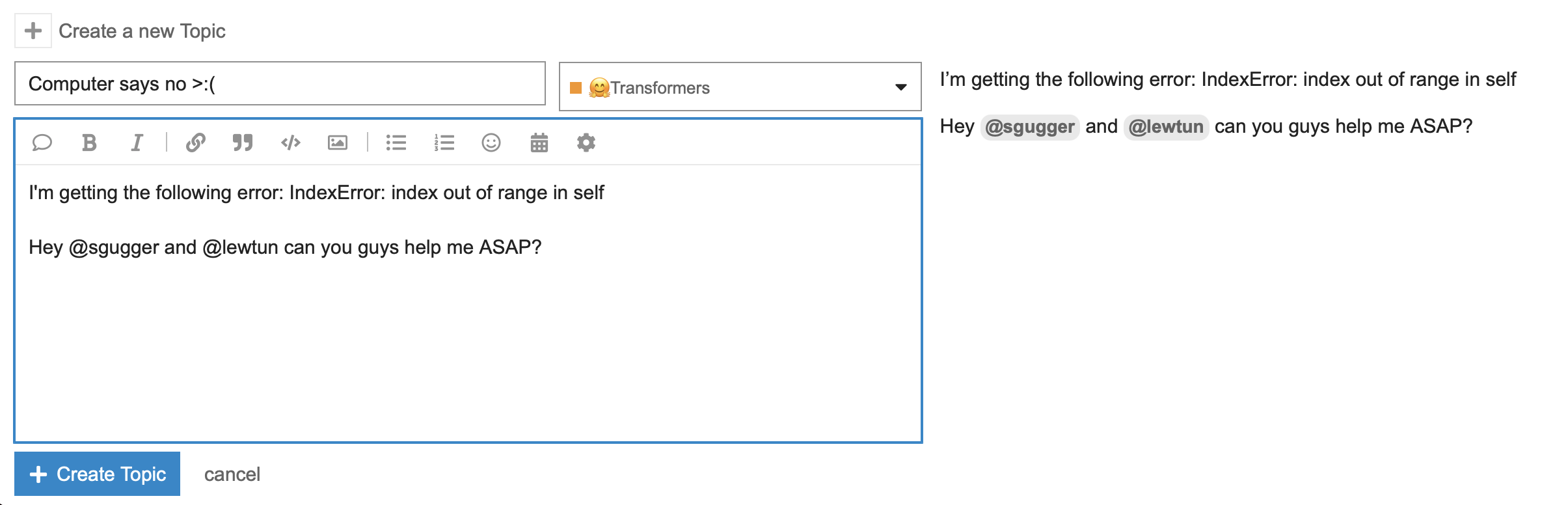
Although this topic contains the error message we need help with, there are a few problems with the way it is written:
为一个新的论坛主题起草内容。尽管本主题包含我们需要帮助的错误消息,但它的编写方式存在一些问题:
- The title is not very descriptive, so anyone browsing the forum won’t be able to tell what the topic is about without reading the body as well.
- The body doesn’t provide enough information about where the error is coming from and how to reproduce it.
- The topic tags a few people directly with a somewhat demanding tone.
Topics like this one are not likely to get a fast answer (if they get one at all), so let’s look at how we can improve it. We’ll start with the first issue of picking a good title.
标题不是很有描述性,所以任何浏览论坛的人如果不阅读正文就无法知道主题是关于什么的。正文没有提供关于错误来自哪里以及如何重现错误的足够信息。主题直接用有点苛刻的语气标记几个人。像这样的主题不太可能得到快速的答案(如果他们真的得到了答案的话),所以让我们看看如何改进它。我们将从第一期选择一个好的标题开始。
Choosing a descriptive title
选择描述性标题
If you’re trying to get help with a bug in your code, a good rule of thumb is to include enough information in the title so that others can quickly determine whether they think they can answer your question or not. In our running example, we know the name of the exception that’s being raised and have some hints that it’s triggered in the forward pass of the model, where we call model(**inputs). To communicate this, one possible title could be:
如果您试图获得有关代码错误的帮助,一个很好的经验法则是在标题中包含足够的信息,以便其他人可以快速确定他们是否可以回答您的问题。在我们的运行示例中,我们知道正在引发的异常的名称,并有一些提示它是在模型的正向传递中触发的,其中我们调用Model(**inputs)。要传达这一点,一个可能的标题可能是:
Source of IndexError in the AutoModel forward pass?
自动模型正向传递中的索引错误的来源?
This title tells the reader where you think the bug is coming from, and if they’ve encountered an IndexError before, there’s a good chance they’ll know how to debug it. Of course, the title can be anything you want, and other variations like:
这个标题告诉读者您认为错误来自哪里,如果他们以前遇到过‘IndexError’,他们很有可能知道如何调试它。当然,标题可以是您想要的任何内容,也可以是其他变体,如:
Why does my model produce an IndexError?
为什么我的模型会产生一个IndexError?
could also be fine. Now that we’ve got a descriptive title, let’s take a look at improving the body.
也可能没问题。现在我们已经有了一个描述性的标题,让我们来看看如何改善身体。
Formatting your code snippets
设置代码段的格式
Reading source code is hard enough in an IDE, but it’s even harder when the code is copied and pasted as plain text! Fortunately, the Hugging Face forums support the use of Markdown, so you should always enclose your code blocks with three backticks (```) so it’s more easily readable. Let’s do this to prettify the error message — and while we’re at it, let’s make the body a bit more polite than our original version:
在IDE中阅读源代码已经够难的了,但当代码被复制和粘贴为纯文本时就更难了!幸运的是,Hugging Face论坛支持使用Markdown,所以你应该总是用三个反号(`)括起你的代码块,这样更容易阅读。让我们这样做来美化错误消息–同时,让我们让身体比我们的原始版本更有礼貌一些:
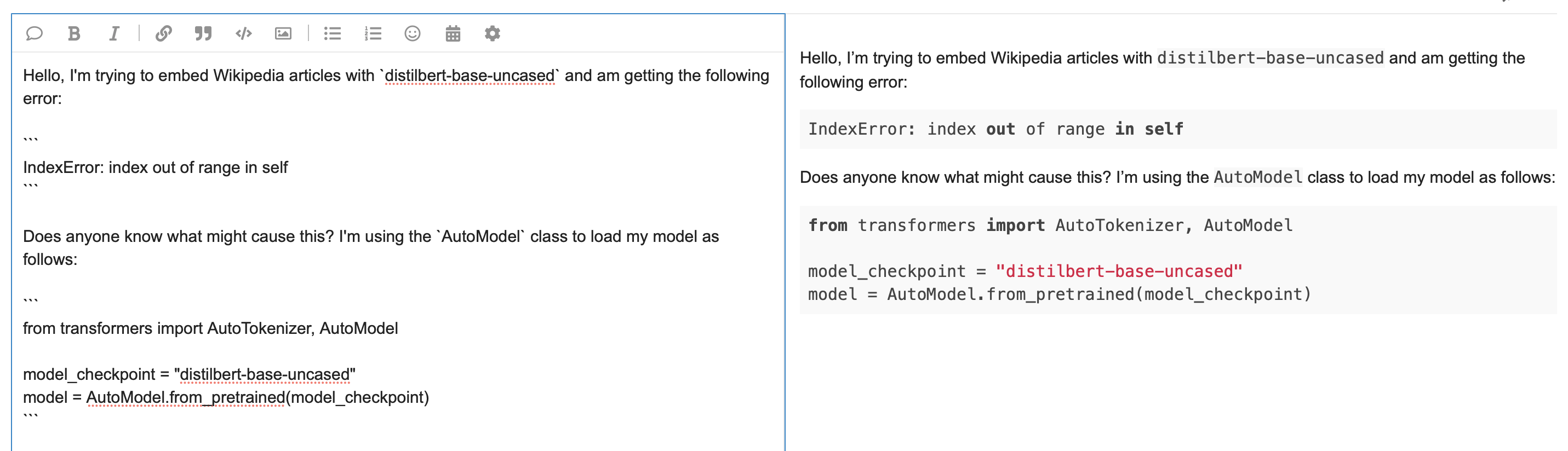
As you can see in the screenshot, enclosing the code blocks in backticks converts the raw text into formatted code, complete with color styling! Also note that single backticks can be used to format inline variables, like we’ve done for distilbert-base-uncased. This topic is looking much better, and with a bit of luck we might find someone in the community who can guess what the error is about. However, instead of relying on luck, let’s make life easier by including the traceback in its full gory detail!
我们修改了论坛主题,并采用了适当的代码格式。正如您在屏幕截图中看到的,用反引号括起代码块可以将原始文本转换为格式化代码,并带有颜色样式!还请注意,可以使用单个反号来格式化内联变量,就像我们对distilbert-base-unased所做的那样。这个话题看起来好多了,如果运气好的话,我们可能会在社区中找到一些人,他们可以猜到错误是关于什么的。然而,与其依赖运气,不如让我们通过将追溯包含在其全部血淋淋的细节中来让生活变得更容易!
Including the full traceback
包括完整的回溯
Since the last line of the traceback is often enough to debug your own code, it can be tempting to just provide that in your topic to “save space.” Although well intentioned, this actually makes it harder for others to debug the problem since the information that’s higher up in the traceback can be really useful too. So, a good practice is to copy and paste the whole traceback, while making sure that it’s nicely formatted. Since these tracebacks can get rather long, some people prefer to show them after they’ve explained the source code. Let’s do this. Now, our forum topic looks like the following:
由于回溯的最后一行通常足以调试您自己的代码,因此在您的主题中只提供这一行以“节省空间”是很有诱惑力的。尽管用意是好的,但这实际上会使其他人更难调试问题,因为回溯中位置较高的信息也可能非常有用。因此,一个好的做法是复制并粘贴整个回溯,同时确保它的格式很好。由于这些回溯可能会相当长,所以有些人更喜欢在解释完源代码之后再显示它们。我们开始吧。现在,我们的论坛主题如下:
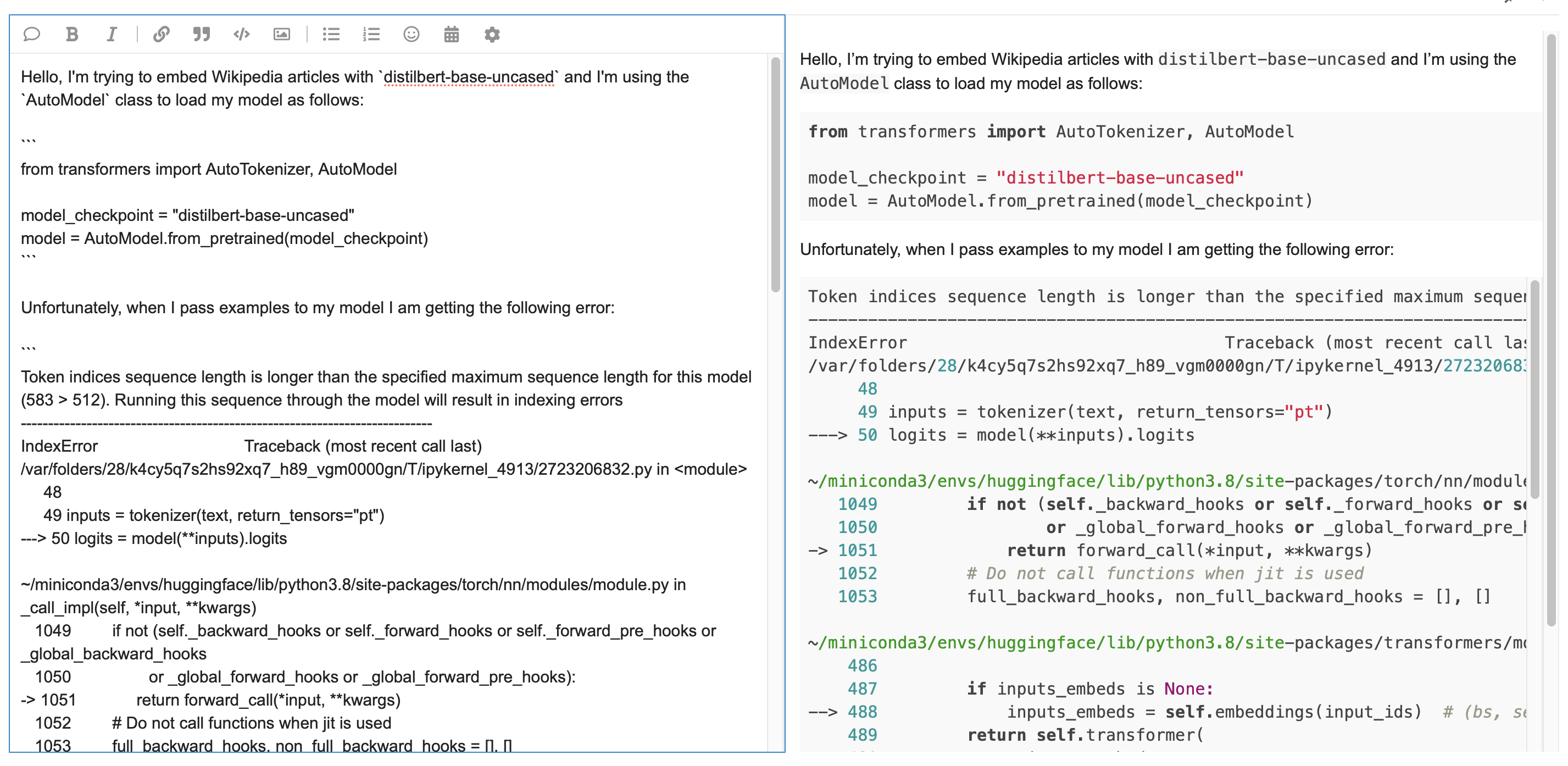
This is much more informative, and a careful reader might be able to point out that the problem seems to be due to passing a long input because of this line in the traceback:
我们的示例论坛主题,带有完整的回溯。这提供了更多的信息,细心的读者可能会指出,问题似乎是由于回溯中的这一行传递了很长的输入造成的:
Token indices sequence length is longer than the specified maximum sequence length for this model (583 > 512).
令牌索引序列长度大于为此型号指定的最大序列长度(583>512)。
However, we can make things even easier for them by providing the actual code that triggered the error. Let’s do that now.
但是,通过提供触发错误的实际代码,我们可以让他们的工作变得更容易。我们现在就开始吧。
Providing a reproducible example
提供了一个可重复使用的例子
If you’ve ever tried to debug someone else’s code, you’ve probably first tried to recreate the problem they’ve reported so you can start working your way through the traceback to pinpoint the error. It’s no different when it comes to getting (or giving) assistance on the forums, so it really helps if you can provide a small example that reproduces the error. Half the time, simply walking through this exercise will help you figure out what’s going wrong. In any case, the missing piece of our example is to show the inputs that we provided to the model. Doing that gives us something like the following completed example:
如果您曾经尝试调试其他人的代码,您可能首先尝试重新创建他们报告的问题,这样您就可以开始通过回溯来定位错误。在论坛上获得(或提供)帮助没有什么不同,所以如果你能提供一个重现错误的小例子,那真的很有帮助。在一半的时间里,简单地走一遍这个练习就能帮助你找出哪里出了问题。在任何情况下,我们的示例中缺少的部分是显示我们提供给模型的输入。这样做会给我们提供类似以下完整示例的内容:
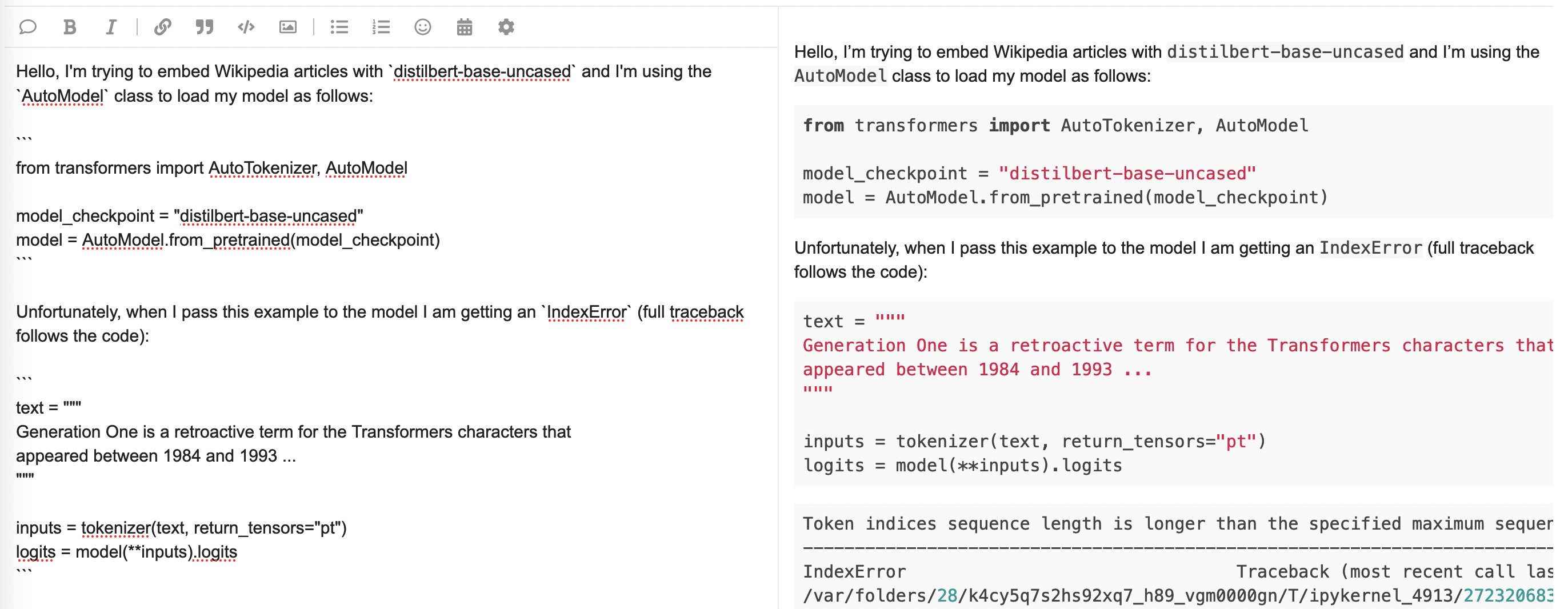
This topic now contains quite a lot of information, and it’s written in a way that is much more likely to attract the attention of the community and get a helpful answer. With these basic guidelines, you can now create great topics to find the answers to your 🤗 Transformers questions!
这是我们论坛主题的最终版本。这个话题现在包含了相当多的信息,而且它的写作方式更有可能吸引社区的注意,并得到有用的答案。有了这些基本的指导方针,您现在可以创建伟大的主题来找到您的🤗Transformer问题的答案!