7-Main_NLP_tasks-6-Question_answering
中英文对照学习,效果更佳!
原课程链接:https://huggingface.co/course/chapter7/7?fw=pt
Question answering
答疑



Time to look at question answering! This task comes in many flavors, but the one we’ll focus on in this section is called extractive question answering. This involves posing questions about a document and identifying the answers as spans of text in the document itself.
问一个问题在可乐中打开在工作室实验室中打开时间来看问题回答!这项任务有很多种,但我们在这一节将重点关注的一项任务称为摘要式问答。这包括提出关于文档的问题,并将答案标识为文档本身中的文本跨度。
We will fine-tune a BERT model on the SQuAD dataset, which consists of questions posed by crowdworkers on a set of Wikipedia articles. This will give us a model able to compute predictions like this one:
我们将在球队数据集上对Bert模型进行微调,该数据集包括众筹人员对一组维基百科文章提出的问题。这将为我们提供一个能够计算如下预测的模型:
This is actually showcasing the model that was trained and uploaded to the Hub using the code shown in this section. You can find it and double-check the predictions here.
这实际上展示了使用本节中显示的代码训练并上载到Hub的模型。你可以在这里找到它,并再次检查预测。
💡 Encoder-only models like BERT tend to be great at extracting answers to factoid questions like “Who invented the Transformer architecture?” but fare poorly when given open-ended questions like “Why is the sky blue?” In these more challenging cases, encoder-decoder models like T5 and BART are typically used to synthesize the information in a way that’s quite similar to text summarization. If you’re interested in this type of generative question answering, we recommend checking out our demo based on the ELI5 dataset.
像伯特这样只有💡编码器的模型倾向于很好地提取事实问题的答案,比如“谁发明了Transformer的架构?”但当被问到像“天空为什么是蓝色的?”这样的开放式问题时,情况就不太好了。在这些更具挑战性的情况下,通常使用像T5和BART这样的编解码器模型来合成信息,其方式与文本摘要非常相似。如果您对这种生成性问题回答感兴趣,我们建议您查看基于ELI5数据集的演示。
Preparing the data
准备数据
The dataset that is used the most as an academic benchmark for extractive question answering is SQuAD, so that’s the one we’ll use here. There is also a harder SQuAD v2 benchmark, which includes questions that don’t have an answer. As long as your own dataset contains a column for contexts, a column for questions, and a column for answers, you should be able to adapt the steps below.
最常被用作摘要问答的学术基准的数据集是QUAND,所以我们将在这里使用它。还有一个更难的球队v2基准,其中包括没有答案的问题。只要您自己的数据集包含一个用于上下文的列、一个用于问题的列和一个用于答案的列,您就应该能够调整以下步骤。
The SQuAD dataset
小队数据集
As usual, we can download and cache the dataset in just one step thanks to load_dataset():
像往常一样,我们可以一步完成数据集的下载和缓存,这要归功于Load_Dataet():
1 | |
We can then have a look at this object to learn more about the SQuAD dataset:
然后,我们可以查看此对象以了解有关球队数据集的更多信息:
1 | |
1 | |
It looks like we have everything we need with the context, question, and answers fields, so let’s print those for the first element of our training set:
看起来我们已经具备了Conext、Queston和Answers字段所需的一切,所以让我们将它们打印出来,作为我们训练集的第一个元素:
1 | |
1 | |
The context and question fields are very straightforward to use. The answers field is a bit trickier as it comports a dictionary with two fields that are both lists. This is the format that will be expected by the squad metric during evaluation; if you are using your own data, you don’t necessarily need to worry about putting the answers in the same format. The text field is rather obvious, and the answer_start field contains the starting character index of each answer in the context.
`Conext和Queston字段使用起来非常简单。Answers字段比较复杂,因为它传送的词典中有两个字段都是列表。这是Squad指标在评估过程中所期望的格式;如果您使用自己的数据,则不必担心将答案放在相同的格式中。ext字段非常明显,Answer_start`字段包含上下文中每个答案的起始字符索引。
During training, there is only one possible answer. We can double-check this by using the Dataset.filter() method:
在训练期间,只有一个可能的答案。我们可以使用Dataset.Filter()方法再次检查:
1 | |
1 | |
For evaluation, however, there are several possible answers for each sample, which may be the same or different:
然而,对于评估,每个样本都有几个可能的答案,可能相同也可能不同:
1 | |
1 | |
We won’t dive into the evaluation script as it will all be wrapped up by a 🤗 Datasets metric for us, but the short version is that some of the questions have several possible answers, and this script will compare a predicted answer to all the acceptable answers and take the best score. If we take a look at the sample at index 2, for instance:
我们不会深入到评估脚本,因为它将由🤗数据集度量为我们包裹,但简短的版本是,一些问题有几个可能的答案,该脚本将把预测的答案与所有可接受的答案进行比较,并获得最佳分数。如果我们看一下索引2处的样本,例如:
1 | |
1 | |
we can see that the answer can indeed be one of the three possibilities we saw before.
我们可以看到,答案确实可以是我们之前看到的三种可能性之一。
Processing the training data
训练数据的处理
Let’s start with preprocessing the training data. The hard part will be to generate labels for the question’s answer, which will be the start and end positions of the tokens corresponding to the answer inside the context.
让我们从对训练数据进行预处理开始。困难的部分将是为问题的答案生成标签,这将是上下文中与答案对应的令牌的开始和结束位置。
But let’s not get ahead of ourselves. First, we need to convert the text in the input into IDs the model can make sense of, using a tokenizer:
但我们不要操之过急。首先,我们需要使用标记器将输入中的文本转换为模型可以理解的ID:
1 | |
As mentioned previously, we’ll be fine-tuning a BERT model, but you can use any other model type as long as it has a fast tokenizer implemented. You can see all the architectures that come with a fast version in this big table, and to check that the tokenizer object you’re using is indeed backed by 🤗 Tokenizers you can look at its is_fast attribute:
如前所述,我们将对BERT模型进行微调,但您可以使用任何其他模型类型,只要它实现了快速记号赋值器。您可以在这个大表中看到FAST版本附带的所有架构,要检查您正在使用的tokenizer对象是否确实受🤗Tokenizers支持,您可以查看它的is_fast属性:
1 | |
1 | |
We can pass to our tokenizer the question and the context together, and it will properly insert the special tokens to form a sentence like this:
我们可以将问题和上下文一起传递给我们的标记器,它会适当地插入特殊的标记符,形成如下句子:
1 | |
Let’s double-check:
让我们再检查一遍:
1 | |
1 | |
The labels will then be the index of the tokens starting and ending the answer, and the model will be tasked to predicted one start and end logit per token in the input, with the theoretical labels being as follow:
然后,标签将是开始和结束答案的令牌的索引,模型将负责预测输入中每个令牌一个开始和结束Logit,理论标签如下:
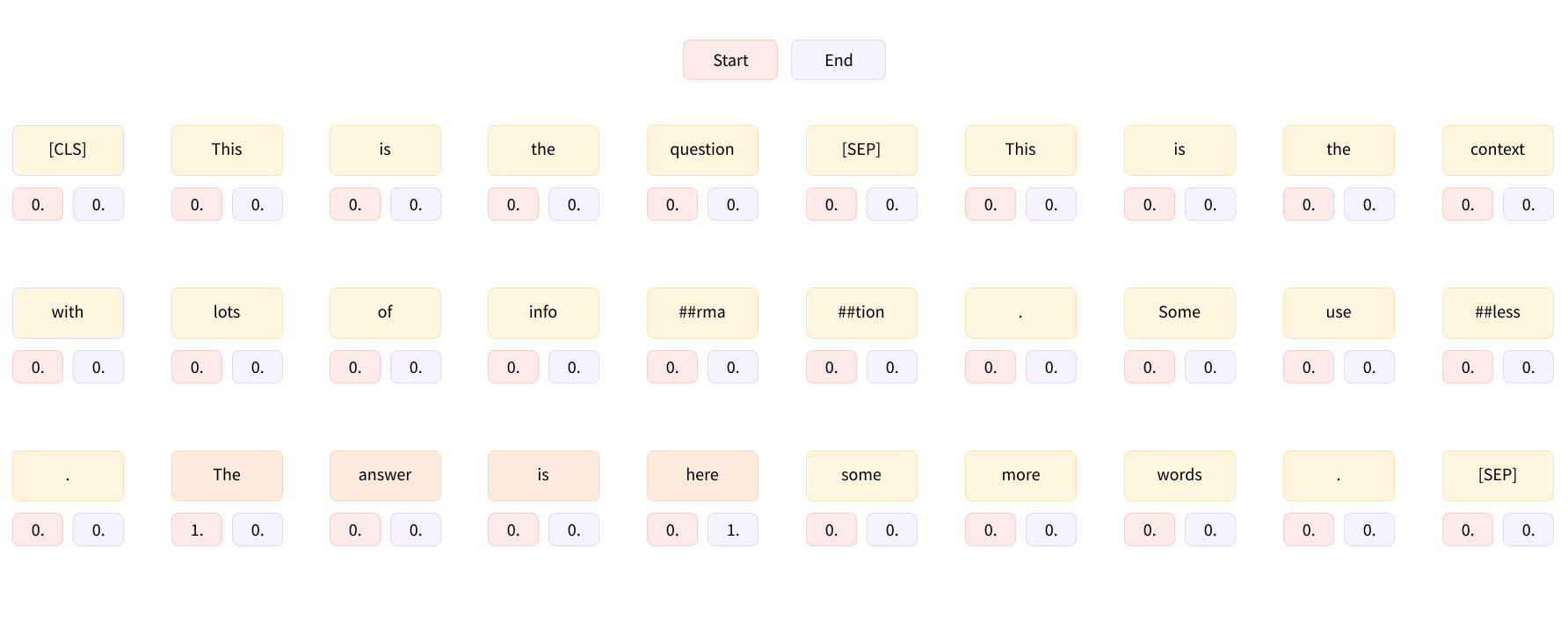
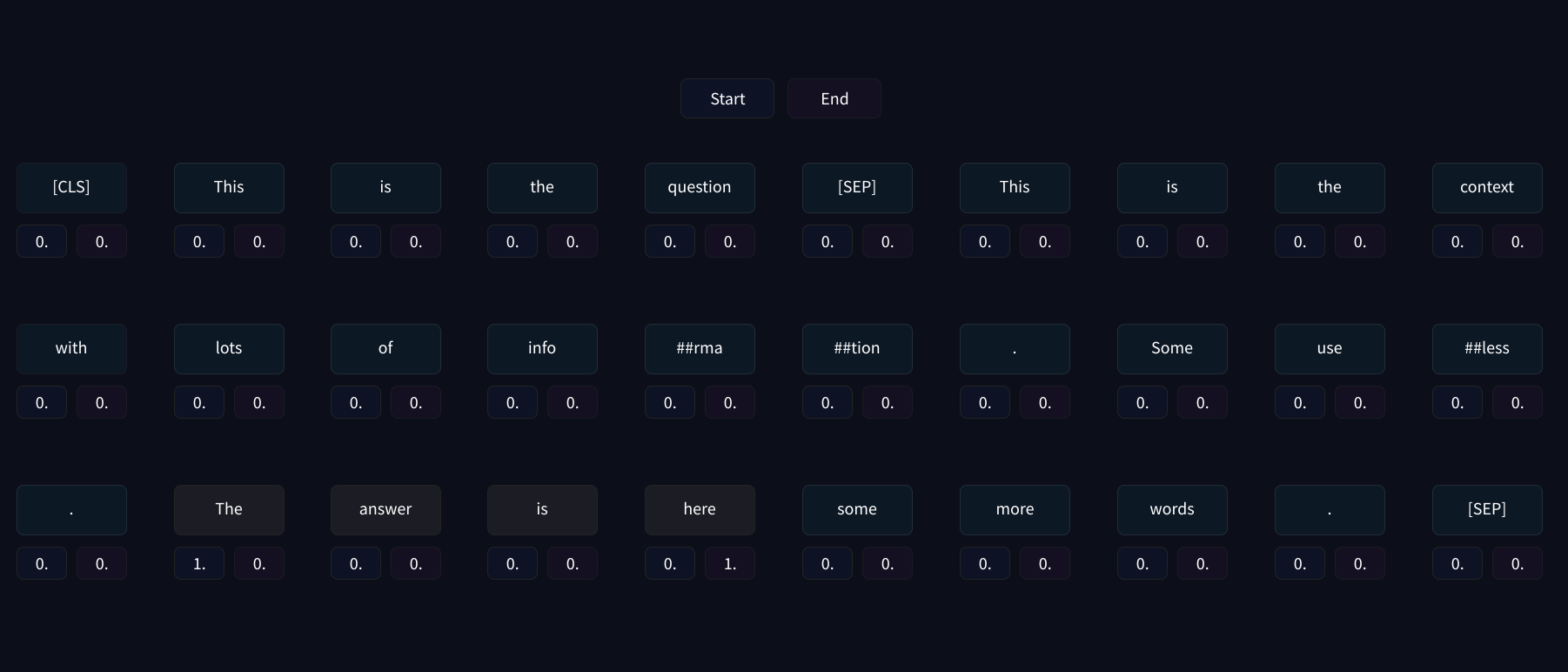
In this case the context is not too long, but some of the examples in the dataset have very long contexts that will exceed the maximum length we set (which is 384 in this case). As we saw in Chapter 6 when we explored the internals of the question-answering pipeline, we will deal with long contexts by creating several training features from one sample of our dataset, with a sliding window between them.
One-用于回答问题的热编码标签。One-用于回答问题的热编码标签。在本例中,上下文不是太长,但数据集中的一些示例具有非常长的上下文,这将超过我们设置的最大长度(在本例中为384)。正如我们在第6章中看到的那样,当我们探索“问题-答案”管道的内部时,我们将通过从数据集的一个样本创建几个训练特征来处理长上下文,并在它们之间设置一个滑动窗口。
To see how this works using the current example, we can limit the length to 100 and use a sliding window of 50 tokens. As a reminder, we use:
要使用当前示例查看这是如何工作的,我们可以将长度限制为100,并使用50个标记的滑动窗口。作为提醒,我们使用:
max_lengthto set the maximum length (here 100)truncation="only_second"to truncate the context (which is in the second position) when the question with its context is too longstrideto set the number of overlapping tokens between two successive chunks (here 50)return_overflowing_tokens=Trueto let the tokenizer know we want the overflowing tokens
1 | |
1 | |
As we can see, our example has been in split into four inputs, each of them containing the question and some part of the context. Note that the answer to the question (“Bernadette Soubirous”) only appears in the third and last inputs, so by dealing with long contexts in this way we will create some training examples where the answer is not included in the context. For those examples, the labels will be start_position = end_position = 0 (so we predict the [CLS] token). We will also set those labels in the unfortunate case where the answer has been truncated so that we only have the start (or end) of it. For the examples where the answer is fully in the context, the labels will be the index of the token where the answer starts and the index of the token where the answer ends.
`MAX_LENGTH设置最大长度(此处为100)TRUNCAPTION=“Only_Second”在上下文问题太长时截断上下文(位于第二位置)stride设置两个连续块之间重叠令牌的数量(此处为50)Return_OVERFLOW_TOKENS=True让令牌器知道我们想要溢出的令牌如我们所见,我们的示例被分成四个输入,每个输入都包含问题和上下文的某一部分。请注意,问题(“Bernadette Soubious”)的答案只出现在第三个也是最后一个输入中,因此,通过以这种方式处理长上下文,我们将创建一些训练示例,其中答案不包括在上下文中。对于这些示例,标签将为Start_Position=End_Position=0(因此我们预测[CLS]`内标识)。我们还将在不幸的情况下设置这些标签,在这种情况下,答案被截断,因此我们只有它的开始(或结束)。对于答案完全在上下文中的例子,标签将是答案开始处的令牌的索引和答案结束处的令牌的索引。
The dataset provides us with the start character of the answer in the context, and by adding the length of the answer, we can find the end character in the context. To map those to token indices, we will need to use the offset mappings we studied in Chapter 6. We can have our tokenizer return these by passing along return_offsets_mapping=True:
数据集为我们提供了上下文中答案的开始字符,通过添加答案的长度,我们可以找到上下文中的结束字符。要将这些映射到令牌索引,我们将需要使用我们在第6章中学习的偏移量映射。我们可以让我们的令牌化器通过传递Return_Offsets_map=True来返回这些映射:
1 | |
1 | |
As we can see, we get back the usual input IDs, token type IDs, and attention mask, as well as the offset mapping we required and an extra key, overflow_to_sample_mapping. The corresponding value will be of use to us when we tokenize several texts at the same time (which we should do to benefit from the fact that our tokenizer is backed by Rust). Since one sample can give several features, it maps each feature to the example it originated from. Because here we only tokenized one example, we get a list of 0s:
正如我们看到的,我们得到了通常的输入ID、令牌类型ID和注意掩码,以及我们需要的偏移量映射和一个额外的键overflow_to_Sample_mapping。当我们同时对几个文本进行标记化时,相应的值将对我们有用(我们应该这样做,以受益于我们的标记器是由Rust支持的)。因为一个样本可以给出几个特征,所以它将每个特征映射到它所源自的样本。因为在这里我们只标记化了一个例子,所以我们得到了一个‘0’的列表:
1 | |
1 | |
But if we tokenize more examples, this will become more useful:
但如果我们标记化更多的例子,这将变得更有用:
1 | |
1 | |
As we can see, the first three examples (at indices 2, 3, and 4 in the training set) each gave four features and the last example (at index 5 in the training set) gave 7 features.
正如我们所看到的,前三个例子(在训练集中的索引2、3和4处)每个给出了4个特征,最后一个例子(在训练集中的索引5处)给出了7个特征。
This information will be useful to map each feature we get to its corresponding label. As mentioned earlier, those labels are:
这些信息将有助于将我们得到的每个要素映射到其对应的标签。如前所述,这些标签是:
(0, 0)if the answer is not in the corresponding span of the context(start_position, end_position)if the answer is in the corresponding span of the context, withstart_positionbeing the index of the token (in the input IDs) at the start of the answer andend_positionbeing the index of the token (in the input IDs) where the answer ends
To determine which of these is the case and, if relevant, the positions of the tokens, we first find the indices that start and end the context in the input IDs. We could use the token type IDs to do this, but since those do not necessarily exist for all models (DistilBERT does not require them, for instance), we’ll instead use the sequence_ids() method of the BatchEncoding our tokenizer returns.
`(0,0)如果答案不在上下文的对应范围内(START_POSITION,END_POSITION)如果答案在上下文的相应范围内,其中START_Position是答案开始处的令牌的索引(在输入ID中),而end_Position是答案结束处的令牌的索引为了确定这些中的哪一个是大小写,以及如果相关,确定令牌的位置。我们首先找到输入ID中开始和结束上下文的索引。我们可以使用令牌类型ID来完成此操作,但由于这些ID不一定适用于所有模型(例如,DistilBERT不需要它们),因此我们将改用令牌化器返回的BatchEncoding的Sequence_IDs()`方法。
Once we have those token indices, we look at the corresponding offsets, which are tuples of two integers representing the span of characters inside the original context. We can thus detect if the chunk of the context in this feature starts after the answer or ends before the answer begins (in which case the label is (0, 0)). If that’s not the case, we loop to find the first and last token of the answer:
一旦我们有了这些标记索引,我们就会查看相应的偏移量,它们是表示原始上下文中的字符范围的两个整数的元组。因此,我们可以检测该特征中的上下文的块是在答案之后开始还是在答案开始之前结束(在这种情况下,标签是(0,0))。如果不是这样,我们循环查找答案的第一个也是最后一个令牌:
1 | |
1 | |
Let’s take a look at a few results to verify that our approach is correct. For the first feature we find (83, 85) as labels, so let’s compare the theoretical answer with the decoded span of tokens from 83 to 85 (inclusive):
让我们看看几个结果,以验证我们的方法是正确的。对于第一个特征,我们找到(83,85)作为标签,让我们将理论答案与从83到85(含)的Token的解码跨度进行比较:
1 | |
1 | |
So that’s a match! Now let’s check index 4, where we set the labels to (0, 0), which means the answer is not in the context chunk of that feature:
所以这是匹配的!现在让我们检查索引4,其中我们将标签设置为(0,0),这意味着答案不在该功能的上下文块中:
1 | |
1 | |
Indeed, we don’t see the answer inside the context.
事实上,我们在上下文中看不到答案。
✏️ Your turn! When using the XLNet architecture, padding is applied on the left and the question and context are switched. Adapt all the code we just saw to the XLNet architecture (and add padding=True). Be aware that the [CLS] token may not be at the 0 position with padding applied.
✏️轮到你了!当使用XLNet架构时,在左侧应用填充,并切换问题和上下文。将我们刚才看到的所有代码都适应XLNet架构(并添加paddingTrue)。请注意,[cls]内标识可能不在应用填充的0位置。
Now that we have seen step by step how to preprocess our training data, we can group it in a function we will apply on the whole training dataset. We’ll pad every feature to the maximum length we set, as most of the contexts will be long (and the corresponding samples will be split into several features), so there is no real benefit to applying dynamic padding here:
现在我们已经逐步了解了如何对训练数据进行预处理,我们可以将其分组到将应用于整个训练数据集的函数中。我们会将每个要素填充到我们设置的最大长度,因为大多数上下文都会很长(并且相应的样本将被分成几个要素),因此在这里应用动态填充没有实际的好处:
1 | |
Note that we defined two constants to determine the maximum length used as well as the length of the sliding window, and that we added a tiny bit of cleanup before tokenizing: some of the questions in the SQuAD dataset have extra spaces at the beginning and the end that don’t add anything (and take up space when being tokenized if you use a model like RoBERTa), so we removed those extra spaces.
请注意,我们定义了两个常量来确定所使用的最大长度以及滑动窗口的长度,并且我们在标记化之前添加了一些清理:分组数据集中的一些问题在开头和结尾都有额外的空格,不会添加任何东西(如果使用Roberta这样的模型,则会在标记化时占用空间),所以我们删除了这些额外的空格。
To apply this function to the whole training set, we use the Dataset.map() method with the batched=True flag. It’s necessary here as we are changing the length of the dataset (since one example can give several training features):
要将此函数应用于整个训练集,我们使用带有Batcher=True标志的Dataset.map()方法。这在这里是必要的,因为我们要更改数据集的长度(因为一个示例可以提供几个训练特征):
1 | |
1 | |
As we can see, the preprocessing added roughly 1,000 features. Our training set is now ready to be used — let’s dig into the preprocessing of the validation set!
正如我们所看到的,预处理添加了大约1,000个特征。我们的训练集现在可以使用了–让我们深入研究验证集的预处理!
Processing the validation data
正在处理验证数据
Preprocessing the validation data will be slightly easier as we don’t need to generate labels (unless we want to compute a validation loss, but that number won’t really help us understand how good the model is). The real joy will be to interpret the predictions of the model into spans of the original context. For this, we will just need to store both the offset mappings and some way to match each created feature to the original example it comes from. Since there is an ID column in the original dataset, we’ll use that ID.
因为我们不需要生成标签(除非我们想要计算验证损失,但是这个数字并不能真正帮助我们理解模型有多好),所以对验证数据进行预处理会稍微容易一些。真正的joy将把模型的预测解释成原始语境的跨度。为此,我们只需要存储偏移量映射和将每个创建的要素与其原始示例进行匹配的某种方法。由于原始数据集中有一个ID列,因此我们将使用该ID。
The only thing we’ll add here is a tiny bit of cleanup of the offset mappings. They will contain offsets for the question and the context, but once we’re in the post-processing stage we won’t have any way to know which part of the input IDs corresponded to the context and which part was the question (the sequence_ids() method we used is available for the output of the tokenizer only). So, we’ll set the offsets corresponding to the question to None:
我们在这里要添加的唯一一件事是对偏移量映射进行一点清理。它们将包含问题和上下文的偏移量,但一旦进入后处理阶段,我们将无法知道输入ID的哪一部分对应于上下文,哪一部分是问题(我们使用的equence_ids()方法仅适用于记号赋值器的输出)。因此,我们将问题对应的偏移量设置为无:
1 | |
We can apply this function on the whole validation dataset like before:
我们可以像前面一样对整个验证数据集应用此函数:
1 | |
1 | |
In this case we’ve only added a couple of hundred samples, so it appears the contexts in the validation dataset are a bit shorter.
在本例中,我们只添加了几百个样本,因此验证数据集中的上下文看起来有点短。
Now that we have preprocessed all the data, we can get to the training.
既然我们已经对所有数据进行了预处理,我们就可以进行培训了。
Fine-tuning the model with the Trainer API
使用Traine接口对模型进行微调
The training code for this example will look a lot like the code in the previous sections — the hardest thing will be to write the compute_metrics() function. Since we padded all the samples to the maximum length we set, there is no data collator to define, so this metric computation is really the only thing we have to worry about. The difficult part will be to post-process the model predictions into spans of text in the original examples; once we have done that, the metric from the 🤗 Datasets library will do most of the work for us.
本例的训练代码看起来与前面几节中的代码非常相似–最困难的事情是编写Compute_Metrics()函数。由于我们将所有样本填充到我们设置的最大长度,因此不需要定义数据校验器,所以这个度量计算实际上是我们唯一需要担心的事情。困难的部分将是将模型预测后处理为原始示例中的文本范围;一旦我们完成了这一点,来自🤗数据集库的指标将为我们完成大部分工作。
Post-processing
后处理
The model will output logits for the start and end positions of the answer in the input IDs, as we saw during our exploration of the question-answering pipeline. The post-processing step will be similar to what we did there, so here’s a quick reminder of the actions we took:
该模型将输出输入ID中答案的开始和结束位置的日志,正如我们在探索“问题-答案”管道时所看到的那样。后处理步骤将类似于我们在那里所做的操作,因此,以下是我们所采取的操作的快速提示:
- We masked the start and end logits corresponding to tokens outside of the context.
- We then converted the start and end logits into probabilities using a softmax.
- We attributed a score to each
(start_token, end_token)pair by taking the product of the corresponding two probabilities. - We looked for the pair with the maximum score that yielded a valid answer (e.g., a
start_tokenlower thanend_token).
Here we will change this process slightly because we don’t need to compute actual scores (just the predicted answer). This means we can skip the softmax step. To go faster, we also won’t score all the possible (start_token, end_token) pairs, but only the ones corresponding to the highest n_best logits (with n_best=20). Since we will skip the softmax, those scores will be logit scores, and will be obtained by taking the sum of the start and end logits (instead of the product, because of the rule log(ab)=log(a)+log(b)\log(ab) = \log(a) + \log(b)log(ab)=log(a)+log(b)).
我们屏蔽了上下文外部令牌对应的开始和结束日志,然后使用软极大值将开始和结束日志转换为概率。我们通过取相应两个概率的乘积为每个(Start_Token,End_Token)对分配一个分数。我们寻找得分最大的一对,以产生有效答案(例如,start_token低于end_token)。这里我们将略微改变这一过程,因为我们不需要计算实际分数(只需计算预测答案)。这意味着我们可以跳过Softmax步骤。为了更快,我们也不会对所有可能的(Start_Token,End_Token)对进行评分,而是只对最高的n_BestLogit(n_Best=20)进行评分。因为我们将跳过SOFTMAX,所以这些分数将是LOGIT分数,并且将通过取开始和结束LOG的总和来获得(而不是乘积,因为规则LOG(Ab)=LOG(A)+LOG(B)\LOG(Ab)=\LOG(A)+\LOG(B)LOG(Ab)=LOG(A)+LOG(B))。
To demonstrate all of this, we will need some kind of predictions. Since we have not trained our model yet, we are going to use the default model for the QA pipeline to generate some predictions on a small part of the validation set. We can use the same processing function as before; because it relies on the global constant tokenizer, we just have to change that object to the tokenizer of the model we want to use temporarily:
为了证明这一切,我们需要某种预测。因为我们还没有训练我们的模型,所以我们将使用QA管道的默认模型来在验证集的一小部分上生成一些预测。我们可以使用与之前相同的处理函数;因为它依赖于全局常量tokenizer,所以我们只需将该Object更改为我们要临时使用的模型的tokenizer:
1 | |
Now that the preprocessing is done, we change the tokenizer back to the one we originally picked:
现在,预处理已经完成,我们将令牌器更改回我们最初选择的那个:
1 | |
We then remove the columns of our eval_set that are not expected by the model, build a batch with all of that small validation set, and pass it through the model. If a GPU is available, we use it to go faster:
然后,我们删除模型不需要的eval_set列,构建一个包含所有小验证集的批处理,并将其传递给模型。如果有可用的图形处理器,我们会使用它来提高速度:
1 | |
Since the Trainer will give us predictions as NumPy arrays, we grab the start and end logits and convert them to that format:
由于Traine将向我们提供NumPy数组形式的预测,因此我们获取开始和结束日志并将它们转换为该格式:
1 | |
Now, we need to find the predicted answer for each example in our small_eval_set. One example may have been split into several features in eval_set, so the first step is to map each example in small_eval_set to the corresponding features in eval_set:
现在,我们需要在mall_eval_set中找到每个示例的预测答案。其中一个示例可能在eval_set中被拆分成多个特征,因此第一步是将mall_eval_set中的每个示例映射到eval_set中对应的特征:
1 | |
With this in hand, we can really get to work by looping through all the examples and, for each example, through all the associated features. As we said before, we’ll look at the logit scores for the n_best start logits and end logits, excluding positions that give:
有了这一点,我们就可以通过循环遍历所有示例并针对每个示例遍历所有关联的功能来真正开始工作。如前所述,我们将查看`n_Best‘开始日志和结束日志的Logit得分,不包括满足以下条件的职位:
- An answer that wouldn’t be inside the context
- An answer with negative length
- An answer that is too long (we limit the possibilities at
max_answer_length=30)
Once we have all the scored possible answers for one example, we just pick the one with the best logit score:
答案不会在上下文中长度为负的答案答案太长(我们将可能性限制在MAX_ACHNOWN_LENGTH=30)一旦我们为一个例子评分了所有可能的答案,我们只选择Logit分数最高的一个:
1 | |
The final format of the predicted answers is the one that will be expected by the metric we will use. As usual, we can load it with the help of the 🤗 Evaluate library:
预测答案的最终格式将是我们将使用的指标所预期的格式。像往常一样,我们可以在🤗评估库的帮助下加载它:
1 | |
This metric expects the predicted answers in the format we saw above (a list of dictionaries with one key for the ID of the example and one key for the predicted text) and the theoretical answers in the format below (a list of dictionaries with one key for the ID of the example and one key for the possible answers):
此指标预期预测答案采用我们上面看到的格式(词典列表,一个键用于示例的ID,一个键用于预测的文本),理论答案的格式如下(词典列表,一个键用于示例的ID,一个键用于可能的答案):
1 | |
We can now check that we get sensible results by looking at the first element of both lists:
现在,我们可以通过查看两个列表的第一个元素来检查是否获得了合理的结果:
1 | |
1 | |
Not too bad! Now let’s have a look at the score the metric gives us:
还不错!现在让我们来看看该指标给我们的分数:
1 | |
1 | |
Again, that’s rather good considering that according to its paper DistilBERT fine-tuned on SQuAD obtains 79.1 and 86.9 for those scores on the whole dataset.
再说一次,考虑到DistilBERT在整个数据集上的这些分数分别为79.1和86.9,这是相当好的。
Now let’s put everything we just did in a compute_metrics() function that we will use in the Trainer. Normally, that compute_metrics() function only receives a tuple eval_preds with logits and labels. Here we will need a bit more, as we have to look in the dataset of features for the offset and in the dataset of examples for the original contexts, so we won’t be able to use this function to get regular evaluation results during training. We will only use it at the end of training to check the results.
现在,让我们将刚才所做的一切都放在一个将在Traine中使用的计算度量()函数中。通常,Compute_Metrics()函数只接收带有Logit和标签的元组eval_preds。这里我们需要更多,因为我们必须查看偏移量的特征数据集和原始上下文的示例数据集,因此我们不能在训练期间使用此函数来获得常规评估结果。我们只会在培训结束时使用它来检查结果。
The compute_metrics() function groups the same steps as before; we just add a small check in case we don’t come up with any valid answers (in which case we predict an empty string).
`culate_metrics()`函数将与前面相同的步骤分组;我们只是添加了一个小检查,以防找不到任何有效的答案(在这种情况下,我们预测为空字符串)。
1 | |
We can check it works on our predictions:
我们可以检查它是否符合我们的预测:
1 | |
1 | |
Looking good! Now let’s use this to fine-tune our model.
看起来不错!现在,让我们使用它来微调我们的模型。
Fine-tuning the model
微调模型
We are now ready to train our model. Let’s create it first, using the AutoModelForQuestionAnswering class like before:
我们现在准备好训练我们的模型了。让我们首先创建它,像前面一样使用AutoModelForQuestionAnswering类:
1 | |
As usual, we get a warning that some weights are not used (the ones from the pretraining head) and some others are initialized randomly (the ones for the question answering head). You should be used to this by now, but that means this model is not ready to be used just yet and needs fine-tuning — good thing we’re about to do that!
像往常一样,我们收到一个警告,一些权重没有被使用(来自预训训头的权重),而另一些权重是随机初始化的(用于回答问题的头部的权重)。您现在应该已经习惯了这一点,但这意味着这个模型还没有准备好使用,需要微调–好消息是我们即将这样做!
To be able to push our model to the Hub, we’ll need to log in to Hugging Face. If you’re running this code in a notebook, you can do so with the following utility function, which displays a widget where you can enter your login credentials:
为了能够将我们的模型推向Hub,我们需要登录到Hugging Face。如果您在笔记本中运行此代码,则可以使用以下实用程序函数执行此操作,该函数显示一个小部件,您可以在其中输入您的登录凭据:
1 | |
If you aren’t working in a notebook, just type the following line in your terminal:
如果您不是在笔记本电脑上工作,只需在您的终端中键入以下行:
1 | |
Once this is done, we can define our TrainingArguments. As we said when we defined our function to compute the metric, we won’t be able to have a regular evaluation loop because of the signature of the compute_metrics() function. We could write our own subclass of Trainer to do this (an approach you can find in the question answering example script), but that’s a bit too long for this section. Instead, we will only evaluate the model at the end of training here and show you how to do a regular evaluation in “A custom training loop” below.
一旦完成,我们就可以定义我们的TrainingArguments‘了。正如我们所说的,当我们定义函数来计算度量时,我们将不能有一个常规的求值循环,这是因为Compute_Metrics()函数的签名。我们可以编写我们自己的Traine`子类来完成这项工作(您可以在问题回答示例脚本中找到一种方法),但对于这一节来说,这样做有点太长了。相反,我们将只在培训结束时对模型进行评估,并在下面的“定制培训循环”中向您展示如何进行常规评估。
This is really where the Trainer API shows its limits and the 🤗 Accelerate library shines: customizing the class to a specific use case can be painful, but tweaking a fully exposed training loop is easy.
这就是TraineAPI展示其局限性和🤗Accelerate库闪亮之处的地方:根据特定的用例定制类可能很痛苦,但调整完全公开的培训循环很容易。
Let’s take a look at our TrainingArguments:
让我们来看看我们的TrainingArguments:
1 | |
We’ve seen most of these before: we set some hyperparameters (like the learning rate, the number of epochs we train for, and some weight decay) and indicate that we want to save the model at the end of every epoch, skip evaluation, and upload our results to the Model Hub. We also enable mixed-precision training with fp16=True, as it can speed up the training nicely on a recent GPU.
我们以前已经看到了其中的大多数:我们设置了一些超参数(如学习速率、我们训练的历元数和一些权重衰减),并指示我们希望在每个历元结束时保存模型,跳过评估,并将结果上载到Model Hub。我们还支持fp16=True的混合精度训练,因为它可以在最近的GPU上很好地加速训练。
By default, the repository used will be in your namespace and named after the output directory you set, so in our case it will be in "sgugger/bert-finetuned-squad". We can override this by passing a hub_model_id; for instance, to push the model to the huggingface_course organization we used hub_model_id="huggingface_course/bert-finetuned-squad" (which is the model we linked to at the beginning of this section).
默认情况下,使用的存储库将位于您的命名空间中,并以您设置的输出目录命名,因此在我们的示例中,它将位于“sgugger/bert-finetuned-Team”中。我们可以通过传递Hub_Model_id来覆盖它;例如,要将模型推送到我们使用hub_model_id=“huggingface_course/bert-finetuned-squad”的huggingfaceCourse组织(这是我们在本节开头链接到的模型)。
💡 If the output directory you are using exists, it needs to be a local clone of the repository you want to push to (so set a new name if you get an error when defining your Trainer).
💡如果您正在使用的输出目录已经存在,则它需要是您要推送到的存储库的本地克隆(如果在定义Traine时出错,请设置一个新名称)。
Finally, we just pass everything to the Trainer class and launch the training:
最后,我们只需将所有内容传递给Traine类,并启动培训:
1 | |
Note that while the training happens, each time the model is saved (here, every epoch) it is uploaded to the Hub in the background. This way, you will be able to to resume your training on another machine if necessary. The whole training takes a while (a little over an hour on a Titan RTX), so you can grab a coffee or reread some of the parts of the course that you’ve found more challenging while it proceeds. Also note that as soon as the first epoch is finished, you will see some weights uploaded to the Hub and you can start playing with your model on its page.
请注意,在进行训练时,每次保存模型(这里是每个时期)时,都会将其上载到后台的Hub。这样,如果需要,您将能够在另一台计算机上恢复您的训练。整个培训需要一段时间(在泰坦RTX上需要一个小时多一点),所以在进行过程中,你可以喝杯咖啡或重读课程中你认为更具挑战性的部分。还要注意的是,一旦第一个纪元结束,你就会看到一些权重被上传到Hub,你可以开始在它的页面上玩你的模型。
Once the training is complete, we can finally evaluate our model (and pray we didn’t spend all that compute time on nothing). The predict() method of the Trainer will return a tuple where the first elements will be the predictions of the model (here a pair with the start and end logits). We send this to our compute_metrics() function:
一旦训练完成,我们终于可以评估我们的模型了(祈祷我们没有把所有的计算机时间都花在什么上)。Traine的Forecast()方法将返回一个元组,其中第一个元素将是模型的预测(这里是一对开始和结束对数)。我们将此代码发送到Compute_Metrics()函数:
1 | |
1 | |
Great! As a comparison, the baseline scores reported in the BERT article for this model are 80.8 and 88.5, so we’re right where we should be.
太棒了!作为比较,BERT文章中报告的该模型的基准分数分别为80.8和88.5,因此我们处于正确的位置。
Finally, we use the push_to_hub() method to make sure we upload the latest version of the model:
最后,我们使用ush_to_Hub()方法来确保我们上传了模型的最新版本:
1 | |
This returns the URL of the commit it just did, if you want to inspect it:
如果您想检查它,这将返回它刚刚执行的提交的URL:
1 | |
The Trainer also drafts a model card with all the evaluation results and uploads it.
“火车”还起草了一张包含所有评估结果的模型卡,并将其上传。
At this stage, you can use the inference widget on the Model Hub to test the model and share it with your friends, family, and favorite pets. You have successfully fine-tuned a model on a question answering task — congratulations!
在此阶段,您可以使用Model Hub上的推理小部件来测试模型,并将其与您的朋友、家人和喜爱的宠物共享。您已经成功地对问答任务中的模型进行了微调-祝贺您!
✏️ Your turn! Try another model architecture to see if it performs better on this task!
✏️轮到你了!尝试另一个模型体系结构,看看它在这项任务上是否表现得更好!
If you want to dive a bit more deeply into the training loop, we will now show you how to do the same thing using 🤗 Accelerate.
如果您想更深入地了解训练循环,我们现在将向您展示如何使用🤗Accelerate来做同样的事情。
A custom training loop
定制培训循环
Let’s now have a look at the full training loop, so you can easily customize the parts you need. It will look a lot like the training loop in Chapter 3, with the exception of the evaluation loop. We will be able to evaluate the model regularly since we’re not constrained by the Trainer class anymore.
现在让我们来看看完整的培训循环,这样您就可以轻松地定制您需要的部件。除了评估循环之外,它看起来与第3章中的训练循环非常相似。我们将能够定期评估该模型,因为我们不再受Traine类的限制。
Preparing everything for training
为训练做好一切准备
First we need to build the DataLoaders from our datasets. We set the format of those datasets to "torch", and remove the columns in the validation set that are not used by the model. Then, we can use the default_data_collator provided by Transformers as a collate_fn and shuffle the training set, but not the validation set:
首先,我们需要从数据集构建DataLoader‘s。我们将这些数据集的格式设置为“Torch”,并删除验证集中模型不使用的列。然后,我们可以使用Transformers提供的Default_Data_Collator作为Collate_fn`,并对训练集进行混洗,但不对验证集进行混洗:
1 | |
Next we reinstantiate our model, to make sure we’re not continuing the fine-tuning from before but starting from the BERT pretrained model again:
接下来,我们重新实例化我们的模型,以确保我们不会继续之前的微调,而是再次从Bert预先训练的模型开始:
1 | |
Then we will need an optimizer. As usual we use the classic AdamW, which is like Adam, but with a fix in the way weight decay is applied:
那么我们需要一个优化器。像往常一样,我们使用经典的‘AdamW’,这与Adam类似,但修正了体重衰减的应用方式:
1 | |
Once we have all those objects, we can send them to the accelerator.prepare() method. Remember that if you want to train on TPUs in a Colab notebook, you will need to move all of this code into a training function, and that shouldn’t execute any cell that instantiates an Accelerator. We can force mixed-precision training by passing fp16=True to the Accelerator (or, if you are executing the code as a script, just make sure to fill in the 🤗 Accelerate config appropriately).
一旦我们拥有了所有这些对象,我们就可以将它们发送到accelerator.preparate()方法。请记住,如果您想要在Colab笔记本中训练TPU,则需要将所有这些代码移到一个训练函数中,并且该函数不应该执行任何实例化Accelerator‘的单元格。我们可以通过将fp16=True传递给Accelerator来强制执行混合精度训练(或者,如果您是以脚本形式执行代码,请确保正确填写🤗Accelerateconfig`)。
1 | |
As you should know from the previous sections, we can only use the train_dataloader length to compute the number of training steps after it has gone through the accelerator.prepare() method. We use the same linear schedule as in the previous sections:
从前面的章节中可以看出,我们只能在通过accelerator.preparate()方法之后,使用train_dataloader长度来计算训练步数。我们使用与前几节相同的线性时间表:
1 | |
To push our model to the Hub, we will need to create a Repository object in a working folder. First log in to the Hugging Face Hub, if you’re not logged in already. We’ll determine the repository name from the model ID we want to give our model (feel free to replace the repo_name with your own choice; it just needs to contain your username, which is what the function get_full_repo_name() does):
要将我们的模型推送到Hub,我们需要在工作文件夹中创建一个Repository对象。首先登录Hugging Face中心,如果你还没有登录的话。我们将根据我们想要为我们的模型提供的模型ID来确定存储库名称(您可以随意将repo_name替换为您自己的选择;它只需要包含您的用户名,这就是函数get_Full_repo_name()所做的):
1 | |
1 | |
Then we can clone that repository in a local folder. If it already exists, this local folder should be a clone of the repository we are working with:
然后,我们可以在本地文件夹中克隆该存储库。如果它已经存在,则此本地文件夹应该是我们正在使用的存储库的克隆:
1 | |
We can now upload anything we save in output_dir by calling the repo.push_to_hub() method. This will help us upload the intermediate models at the end of each epoch.
现在,我们可以通过调用repo.ush_to_Hub()方法上传保存在out_dir中的任何内容。这将帮助我们在每个时代结束时上传中间模型。
Training loop
训练循环
We are now ready to write the full training loop. After defining a progress bar to follow how training goes, the loop has three parts:
我们现在已经准备好编写完整的训练循环。在定义了跟踪培训进展情况的进度条后,循环包含三个部分:
- The training in itself, which is the classic iteration over the
train_dataloader, forward pass through the model, then backward pass and optimizer step. - The evaluation, in which we gather all the values for
start_logitsandend_logitsbefore converting them to NumPy arrays. Once the evaluation loop is finished, we concatenate all the results. Note that we need to truncate because theAcceleratormay have added a few samples at the end to ensure we have the same number of examples in each process. - Saving and uploading, where we first save the model and the tokenizer, then call
repo.push_to_hub(). As we did before, we use the argumentblocking=Falseto tell the 🤗 Hub library to push in an asynchronous process. This way, training continues normally and this (long) instruction is executed in the background.
Here’s the complete code for the training loop:
训练本身是在train_dataloader上的经典迭代,它正向遍历模型,然后向后遍历和优化器步骤。求值,在将start_logits和end_logits的值转换为NumPy数组之前,收集它们的所有值。一旦评估循环完成,我们将连接所有结果。注意,我们需要截断,因为Accelerator可能在最后添加了几个样本,以确保我们在每个进程中拥有相同数量的示例。保存并上传,其中我们首先保存模型和记号赋值器,然后调用repo.ush_to_Hub()。正如我们之前所做的那样,我们使用参数`🤗=False‘来告诉BLOCKING集线器库推入一个异步进程。这样,训练将正常继续,并在后台执行此(长)指令。以下是训练循环的完整代码:
1 | |
In case this is the first time you’re seeing a model saved with 🤗 Accelerate, let’s take a moment to inspect the three lines of code that go with it:
如果这是您第一次看到使用🤗Accelerate保存的模型,让我们花点时间来检查一下与之配套的三行代码:
1 | |
The first line is self-explanatory: it tells all the processes to wait until everyone is at that stage before continuing. This is to make sure we have the same model in every process before saving. Then we grab the unwrapped_model, which is the base model we defined. The accelerator.prepare() method changes the model to work in distributed training, so it won’t have the save_pretrained() method anymore; the accelerator.unwrap_model() method undoes that step. Lastly, we call save_pretrained() but tell that method to use accelerator.save() instead of torch.save().
第一行是不言而喻的:它告诉所有进程等到每个进程都到了那个阶段再继续。这是为了确保我们在保存之前的每个过程中都有相同的模型。然后,我们获取我们定义的基本模型–UNWARTED_MODEL。accelerator.prepare()方法将模型更改为在分布式训练中工作,因此它将不再有save_preTraded()方法;accelerator.unwire_Model()方法撤消这一步骤。最后,我们调用save_preTraded(),但告诉该方法使用accelerator()而不是torch.save()。
Once this is done, you should have a model that produces results pretty similar to the one trained with the Trainer. You can check the model we trained using this code at huggingface-course/bert-finetuned-squad-accelerate. And if you want to test out any tweaks to the training loop, you can directly implement them by editing the code shown above!
一旦做到这一点,你应该有一个模型,产生的结果非常类似于用‘火车’训练的结果。您可以在huggingface-course/bert-finetuned-squad-accelerate.上使用此代码检查我们训练的模型如果您想测试对训练循环的任何调整,您可以通过编辑上面显示的代码直接实现它们!
Using the fine-tuned model
使用微调的模型
We’ve already shown you how you can use the model we fine-tuned on the Model Hub with the inference widget. To use it locally in a pipeline, you just have to specify the model identifier:
我们已经向您展示了如何将我们在Model Hub上微调的模型与推理小部件一起使用。要在Pipeline中本地使用,只需指定型号标识即可:
1 | |
1 | |
Great! Our model is working as well as the default one for this pipeline!
太棒了!我们的模型与此管道的默认模型一样有效!