7-Main_NLP_tasks-4-Summarization
中英文对照学习,效果更佳!
原课程链接:https://huggingface.co/course/chapter7/5?fw=pt
Summarization
摘要



In this section we’ll take a look at how Transformer models can be used to condense long documents into summaries, a task known as text summarization. This is one of the most challenging NLP tasks as it requires a range of abilities, such as understanding long passages and generating coherent text that captures the main topics in a document. However, when done well, text summarization is a powerful tool that can speed up various business processes by relieving the burden of domain experts to read long documents in detail.
在本节中,我们将了解如何使用Transformer模型将较长的文档压缩为摘要,这项任务称为文本摘要。这是最具挑战性的NLP任务之一,因为它需要一系列能力,例如理解长段落和生成连贯的文本以捕捉文档中的主要主题。然而,如果做得好,文本摘要是一个强大的工具,可以通过减轻领域专家详细阅读长篇文档的负担来加快各种业务流程。
Although there already exist various fine-tuned models for summarization on the Hugging Face Hub, almost all of these are only suitable for English documents. So, to add a twist in this section, we’ll train a bilingual model for English and Spanish. By the end of this section, you’ll have a model that can summarize customer reviews like the one shown here:
虽然已经有各种微调的模式在Hugging Face中心摘要,但几乎所有这些都只适用于英文文件。因此,为了在这一节中增加一些技巧,我们将训练一个英语和西班牙语的双语模型。在本部分结束时,您将拥有一个可以汇总客户评论的模型,如下所示:
As we’ll see, these summaries are concise because they’re learned from the titles that customers provide in their product reviews. Let’s start by putting together a suitable bilingual corpus for this task.
正如我们将看到的,这些摘要是简洁的,因为它们是从客户在他们的产品评论中提供的标题中学习的。让我们首先为这项任务建立一个合适的双语语料库。
Preparing a multilingual corpus
准备多语种语料库
We’ll use the Multilingual Amazon Reviews Corpus to create our bilingual summarizer. This corpus consists of Amazon product reviews in six languages and is typically used to benchmark multilingual classifiers. However, since each review is accompanied by a short title, we can use the titles as the target summaries for our model to learn from! To get started, let’s download the English and Spanish subsets from the Hugging Face Hub:
我们将使用多语言Amazon评论语料库来创建双语摘要。该语料库包括六种语言的亚马逊产品评论,通常用于对多语言分类器进行基准测试。然而,由于每一篇评论都伴随着一个简短的标题,我们可以使用这些标题作为我们的模型学习的目标总结!首先,让我们从Hugging Face中心下载英语和西班牙语的子集:
1 | |
1 | |
As you can see, for each language there are 200,000 reviews for the train split, and 5,000 reviews for each of the validation and test splits. The review information we are interested in is contained in the review_body and review_title columns. Let’s take a look at a few examples by creating a simple function that takes a random sample from the training set with the techniques we learned in [Chapter 5]:
正如你所看到的,对于每种语言,有200,000条评论是关于“列车”的,而“验证”和“测试”这两个部分分别有5,000条评论。我们感兴趣的点评信息包含在Review_body和Review_tile列中。让我们通过创建一个简单的函数来查看几个示例,该函数使用我们在第5章中学到的技术从训练集中随机抽取样本:
1 | |
1 | |
✏️ Try it out! Change the random seed in the Dataset.shuffle() command to explore other reviews in the corpus. If you’re a Spanish speaker, take a look at some of the reviews in spanish_dataset to see if the titles also seem like reasonable summaries.
✏️试试看吧!更改Dataset.shashffle()命令中的随机种子,以探索语料库中的其他评论。如果你会说西班牙语,看看`spanish_dataset‘上的一些评论,看看这些标题是否也是合理的总结。
This sample shows the diversity of reviews one typically finds online, ranging from positive to negative (and everything in between!). Although the example with the “meh” title is not very informative, the other titles look like decent summaries of the reviews themselves. Training a summarization model on all 400,000 reviews would take far too long on a single GPU, so instead we’ll focus on generating summaries for a single domain of products. To get a feel for what domains we can choose from, let’s convert english_dataset to a pandas.DataFrame and compute the number of reviews per product category:
这个样本展示了人们通常在网上找到的各种各样的评论,从积极到消极(以及介于两者之间的一切!)尽管标题为“meh”的例子信息量不大,但其他标题看起来像是对评论本身的像样的总结。在单个GPU上训练针对所有400,000条评论的摘要模型将花费太长时间,因此我们将专注于为单个产品领域生成摘要。为了感受一下我们可以选择哪些域名,让我们将english_dataset转换为anda as.DataFrame,并计算每个产品类别的评论数:
1 | |
1 | |
The most popular products in the English dataset are about household items, clothing, and wireless electronics. To stick with the Amazon theme, though, let’s focus on summarizing book reviews — after all, this is what the company was founded on! We can see two product categories that fit the bill (book and digital_ebook_purchase), so let’s filter the datasets in both languages for just these products. As we saw in [Chapter 5], the Dataset.filter() function allows us to slice a dataset very efficiently, so we can define a simple function to do this:
英国数据集中最受欢迎的产品是家居用品、服装和无线电子产品。然而,为了坚持亚马逊的主题,让我们专注于总结书评–毕竟,这就是这家公司成立的基础!我们可以看到两个符合要求的产品类别(book和Digital_ebook_Purchase),所以让我们只筛选这些产品的两种语言的数据集。正如我们在第5章中看到的,Dataset.Filter()函数允许我们非常高效地对数据集进行切片,因此我们可以定义一个简单的函数来完成此操作:
1 | |
Now when we apply this function to english_dataset and spanish_dataset, the result will contain just those rows involving the book categories. Before applying the filter, let’s switch the format of english_dataset from "pandas" back to "arrow":
现在,当我们将此函数应用于english_datet和spanish_datet时,结果将只包含涉及图书类别的那些行。在应用过滤器之前,我们先将english_datet的格式从“Pandas”换回“Arrow”:
1 | |
We can then apply the filter function, and as a sanity check let’s inspect a sample of reviews to see if they are indeed about books:
然后,我们可以应用过滤器函数,作为一种理智的检查,让我们检查一个评论样本,看看它们是否确实与书籍有关:
1 | |
1 | |
Okay, we can see that the reviews are not strictly about books and might refer to things like calendars and electronic applications such as OneNote. Nevertheless, the domain seems about right to train a summarization model on. Before we look at various models that are suitable for this task, we have one last bit of data preparation to do: combining the English and Spanish reviews as a single DatasetDict object. 🤗 Datasets provides a handy concatenate_datasets() function that (as the name suggests) will stack two Dataset objects on top of each other. So, to create our bilingual dataset, we’ll loop over each split, concatenate the datasets for that split, and shuffle the result to ensure our model doesn’t overfit to a single language:
好吧,我们可以看到,这些评论并不是严格意义上的书籍,可能涉及日历和OneNote等电子应用程序。然而,该领域似乎是训练摘要模型的正确之选。在我们研究适合这项任务的各种模型之前,我们还有最后一点数据准备工作要做:将英语和西班牙语的评论合并为一个DatasetDict对象。🤗DataSets提供了一个方便的Connecatenate_DataSets()函数,顾名思义,它可以将两个Dataset对象堆叠在一起。因此,要创建我们的双语数据集,我们将遍历每个拆分,连接该拆分的数据集,并对结果进行置乱,以确保我们的模型不会太适合一种语言:
1 | |
1 | |
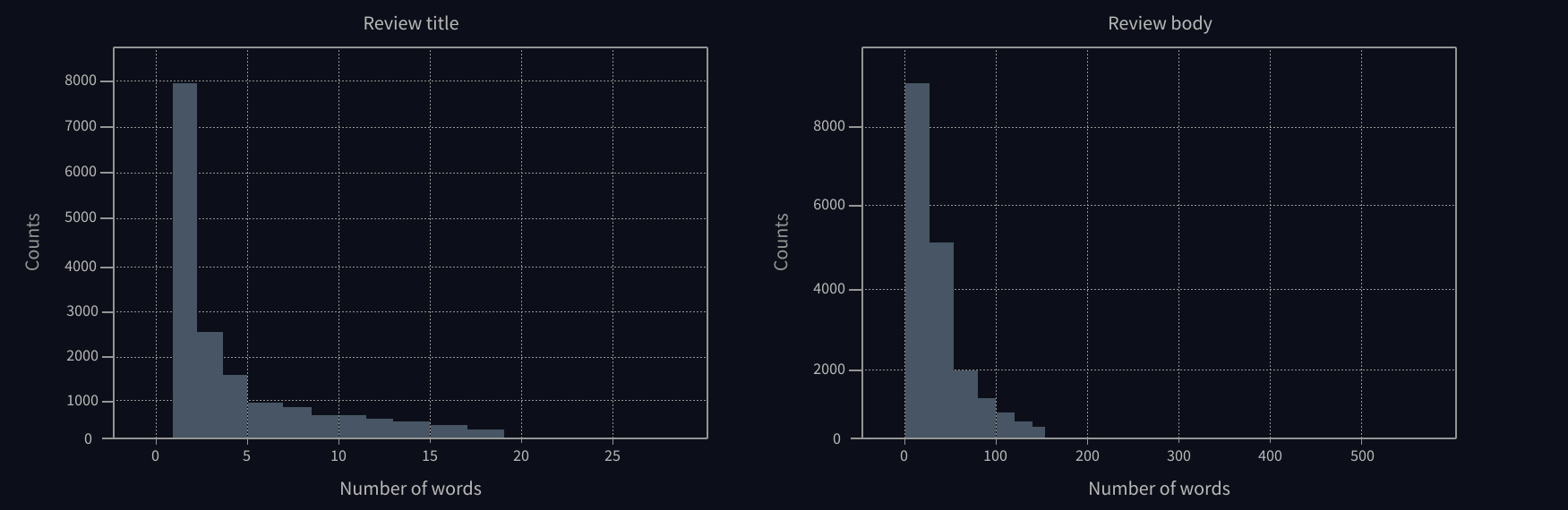
This certainly looks like a mix of English and Spanish reviews! Now that we have a training corpus, one final thing to check is the distribution of words in the reviews and their titles. This is especially important for summarization tasks, where short reference summaries in the data can bias the model to only output one or two words in the generated summaries. The plots below show the word distributions, and we can see that the titles are heavily skewed toward just 1-2 words:
这看起来当然像是英语和西班牙语评论的混合体!现在我们有了一个训练语料库,最后要检查的是评论中单词的分布及其标题。这对于摘要任务尤其重要,其中数据中的简短参考摘要可能会使模型偏向于仅输出生成的摘要中的一个或两个单词。下面的图表显示了单词的分布,我们可以看到标题严重倾向于只有1-2个单词:
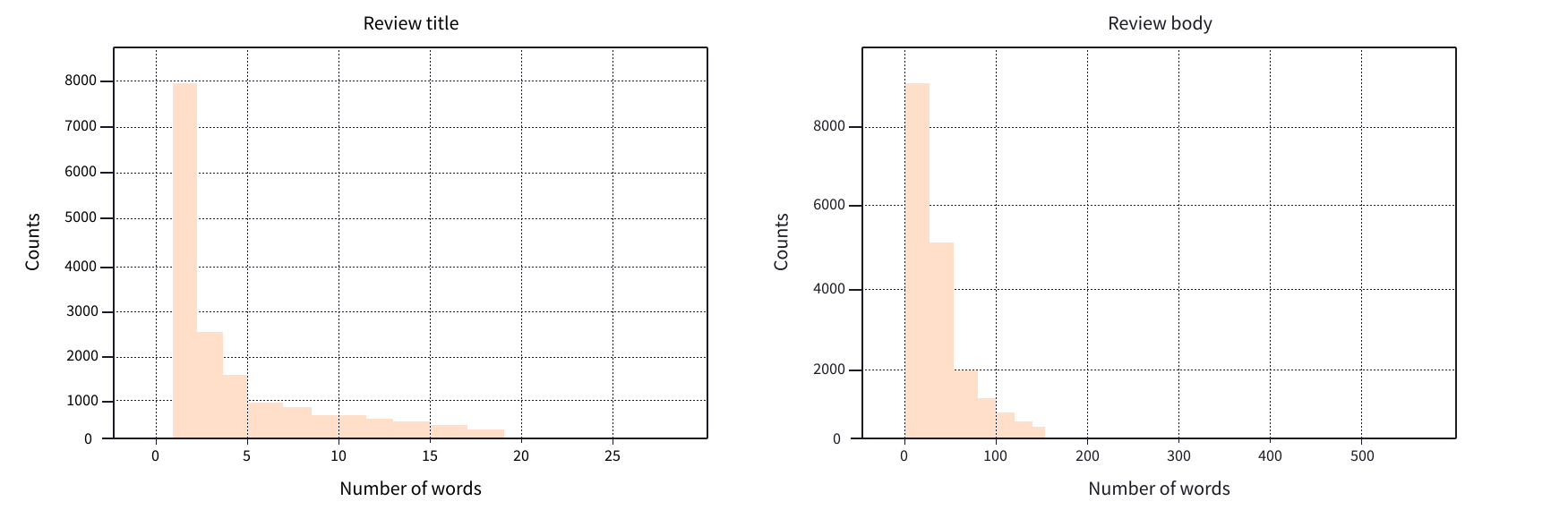
To deal with this, we’ll filter out the examples with very short titles so that our model can produce more interesting summaries. Since we’re dealing with English and Spanish texts, we can use a rough heuristic to split the titles on whitespace and then use our trusty Dataset.filter() method as follows:
评论标题和正文的字数统计分布。评论标题和正文的字数统计分布。为了解决这个问题,我们将过滤掉标题非常短的示例,以便我们的模型可以生成更有趣的摘要。因为我们处理的是英语和西班牙语文本,所以我们可以使用粗略的启发式方法在空格上拆分标题,然后使用值得信赖的Dataset.Filter()方法,如下所示:
1 | |
Now that we’ve prepared our corpus, let’s take a look at a few possible Transformer models that one might fine-tune on it!
现在我们已经准备好了语料库,让我们来看看几个可能的Transformer模型,人们可能会对其进行微调!
Models for text summarization
文本摘要的模型
If you think about it, text summarization is a similar sort of task to machine translation: we have a body of text like a review that we’d like to “translate” into a shorter version that captures the salient features of the input. Accordingly, most Transformer models for summarization adopt the encoder-decoder architecture that we first encountered in [Chapter 1], although there are some exceptions like the GPT family of models which can also be used for summarization in few-shot settings. The following table lists some popular pretrained models that can be fine-tuned for summarization.
如果你仔细想想,文本摘要是一种类似于机器翻译的任务:我们有一个像评论一样的文本正文,我们想把它“翻译”成一个更短的版本,以捕捉输入的显著特征。因此,大多数用于摘要的Transformer模型采用我们在第1章中第一次遇到的编解码器体系结构,尽管也有一些例外,如GPT模型系列,该模型也可用于在极少的情况下进行摘要。下表列出了一些常用的预先训练好的模型,可以针对摘要进行微调。
| Transformer model Transformer模型 | Description 描述 | Multilingual? 会说多种语言吗? |
|---|---|---|
| GPT-2 GPT-2 | Although trained as an auto-regressive language model, you can make GPT-2 generate summaries by appending “TL;DR” at the end of the input text. 尽管被训练为自回归语言模型,但您可以通过在输入文本的末尾附加“TL;DR”来使GPT-2生成摘要。 | ❌ ❌ |
| PEGASUS 帕伽索斯 | Uses a pretraining objective to predict masked sentences in multi-sentence texts. This pretraining objective is closer to summarization than vanilla language modeling and scores highly on popular benchmarks. 使用预训练目标来预测多句子文本中的掩蔽句子。这个预培训目标比普通语言建模更接近于总结,并且在流行的基准上得分很高。 | ❌ ❌ |
| T5 T5 | A universal Transformer architecture that formulates all tasks in a text-to-text framework; e.g., the input format for the model to summarize a document is 在文本到文本框架中制定所有任务的通用Transformer体系结构;例如,用于汇总文档的模型的输入格式为summarize: ARTICLE. `汇总:ARTICLE`。 |
❌ ❌ |
| mT5 MT5 | A multilingual version of T5, pretrained on the multilingual Common Crawl corpus (mC4), covering 101 languages. T5的多语言版本,在多语言通用爬虫语料库(MC4)上进行了预培训,涵盖101种语言。 | ✅ ✅ |
| BART 巴特 | A novel Transformer architecture with both an encoder and a decoder stack trained to reconstruct corrupted input that combines the pretraining schemes of BERT and GPT-2. 一种新的Transformer结构,具有编码器和解码器堆栈,经训练以重建被破坏的输入,其结合了BERT和GPT-2的预训练方案。 | ❌ ❌ |
| mBART-50 MBART-50 | A multilingual version of BART, pretrained on 50 languages. BART的多语言版本,预先培训了50种语言。 | ✅ ✅ |
As you can see from this table, the majority of Transformer models for summarization (and indeed most NLP tasks) are monolingual. This is great if your task is in a “high-resource” language like English or German, but less so for the thousands of other languages in use across the world. Fortunately, there is a class of multilingual Transformer models, like mT5 and mBART, that come to the rescue. These models are pretrained using language modeling, but with a twist: instead of training on a corpus of one language, they are trained jointly on texts in over 50 languages at once!
正如您从该表中看到的,大多数用于摘要的Transformer模型(以及大多数NLP任务)都是单语的。如果您的任务使用像英语或德语这样的“高资源”语言,这是很棒的,但对于世界各地正在使用的数千种其他语言来说,这就不是那么好了。幸运的是,有一类多语言Transformer模型可以提供帮助,比如MT5和mBART。这些模型是使用语言建模预先训练的,但有一点不同:它们不是在一种语言的语料库上训练,而是一次在50多种语言的文本上联合训练!
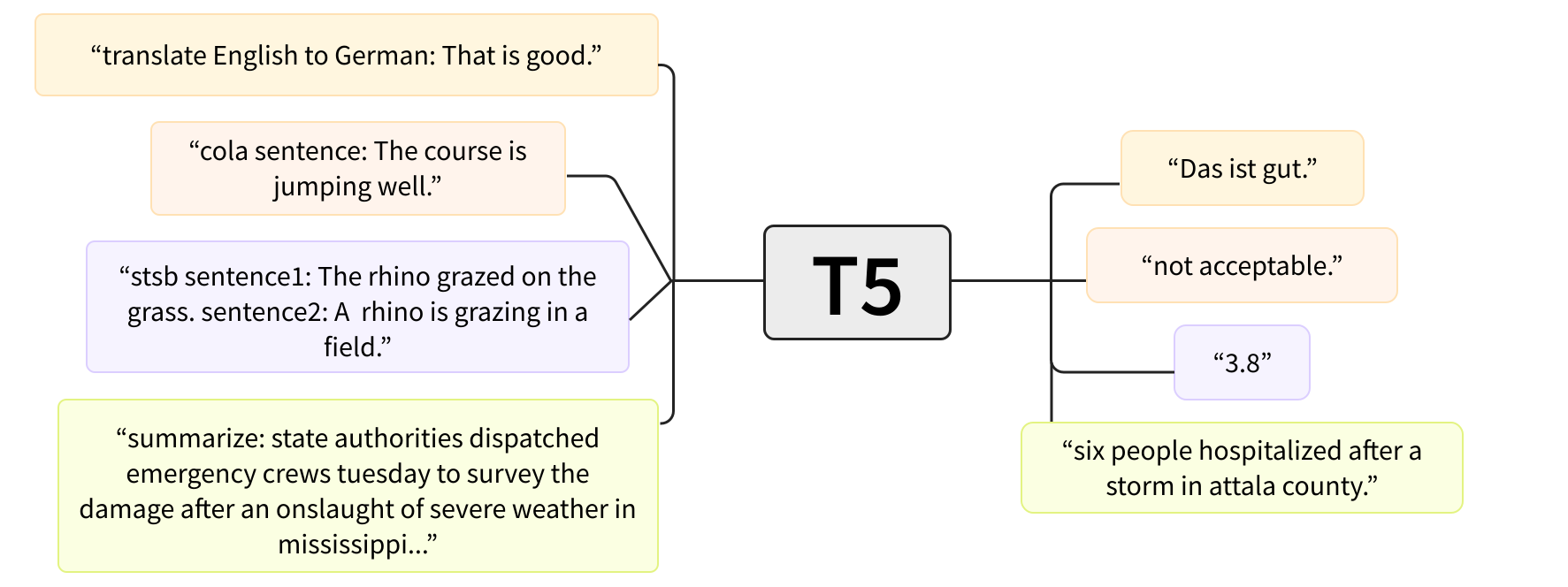
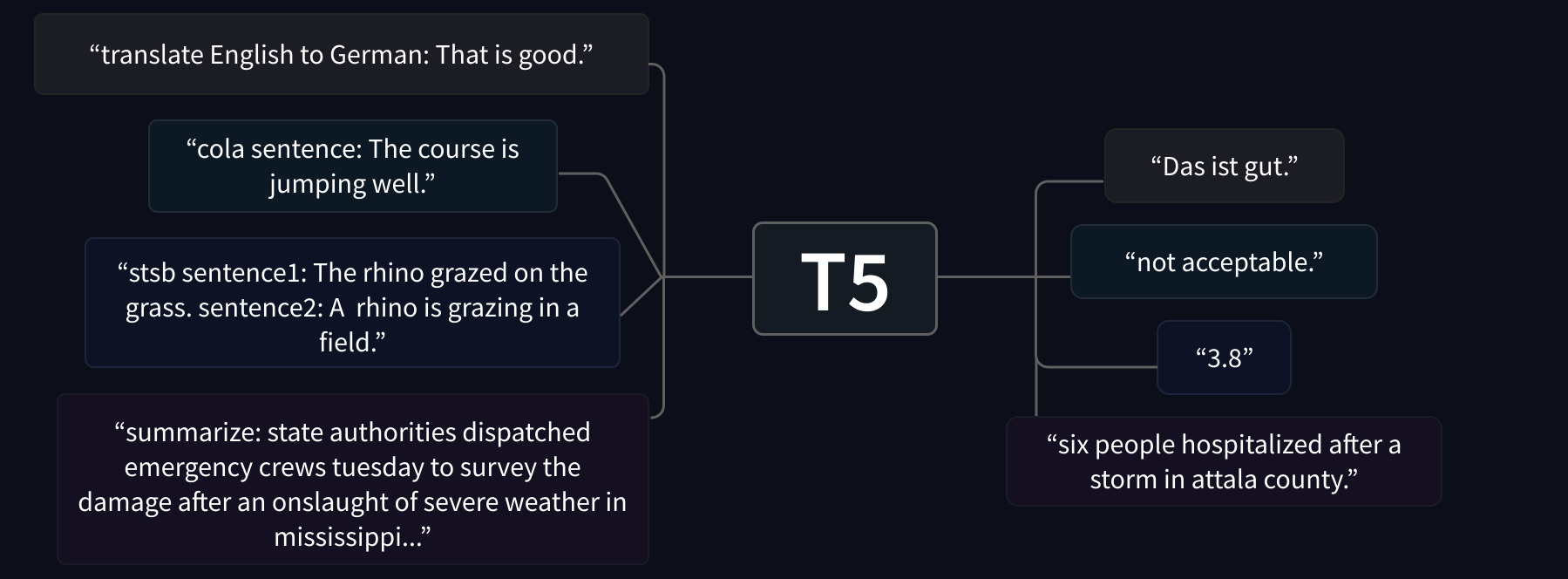
We’ll focus on mT5, an interesting architecture based on T5 that was pretrained in a text-to-text framework. In T5, every NLP task is formulated in terms of a prompt prefix like summarize: which conditions the model to adapt the generated text to the prompt. As shown in the figure below, this makes T5 extremely versatile, as you can solve many tasks with a single model!
我们将重点介绍MT5,这是一个基于T5的有趣架构,在文本到文本框架中经过了预先训练。在T5中,每一个NLP任务都是根据提示前缀来制定的,比如:`摘要:‘,它限制了模型使生成的文本适应提示。如下图所示,这让T5变得非常多才多艺,因为你可以用一个机型解决很多任务!
mT5 doesn’t use prefixes, but shares much of the versatility of T5 and has the advantage of being multilingual. Now that we’ve picked a model, let’s take a look at preparing our data for training.
T5架构执行的不同任务。T5架构执行的不同任务。MT5不使用前缀,但具有T5的许多多功能性,并且具有多语言的优势。既然我们已经选择了一个模型,让我们来看看如何为培训准备数据。
✏️ Try it out! Once you’ve worked through this section, see how well mT5 compares to mBART by fine-tuning the latter with the same techniques. For bonus points, you can also try fine-tuning T5 on just the English reviews. Since T5 has a special prefix prompt, you’ll need to prepend summarize: to the input examples in the preprocessing steps below.
✏️试试看吧!学习完这一节之后,通过使用相同的技术对mBART进行微调,看看MT5与mBART相比有多好。为了获得加分,你也可以尝试只在英语评论上微调T5。由于T5有一个特殊的前缀提示符,所以在下面的预处理步骤中,您需要在输入示例前面加上sum:。
Preprocessing the data
对数据进行预处理
Our next task is to tokenize and encode our reviews and their titles. As usual, we begin by loading the tokenizer associated with the pretrained model checkpoint. We’ll use mt5-small as our checkpoint so we can fine-tune the model in a reasonable amount of time:
我们的下一个任务是对我们的评论及其标题进行标记化和编码。像往常一样,我们从加载与预先训练的模型检查点相关联的标记器开始。我们将使用mt5-mall作为检查点,以便在合理的时间内对模型进行微调:
1 | |
💡 In the early stages of your NLP projects, a good practice is to train a class of “small” models on a small sample of data. This allows you to debug and iterate faster toward an end-to-end workflow. Once you are confident in the results, you can always scale up the model by simply changing the model checkpoint!
💡在您的NLP项目的早期阶段,一个好的做法是在小样本数据上训练一类“小”模型。这使您可以更快地进行调试和迭代,从而实现端到端的工作流。一旦您对结果有信心,您总是可以通过简单地更改模型检查点来放大模型!
Let’s test out the mT5 tokenizer on a small example:
让我们通过一个小示例来测试MT5记号赋值器:
1 | |
1 | |
Here we can see the familiar input_ids and attention_mask that we encountered in our first fine-tuning experiments back in [Chapter 3]. Let’s decode these input IDs with the tokenizer’s convert_ids_to_tokens() function to see what kind of tokenizer we’re dealing with:
这里我们可以看到我们在第3章的第一次微调实验中遇到的熟悉的input_ids和note_mask。让我们用记号器的Convert_ids_to_tokens()函数对这些输入ID进行解码,看看我们处理的是哪种记号器:
1 | |
1 | |
The special Unicode character ▁ and end-of-sequence token </s> indicate that we’re dealing with the SentencePiece tokenizer, which is based on the Unigram segmentation algorithm discussed in [Chapter 6]. Unigram is especially useful for multilingual corpora since it allows SentencePiece to be agnostic about accents, punctuation, and the fact that many languages, like Japanese, do not have whitespace characters.
特殊的UNICODE字符▁和序列结束标记</s>表明我们正在处理的是SentencePiess标记器,它基于第6章中讨论的Unigram分割算法。Unigram对于多语言语料库特别有用,因为它允许SentencePiess不知道重音、标点符号以及许多语言(如日语)没有空格字符的事实。
To tokenize our corpus, we have to deal with a subtlety associated with summarization: because our labels are also text, it is possible that they exceed the model’s maximum context size. This means we need to apply truncation to both the reviews and their titles to ensure we don’t pass excessively long inputs to our model. The tokenizers in 🤗 Transformers provide a nifty text_target argument that allows you to tokenize the labels in parallel to the inputs. Here is an example of how the inputs and targets are processed for mT5:
为了标记化我们的语料库,我们必须处理与摘要相关的细微之处:因为我们的标签也是文本,所以它们有可能超过模型的最大上下文大小。这意味着我们需要对评论及其标题应用截断,以确保我们不会向模型传递过长的输入。🤗Transformer中的标记器提供了一个漂亮的‘Text_Target’参数,该参数允许您与输入并行地标记化标签。以下是如何处理MT5的输入和目标的示例:
1 | |
Let’s walk through this code to understand what’s happening. The first thing we’ve done is define values for max_input_length and max_target_length, which set the upper limits for how long our reviews and titles can be. Since the review body is typically much larger than the title, we’ve scaled these values accordingly.
让我们演练一下这段代码,以了解发生了什么。我们做的第一件事是定义MAX_INPUT_LENGTH和MAX_TARGET_LENGTH的值,它们设置了我们的评论和标题的长度上限。由于审查机构通常比标题大得多,我们对这些值进行了相应的调整。
With preprocess_function(), it is then a simple matter to tokenize the whole corpus using the handy Dataset.map() function we’ve used extensively throughout this course:
有了preprocess_unction(),就可以使用本课程中广泛使用的方便的Dataset.map()函数对整个语料库进行标记化:
1 | |
Now that the corpus has been preprocessed, let’s take a look at some metrics that are commonly used for summarization. As we’ll see, there is no silver bullet when it comes to measuring the quality of machine-generated text.
现在已经对语料库进行了预处理,让我们来看看一些通常用于摘要的指标。正如我们将看到的,在测量机器生成的文本的质量时,没有什么灵丹妙药。
💡 You may have noticed that we used batched=True in our Dataset.map() function above. This encodes the examples in batches of 1,000 (the default) and allows you to make use of the multithreading capabilities of the fast tokenizers in 🤗 Transformers. Where possible, try using batched=True to get the most out of your preprocessing!
💡您可能已经注意到,我们在上面的Dataset.map()函数中使用了Batcher=True。这将以1,000个为一批(默认)对示例进行编码,并允许您利用🤗Transformers中快速令牌化器的多线程功能。在可能的情况下,尝试使用Batcher=True来最大限度地利用您的预处理!
Metrics for text summarization
文本摘要的度量标准
In comparison to most of the other tasks we’ve covered in this course, measuring the performance of text generation tasks like summarization or translation is not as straightforward. For example, given a review like “I loved reading the Hunger Games”, there are multiple valid summaries, like “I loved the Hunger Games” or “Hunger Games is a great read”. Clearly, applying some sort of exact match between the generated summary and the label is not a good solution — even humans would fare poorly under such a metric, because we all have our own writing style.
与我们在本课程中涉及的大多数其他任务相比,衡量摘要或翻译等文本生成任务的性能并不那么简单。例如,给出一篇像《我爱读饥饿游戏》这样的评论,就会有多个有效的总结,比如《我爱饥饿游戏》或《饥饿游戏是一本好书》。显然,在生成的摘要和标签之间应用某种精确的匹配不是一个好的解决方案–即使是人类在这样的衡量标准下也会表现不佳,因为我们都有自己的写作风格。
For summarization, one of the most commonly used metrics is the ROUGE score (short for Recall-Oriented Understudy for Gisting Evaluation). The basic idea behind this metric is to compare a generated summary against a set of reference summaries that are typically created by humans. To make this more precise, suppose we want to compare the following two summaries:
对于总结,最常用的衡量标准之一是Rouge Score(面向召回的候补学习评估的缩写)。该指标背后的基本思想是将生成的摘要与通常由人类创建的一组参考摘要进行比较。为了更准确地说明这一点,假设我们要比较以下两个摘要:
1 | |
One way to compare them could be to count the number of overlapping words, which in this case would be 6. However, this is a bit crude, so instead ROUGE is based on computing the precision and recall scores for the overlap.
比较它们的一种方法可能是计算重叠单词的数量,在本例中为6。然而,这有点粗略,所以Rouge基于计算重叠单词的精确度和召回率分数。
🙋 Don’t worry if this is the first time you’ve heard of precision and recall — we’ll go through some explicit examples together to make it all clear. These metrics are usually encountered in classification tasks, so if you want to understand how precision and recall are defined in that context, we recommend checking out the scikit-learn guides.
🙋如果这是您第一次听说精确度和查全率,请不要担心–我们将一起通过一些明确的例子来说明这一点。这些指标通常是在分类任务中遇到的,所以如果你想了解准确率和查全率是如何在这种情况下定义的,我们建议你去看看`cerkit-learn‘指南。
For ROUGE, recall measures how much of the reference summary is captured by the generated one. If we are just comparing words, recall can be calculated according to the following formula:
Recall=Number of overlapping wordsTotal number of words in reference summary \mathrm{Recall} = \frac{\mathrm{Number,of,overlapping, words}}{\mathrm{Total, number, of, words, in, reference, summary}} Recall=TotalnumberofwordsinreferencesummaryNumberofoverlappingwords
对于Rouge,Recall衡量生成的引用摘要捕获了多少引用摘要。如果我们只是比较单词,可以按照以下公式计算召回率:Recall=Number of overlapping wordsTotal number of words in reference summary\mathm{Recall}=\FRAC{\mathm{Numbers,of,Overlding,Words}}{\mathm{Total,Numbers,of,Words,In,Reference,Sumal}}Recall=TotalnumberofwordsinreferencesummaryNumberofoverlappingwords
For our simple example above, this formula gives a perfect recall of 6/6 = 1; i.e., all the words in the reference summary have been produced by the model. This may sound great, but imagine if our generated summary had been “I really really loved reading the Hunger Games all night”. This would also have perfect recall, but is arguably a worse summary since it is verbose. To deal with these scenarios we also compute the precision, which in the ROUGE context measures how much of the generated summary was relevant:
Precision=Number of overlapping wordsTotal number of words in generated summary \mathrm{Precision} = \frac{\mathrm{Number,of,overlapping, words}}{\mathrm{Total, number, of, words, in, generated, summary}} Precision=TotalnumberofwordsingeneratedsummaryNumberofoverlappingwords
对于上面的简单例子,这个公式给出了6/6=1的完美回忆;即参考摘要中的所有单词都是由模型生成的。这听起来可能很棒,但想象一下,如果我们生成的总结是“我真的非常喜欢通宵阅读《饥饿游戏》,那会是什么样子?”这也会有完美的回忆,但可以说是一个更糟糕的总结,因为它很冗长。为了处理这些场景,我们还计算精度,它在Rouge上下文中衡量生成的摘要中有多少是相关的:Precision=Number of overlapping wordsTotal number of words in generated summary\mathm{Precision}=\FRAC{\mathm{Number,of,Overlative,Words}}{\mathm{Total,Numbers,of,Words,In,Generated,Sumal}}Precision=TotalnumberofwordsingeneratedsummaryNumberofoverlappingwords
Applying this to our verbose summary gives a precision of 6/10 = 0.6, which is considerably worse than the precision of 6/7 = 0.86 obtained by our shorter one. In practice, both precision and recall are usually computed, and then the F1-score (the harmonic mean of precision and recall) is reported. We can do this easily in 🤗 Datasets by first installing the rouge_score package:
将它应用于我们的详细摘要,得到的精度为6/10=0.6,这比我们的较短的摘要获得的6/7=0.86的精度差得多。在实践中,通常同时计算查准率和查全率,然后报告F1分数(查准率和查全率的调和平均值)。我们可以在🤗数据集中轻松实现这一点,只需先安装rouge_core包:
1 | |
and then loading the ROUGE metric as follows:
然后加载Rouge指标,如下所示:
1 | |
Then we can use the rouge_score.compute() function to calculate all the metrics at once:
然后,我们可以使用rouge_Scott()函数一次计算所有指标:
1 | |
1 | |
Whoa, there’s a lot of information in that output — what does it all mean? First, 🤗 Datasets actually computes confidence intervals for precision, recall, and F1-score; these are the low, mid, and high attributes you can see here. Moreover, 🤗 Datasets computes a variety of ROUGE scores which are based on different types of text granularity when comparing the generated and reference summaries. The rouge1 variant is the overlap of unigrams — this is just a fancy way of saying the overlap of words and is exactly the metric we’ve discussed above. To verify this, let’s pull out the mid value of our scores:
哇,那个输出中有很多信息–这一切意味着什么?首先,🤗数据集实际上计算了精确度、查全率和F1分数的置信度区间;您可以在这里看到这些属性。此外,🤗数据集在比较生成的摘要和参考摘要时,基于不同类型的文本粒度计算各种Rouge分数。‘rouge1’的变体是单字的重叠–这只是一种表达单词重叠的花哨方式,也正是我们在上面讨论的度量标准。为了验证这一点,让我们拿出我们分数的Mid值:
1 | |
1 | |
Great, the precision and recall numbers match up! Now what about those other ROUGE scores? rouge2 measures the overlap between bigrams (think the overlap of pairs of words), while rougeL and rougeLsum measure the longest matching sequences of words by looking for the longest common substrings in the generated and reference summaries. The “sum” in rougeLsum refers to the fact that this metric is computed over a whole summary, while rougeL is computed as the average over individual sentences.
太好了,精确度和召回率相匹配!那么其他的Rouge分数呢?rouge2‘衡量的是双词之间的重叠度(想想单词对的重叠度),而rougeL’和rougeLsum‘则通过在生成的摘要和参考摘要中寻找最长的公共子串来衡量单词的最长匹配序列。rougeLsum中的sum是指该指标是按整个摘要计算的,而rougeL`是按单个句子的平均值计算的。
✏️ Try it out! Create your own example of a generated and reference summary and see if the resulting ROUGE scores agree with a manual calculation based on the formulas for precision and recall. For bonus points, split the text into bigrams and compare the precision and recall for the rouge2 metric.
✏️试试看吧!创建您自己的生成和参考摘要的示例,并查看生成的Rouge分数是否与基于精度和召回率公式的手动计算一致。对于加分,将文本拆分成二元组,并比较`rouge2‘指标的精确度和召回率。
We’ll use these ROUGE scores to track the performance of our model, but before doing that let’s do something every good NLP practitioner should do: create a strong, yet simple baseline!
我们将使用这些Rouge分数来跟踪我们模型的性能,但在此之前,让我们做一件每个优秀的NLP实践者都应该做的事情:创建一个强大而简单的基线!
Creating a strong baseline
创建强大的基线
A common baseline for text summarization is to simply take the first three sentences of an article, often called the lead-3 baseline. We could use full stops to track the sentence boundaries, but this will fail on acronyms like “U.S.” or “U.N.” — so instead we’ll use the nltk library, which includes a better algorithm to handle these cases. You can install the package using pip as follows:
文本摘要的一个常见基线是简单地取一篇文章的前三句话,通常称为前导-3基线。我们可以使用句号来跟踪句子的边界,但这在“美国”这样的缩略语上会失败。或者“U.N.”–所以我们将使用nltk‘库,它包含一个更好的算法来处理这些情况。您可以使用piap`安装包,具体步骤如下:
1 | |
and then download the punctuation rules:
然后下载标点符号规则:
1 | |
Next, we import the sentence tokenizer from nltk and create a simple function to extract the first three sentences in a review. The convention in text summarization is to separate each summary with a newline, so let’s also include this and test it on a training example:
接下来,我们从nltk导入句子标记器,并创建一个简单的函数来提取评论中的前三句话。文本摘要的惯例是用换行符分隔每个摘要,因此让我们也包括这一点,并在一个培训示例中进行测试:
1 | |
1 | |
This seems to work, so let’s now implement a function that extracts these “summaries” from a dataset and computes the ROUGE scores for the baseline:
这似乎是可行的,所以现在让我们实现一个函数,该函数从数据集中提取这些“汇总”并计算基线的Rouge分数:
1 | |
We can then use this function to compute the ROUGE scores over the validation set and prettify them a bit using Pandas:
然后,我们可以使用此函数来计算验证集的Rouge分数,并使用Pandas对其进行美化:
1 | |
1 | |
We can see that the rouge2 score is significantly lower than the rest; this likely reflects the fact that review titles are typically concise and so the lead-3 baseline is too verbose. Now that we have a good baseline to work from, let’s turn our attention toward fine-tuning mT5!
我们可以看到,‘rouge2’分数明显低于其他分数;这可能反映了这样一个事实,即评论标题通常都很简洁,因此Lead-3基准太过冗长。现在我们已经有了一个很好的基准,让我们将注意力转向微调MT5!
Fine-tuning mT5 with the Trainer API
使用Traine接口微调MT5
Fine-tuning a model for summarization is very similar to the other tasks we’ve covered in this chapter. The first thing we need to do is load the pretrained model from the mt5-small checkpoint. Since summarization is a sequence-to-sequence task, we can load the model with the AutoModelForSeq2SeqLM class, which will automatically download and cache the weights:
微调用于摘要的模型与我们在本章中介绍的其他任务非常相似。我们需要做的第一件事是从mt5-mall‘检查点加载预训练的模型。由于汇总是一个顺序到顺序的任务,我们可以用AutoModelForSeq2SeqLM`类加载模型,这个类会自动下载并缓存权重:
1 | |
💡 If you’re wondering why you don’t see any warnings about fine-tuning the model on a downstream task, that’s because for sequence-to-sequence tasks we keep all the weights of the network. Compare this to our text classification model in [Chapter 3], where the head of the pretrained model was replaced with a randomly initialized network.
💡如果您想知道为什么在下游任务上没有看到任何关于微调模型的警告,这是因为对于顺序到顺序任务,我们保留了网络的所有权重。将其与第三章中的文本分类模型进行比较,在该模型中,预先训练的模型的头部被随机初始化的网络取代。
The next thing we need to do is log in to the Hugging Face Hub. If you’re running this code in a notebook, you can do so with the following utility function:
我们需要做的下一件事是登录Hugging Face中心。如果您在笔记本电脑中运行此代码,则可以使用以下实用程序函数执行此操作:
1 | |
which will display a widget where you can enter your credentials. Alternatively, you can run this command in your terminal and log in there:
它将显示一个小部件,您可以在其中输入您的凭据。或者,您也可以在您的终端上运行此命令并登录:
1 | |
We’ll need to generate summaries in order to compute ROUGE scores during training. Fortunately, 🤗 Transformers provides dedicated Seq2SeqTrainingArguments and Seq2SeqTrainer classes that can do this for us automatically! To see how this works, let’s first define the hyperparameters and other arguments for our experiments:
我们需要生成摘要,以便在训练期间计算Rouge分数。幸运的是,🤗Transformers提供了专用的Seq2SeqTrainingArguments和Seq2SeqTraine类,它们可以自动为我们完成这项工作!要了解这是如何工作的,让我们首先为我们的实验定义超参数和其他参数:
1 | |
Here, the predict_with_generate argument has been set to indicate that we should generate summaries during evaluation so that we can compute ROUGE scores for each epoch. As discussed in [Chapter 1], the decoder performs inference by predicting tokens one by one, and this is implemented by the model’s generate() method. Setting predict_with_generate=True tells the Seq2SeqTrainer to use that method for evaluation. We’ve also adjusted some of the default hyperparameters, like the learning rate, number of epochs, and weight decay, and we’ve set the save_total_limit option to only save up to 3 checkpoints during training — this is because even the “small” version of mT5 uses around a GB of hard drive space, and we can save a bit of room by limiting the number of copies we save.
在这里,已经设置了Forecast_with_Generate参数,以指示我们应该在评估期间生成摘要,以便我们可以计算每个时期的Rouge分数。如第一章所讨论的,解码器通过一个接一个地预测令牌来执行推理,这是通过模型的Generate()‘方法来实现的。设置Forecast_With_Generate=True会通知Seq2SeqTraine使用该方法进行求值。我们还调整了一些默认的超级参数,如学习速率、历元数和权重衰减,并设置了save_Total_limit`选项,在训练期间仅节省最多3个检查点-这是因为即使是MT5的“小”版本也使用了大约1 GB的硬盘空间,我们可以通过限制保存的副本数来节省一点空间。
The push_to_hub=True argument will allow us to push the model to the Hub after training; you’ll find the repository under your user profile in the location defined by output_dir. Note that you can specify the name of the repository you want to push to with the hub_model_id argument (in particular, you will have to use this argument to push to an organization). For instance, when we pushed the model to the huggingface-course organization, we added hub_model_id="huggingface-course/mt5-finetuned-amazon-en-es" to Seq2SeqTrainingArguments.
`PUSH_TO_HUB=True参数将允许我们在培训后将模型推送到Hub;您将在您的用户配置文件下的outputdir定义的位置找到存储库。请注意,您可以使用Hub_Model_id参数指定要推送到的存储库的名称(特别是必须使用此参数才能推送到组织)。例如,当我们将模型推送到HuggingFace-Course组织时,我们将hub_model_id=“huggingface-course/mt5-finetuned-amazon-en-es”添加到Seq2SeqTrainingArguments`中。
The next thing we need to do is provide the trainer with a compute_metrics() function so that we can evaluate our model during training. For summarization this is a bit more involved than simply calling rouge_score.compute() on the model’s predictions, since we need to decode the outputs and labels into text before we can compute the ROUGE scores. The following function does exactly that, and also makes use of the sent_tokenize() function from nltk to separate the summary sentences with newlines:
我们需要做的下一件事是为培训者提供一个‘Compute_Metrics()’函数,这样我们就可以在培训期间评估我们的模型。对于汇总,这比简单地对模型的预测调用rouge_core()要复杂一些,因为我们需要在计算Rouge分数之前将输出和标签解码为文本。下面的函数就是这样做的,它还使用了nltk中的sed_tokenize()函数来用换行符分隔总结句子:
1 | |
Next, we need to define a data collator for our sequence-to-sequence task. Since mT5 is an encoder-decoder Transformer model, one subtlety with preparing our batches is that during decoding we need to shift the labels to the right by one. This is required to ensure that the decoder only sees the previous ground truth labels and not the current or future ones, which would be easy for the model to memorize. This is similar to how masked self-attention is applied to the inputs in a task like causal language modeling.
接下来,我们需要为Sequence-to-Sequence任务定义数据校验器。由于MT5是一个编解码器Transformer模型,准备我们的批次的一个微妙之处是,在解码过程中,我们需要将标签向右移动一个。这是为了确保解码者只看到以前的基本事实标签,而不是当前或未来的标签,这对模型来说很容易记忆。这类似于如何将掩饰的自我注意应用于因果语言建模等任务中的输入。
Luckily, 🤗 Transformers provides a DataCollatorForSeq2Seq collator that will dynamically pad the inputs and the labels for us. To instantiate this collator, we simply need to provide the tokenizer and model:
幸运的是,🤗Transformer提供了一个DataCollatorForSeq2Seq排序器,它将为我们动态填充输入和标签。要实例化这个排序器,我们只需要提供tokenizer和Model:
1 | |
Let’s see what this collator produces when fed a small batch of examples. First, we need to remove the columns with strings because the collator won’t know how to pad these elements:
让我们看看这个排序器在提供一小批示例时会产生什么结果。首先,我们需要删除带有字符串的列,因为排序器不知道如何填充这些元素:
1 | |
Since the collator expects a list of dicts, where each dict represents a single example in the dataset, we also need to wrangle the data into the expected format before passing it to the data collator:
由于排序器期望获得一个`DICTICS‘列表,其中每个’DICTICS‘表示数据集中的一个示例,因此在将数据传递给数据排序器之前,我们还需要将数据转换为预期的格式:
1 | |
1 | |
The main thing to notice here is that the first example is longer than the second one, so the input_ids and attention_mask of the second example have been padded on the right with a [PAD] token (whose ID is 0). Similarly, we can see that the labels have been padded with -100s, to make sure the padding tokens are ignored by the loss function. And finally, we can see a new decoder_input_ids which has shifted the labels to the right by inserting a [PAD] token in the first entry.
这里主要要注意的是,第一个示例比第二个示例长,所以第二个示例的input_ids和note_mask在右侧填充了一个[pad]内标识(其ID为0)。类似地,我们可以看到Labels被填充了-100‘,以确保填充标记被丢失函数忽略。最后,我们可以看到一个新的decderinputids,它通过在第一个条目中插入[Pad]`标记将标签向右移动。
We finally have all the ingredients we need to train with! We now simply need to instantiate the trainer with the standard arguments:
我们终于有了训练所需的所有材料!现在,我们只需使用标准参数实例化训练器:
1 | |
and launch our training run:
并启动我们的训练运行:
1 | |
During training, you should see the training loss decrease and the ROUGE scores increase with each epoch. Once the training is complete, you can see the final ROUGE scores by running Trainer.evaluate():
在训练中,你应该会看到训练损失随着时间的推移而减少,而红晕分数则会随着时间的推移而增加。训练结束后,您可以通过运行Traine.valuate()来查看最终的Rouge分数:
1 | |
1 | |
From the scores we can see that our model has handily outperformed our lead-3 baseline — nice! The final thing to do is push the model weights to the Hub, as follows:
从分数中我们可以看到,我们的模型已经轻松超过了我们领先的3个基线-很好!最后要做的是将模型权重推送到连接部,如下所示:
1 | |
1 | |
This will save the checkpoint and configuration files to output_dir, before uploading all the files to the Hub. By specifying the tags argument, we also ensure that the widget on the Hub will be one for a summarization pipeline instead of the default text generation one associated with the mT5 architecture (for more information about model tags, see the 🤗 Hub documentation). The output from trainer.push_to_hub() is a URL to the Git commit hash, so you can easily see the changes that were made to the model repository!
这会在将所有文件上传到Hub之前,将检查点和配置文件保存到outputdir。通过指定🤗‘参数,我们还确保集线器上的小部件将是用于摘要管道的小部件,而不是与MT5体系结构关联的默认文本生成小部件(有关模型标签的更多信息,请参阅Tagb文档)。traine.ush_to_Hub()`的输出是Git提交散列的URL,因此您可以很容易地看到对模型存储库所做的更改!
To wrap up this section, let’s take a look at how we can also fine-tune mT5 using the low-level features provided by 🤗 Accelerate.
为了结束这一节,让我们看看如何使用🤗Accelerate提供的低级特性对MT5进行微调。
Fine-tuning mT5 with 🤗 Accelerate
使用🤗Accelerate微调MT5
Fine-tuning our model with 🤗 Accelerate is very similar to the text classification example we encountered in [Chapter 3]. The main differences will be the need to explicitly generate our summaries during training and define how we compute the ROUGE scores (recall that the Seq2SeqTrainer took care of the generation for us). Let’s take a look how we can implement these two requirements within 🤗 Accelerate!
使用🤗Accelerate对我们的模型进行微调与我们在第三章中遇到的文本分类示例非常相似。主要区别将是需要在训练期间显式生成摘要,并定义我们如何计算Rouge分数(回想一下,Seq2SeqTrainer为我们负责生成)。让我们来看看如何在🤗Accelerate中实现这两个要求!
Preparing everything for training
为训练做好一切准备
The first thing we need to do is create a DataLoader for each of our splits. Since the PyTorch dataloaders expect batches of tensors, we need to set the format to "torch" in our datasets:
我们需要做的第一件事是为我们的每个拆分创建一个DataLoader‘。由于PyTorch数据加载器需要批量张量,因此我们需要在数据集中将格式设置为“Torch”`:
1 | |
Now that we’ve got datasets consisting of just tensors, the next thing to do is instantiate the DataCollatorForSeq2Seq again. For this we need to provide a fresh version of the model, so let’s load it again from our cache:
现在我们已经有了只由张量组成的数据集,接下来要做的是再次实例化DataCollatorForSeq2Seq。为此,我们需要提供模型的新版本,因此让我们从缓存中再次加载它:
1 | |
We can then instantiate the data collator and use this to define our dataloaders:
然后,我们可以实例化数据校验器并使用它来定义我们的数据加载器:
1 | |
The next thing to do is define the optimizer we want to use. As in our other examples, we’ll use AdamW, which works well for most problems:
接下来要做的是定义我们想要使用的优化器。与我们的其他示例一样,我们将使用AdamW,它可以很好地解决大多数问题:
1 | |
Finally, we feed our model, optimizer, and dataloaders to the accelerator.prepare() method:
最后,我们将我们的模型、优化器和数据加载器提供给accelerator.prepare()方法:
1 | |
🚨 If you’re training on a TPU, you’ll need to move all the code above into a dedicated training function. See [Chapter 3] for more details.
🚨如果你正在用热塑性弹性体进行训练,你需要把上面的所有代码移到一个专门的训练功能中。有关详细信息,请参阅第3章。
Now that we’ve prepared our objects, there are three remaining things to do:
现在我们已经准备好了对象,接下来还有三件事要做:
- Define the learning rate schedule.
- Implement a function to post-process the summaries for evaluation.
- Create a repository on the Hub that we can push our model to.
For the learning rate schedule, we’ll use the standard linear one from previous sections:
定义学习速率时间表。实现一个函数来对评估摘要进行后处理。在Hub上创建一个存储库,我们可以将我们的模型推送到该存储库。对于学习速率时间表,我们将使用前面几节中的标准线性时间表:
1 | |
For post-processing, we need a function that splits the generated summaries into sentences that are separated by newlines. This is the format the ROUGE metric expects, and we can achieve this with the following snippet of code:
对于后处理,我们需要一个函数来将生成的摘要拆分成由换行符分隔的句子。这是Rouge指标期望的格式,我们可以通过以下代码片段来实现:
1 | |
This should look familiar to you if you recall how we defined the compute_metrics() function of the Seq2SeqTrainer.
如果您还记得我们是如何定义Seq2SeqTraine的COMPUTE_METRICS()函数的,那么您应该对此很熟悉。
Finally, we need to create a model repository on the Hugging Face Hub. For this, we can use the appropriately titled 🤗 Hub library. We just need to define a name for our repository, and the library has a utility function to combine the repository ID with the user profile:
最后,我们需要在Hugging Face中心上创建一个模型库。为此,我们可以使用标题适当的🤗集线库。我们只需要为我们的存储库定义一个名称,并且该库具有一个实用程序函数来组合存储库ID和用户配置文件:
1 | |
1 | |
Now we can use this repository name to clone a local version to our results directory that will store the training artifacts:
现在,我们可以使用此存储库名称将本地版本克隆到将存储训练构件的结果目录中:
1 | |
This will allow us to push the artifacts back to the Hub by calling the repo.push_to_hub() method during training! Let’s now wrap up our analysis by writing out the training loop.
这将允许我们在训练期间通过调用repo.ush_to_Hub()方法将构件推送回Hub!现在让我们通过写出训练循环来结束我们的分析。
Training loop
训练循环
The training loop for summarization is quite similar to the other 🤗 Accelerate examples that we’ve encountered and is roughly split into four main steps:
总结的培训循环与我们遇到的其他🤗Accelerate示例非常相似,大致分为四个主要步骤:
- Train the model by iterating over all the examples in
train_dataloaderfor each epoch. - Generate model summaries at the end of each epoch, by first generating the tokens and then decoding them (and the reference summaries) into text.
- Compute the ROUGE scores using the same techniques we saw earlier.
- Save the checkpoints and push everything to the Hub. Here we rely on the nifty
blocking=Falseargument of theRepositoryobject so that we can push the checkpoints per epoch asynchronously. This allows us to continue training without having to wait for the somewhat slow upload associated with a GB-sized model!
These steps can be seen in the following block of code:
通过迭代每个纪元的所有示例来训练模型。在每个纪元结束时生成模型摘要,方法是首先生成令牌,然后将它们(和参考摘要)解码为文本。使用我们之前看到的相同技术计算Rouge分数。保存检查点并将所有内容推送到Hub。在这里,我们依赖于Repository对象的漂亮的block=False参数,这样我们就可以在每个纪元异步推送检查点。这让我们可以继续训练,而不必等待与GB大小的模型相关的有点慢的上传!这些步骤可以在以下代码块中看到:
1 | |
1 | |
And that’s it! Once you run this, you’ll have a model and results that are pretty similar to the ones we obtained with the Trainer.
就是这样!一旦你运行了这个程序,你就会得到一个模型和结果,和我们用‘火车’得到的结果非常相似。
Using your fine-tuned model
使用您的微调模型
Once you’ve pushed the model to the Hub, you can play with it either via the inference widget or with a pipeline object, as follows:
一旦您将模型推送到Hub,您就可以通过推理小部件或使用Pipeline对象来处理它,如下所示:
1 | |
We can feed some examples from the test set (which the model has not seen) to our pipeline to get a feel for the quality of the summaries. First let’s implement a simple function to show the review, title, and generated summary together:
我们可以将测试集(模型还没有看到)中的一些示例提供给我们的管道,以感受摘要的质量。首先,让我们实现一个简单的函数来同时显示评论、标题和生成的摘要:
1 | |
Let’s take a look at one of the English examples we get:
让我们来看看我们得到的一个英语例子:
1 | |
1 | |
This is not too bad! We can see that our model has actually been able to perform abstractive summarization by augmenting parts of the review with new words. And perhaps the coolest aspect of our model is that it is bilingual, so we can also generate summaries of Spanish reviews:
这还不算太糟!我们可以看到,我们的模型实际上已经能够通过用新单词扩充部分评论来执行抽象摘要。也许我们的模型最酷的方面是它是双语的,所以我们还可以生成西班牙语评论的摘要:
1 | |
1 | |
The summary translates into “Very easy to read” in English, which we can see in this case was extracted directly from the review. Nevertheless, this shows the versatility of the mT5 model and has given you a taste of what it’s like to deal with a multilingual corpus!
摘要翻译成英文的“非常容易阅读”,我们可以看到,在这种情况下,这是直接摘自审查。然而,这展示了MT5模型的多功能性,并让您体验了处理多语言语料库的感觉!
Next, we’ll turn our attention to a slightly more complex task: training a language model from scratch.
接下来,我们将把注意力转向一项稍微复杂的任务:从头开始训练语言模型。