6-The_Tokenizers_library-8-Building_a_tokenizer_block_by_block
中英文对照学习,效果更佳!
原课程链接:https://huggingface.co/course/chapter6/9?fw=pt
Building a tokenizer, block by block
逐块构建记号赋值器



As we’ve seen in the previous sections, tokenization comprises several steps:
在Studio Lab中打开在Colab中打开的问题正如我们在前面几节中看到的,标记化包括几个步骤:
- Normalization (any cleanup of the text that is deemed necessary, such as removing spaces or accents, Unicode normalization, etc.)
- Pre-tokenization (splitting the input into words)
- Running the input through the model (using the pre-tokenized words to produce a sequence of tokens)
- Post-processing (adding the special tokens of the tokenizer, generating the attention mask and token type IDs)
As a reminder, here’s another look at the overall process:
规格化(任何被认为是必要的文本清理,如删除空格或重音符号、Unicode标准化等)预标记化(将输入拆分为单词)通过模型运行输入(使用预标记化的单词来生成一系列标记)后处理(添加记号生成器的特殊标记,生成注意掩码和标记类型ID)作为提醒,下面是整个流程的另一个外观:
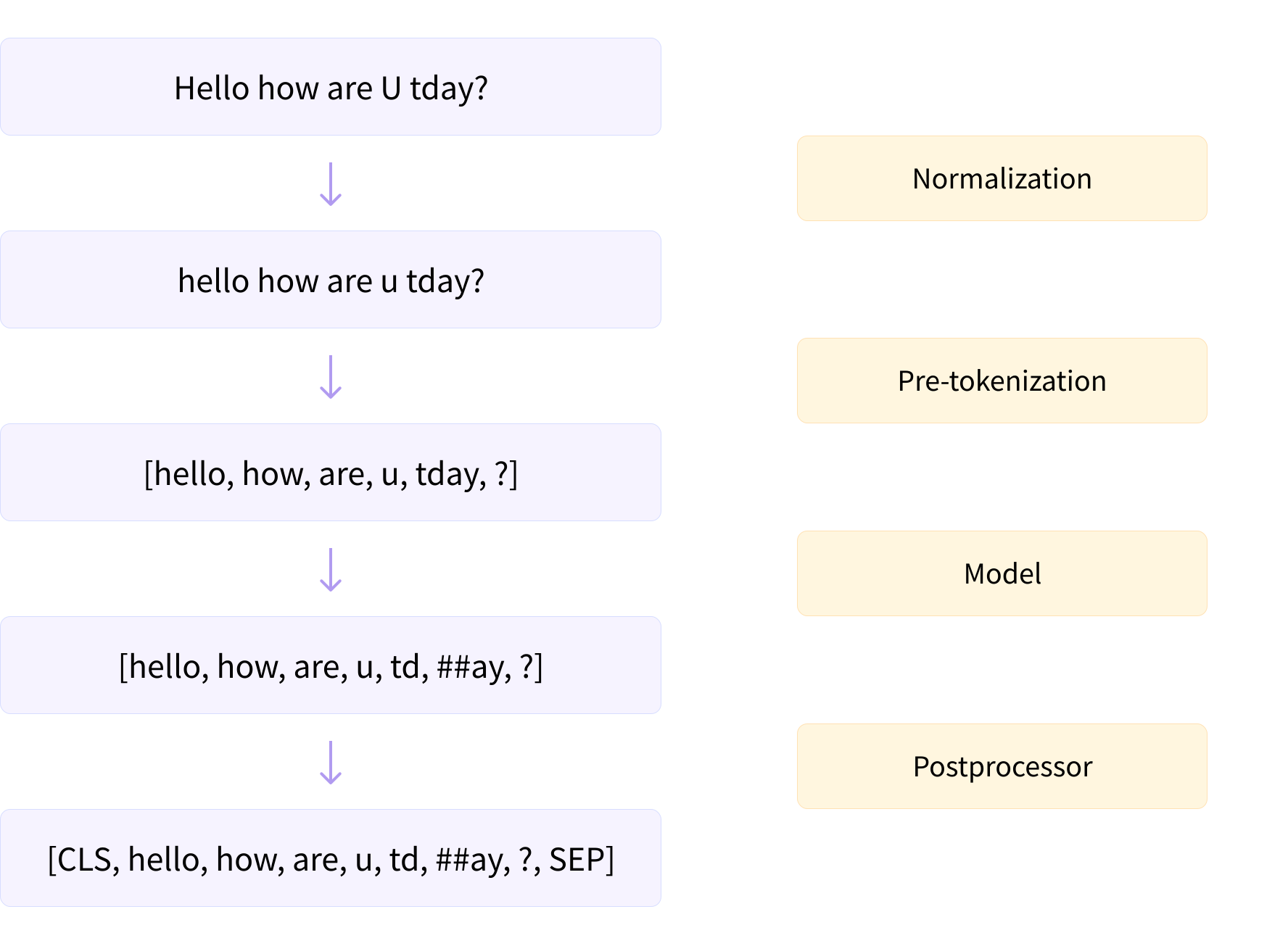
The 🤗 Tokenizers library has been built to provide several options for each of those steps, which you can mix and match together. In this section we’ll see how we can build a tokenizer from scratch, as opposed to training a new tokenizer from an old one as we did in section 2. You’ll then be able to build any kind of tokenizer you can think of!
令牌化管道。令牌化管道。构建了🤗令牌化器库,以便为每个步骤提供多个选项,您可以将这些选项混合在一起。在本节中,我们将了解如何从头开始构建记号器,而不是像我们在第2节中所做的那样,从旧的记号器训练新的记号器。然后,您将能够构建您能想到的任何类型的记号器!
More precisely, the library is built around a central Tokenizer class with the building blocks regrouped in submodules:
更准确地说,该库是围绕一个中央的“Tokenizer”类构建的,并将构建块重新分组到子模块中:
normalizerscontains all the possible types ofNormalizeryou can use (complete list here).pre_tokenizerscontains all the possible types ofPreTokenizeryou can use (complete list here).modelscontains the various types ofModelyou can use, likeBPE,WordPiece, andUnigram(complete list here).trainerscontains all the different types ofTraineryou can use to train your model on a corpus (one per type of model; complete list here).post_processorscontains the various types ofPostProcessoryou can use (complete list here).decoderscontains the various types ofDecoderyou can use to decode the outputs of tokenization (complete list here).
You can find the whole list of building blocks here.
`Normal izers包含您可以使用的所有可能的Normal izer类型(完整列表在这里)。pre_tokenizer包含您可以使用的所有可能的PreTokenizer类型(这里是完整的列表)。Models包含您可以使用的各种类型的Model,如BPE、WordPiece和Unigram(这里是完整的列表)。traines包含您可以用来在语料库上训练模型的所有不同类型的Traine(每种模型一个;完整列表这里).post_Processors包含您可以使用的各种类型的PostProcessor(完整列表在这里).decders包含您可以用来解码标记化输出的各种类型的Decoder`(完整列表在这里).您可以在这里找到构建块的完整列表。
Acquiring a corpus
获取语料库
To train our new tokenizer, we will use a small corpus of text (so the examples run fast). The steps for acquiring the corpus are similar to the ones we took at the beginning of this chapter, but this time we’ll use the WikiText-2 dataset:
为了训练我们的新标记器,我们将使用一个小的文本语料库(这样示例运行得更快)。获取语料库的步骤类似于我们在本章开始时采取的步骤,但这次我们将使用Wikitext-2数据集:
1 | |
The function get_training_corpus() is a generator that will yield batches of 1,000 texts, which we will use to train the tokenizer.
函数GET_Training_Corpus()是一个生成器,它将生成1,000批文本,我们将使用这些文本来训练记号赋值器。
🤗 Tokenizers can also be trained on text files directly. Here’s how we can generate a text file containing all the texts/inputs from WikiText-2 that we can use locally:
🤗令牌化器还可以直接针对文本文件进行培训。以下是我们如何生成一个文本文件,其中包含我们可以在本地使用的来自Wikitext-2的所有文本/输入:
1 | |
Next we’ll show you how to build your own BERT, GPT-2, and XLNet tokenizers, block by block. That will give us an example of each of the three main tokenization algorithms: WordPiece, BPE, and Unigram. Let’s start with BERT!
接下来,我们将向您展示如何逐块构建您自己的BERT、GPT-2和XLNet标记器。这将为我们提供三种主要的标记化算法中的每一种的示例:WordPiess、BPE和Unigram。让我们从伯特开始吧!
Building a WordPiece tokenizer from scratch
从头开始构建WordPiess记号赋值器
To build a tokenizer with the 🤗 Tokenizers library, we start by instantiating a Tokenizer object with a model, then set its normalizer, pre_tokenizer, post_processor, and decoder attributes to the values we want.
要使用🤗令牌化器库构建令牌化器,我们首先使用mod实例化一个Tokenizer对象,然后将其Normizer、pre_tokenizer、post_cessor和decder属性设置为我们想要的值。
For this example, we’ll create a Tokenizer with a WordPiece model:
在本例中,我们将使用WordPiess模型创建一个Tokenizer:
1 | |
We have to specify the unk_token so the model knows what to return when it encounters characters it hasn’t seen before. Other arguments we can set here include the vocab of our model (we’re going to train the model, so we don’t need to set this) and max_input_chars_per_word, which specifies a maximum length for each word (words longer than the value passed will be split).
我们必须指定unk_token,以便模型知道当它遇到以前没有见过的字符时返回什么。我们可以在这里设置的其他参数包括模型的vocab(我们要训练模型,所以不需要设置它)和max_input_chars_per_word,它指定每个单词的最大长度(超过传递的值的单词将被拆分)。
The first step of tokenization is normalization, so let’s begin with that. Since BERT is widely used, there is a BertNormalizer with the classic options we can set for BERT: lowercase and strip_accents, which are self-explanatory; clean_text to remove all control characters and replace repeating spaces with a single one; and handle_chinese_chars, which places spaces around Chinese characters. To replicate the bert-base-uncased tokenizer, we can just set this normalizer:
标记化的第一步是规范化,所以让我们从这一步开始。由于BERT被广泛使用,这里有一个BertNorMalizer,其中包含我们可以为BERT设置的经典选项:lowercase和strie_accents,它们是不言而喻的;lean_ext,用于删除所有控制字符,并将重复的空格替换为一个单独的空格;以及Handle_Chinese_chars,用于在中文字符周围放置空格。要复制bert-base-unased标记化器,我们只需设置此规格化器:
1 | |
Generally speaking, however, when building a new tokenizer you won’t have access to such a handy normalizer already implemented in the 🤗 Tokenizers library — so let’s see how to create the BERT normalizer by hand. The library provides a Lowercase normalizer and a StripAccents normalizer, and you can compose several normalizers using a Sequence:
但是,一般来说,在构建新的标记器时,您将无法访问已经在🤗标记器库中实现的如此方便的规格化程序–所以让我们来看看如何手动创建BERT规格化程序。该库提供了一个Lowercase规格化器和一个StriAccents规格化器,您可以使用一个Sequence来组合多个规格化器:
1 | |
We’re also using an NFD Unicode normalizer, as otherwise the StripAccents normalizer won’t properly recognize the accented characters and thus won’t strip them out.
我们还使用了一个NFDUnicode规格化程序,否则`Strip Accents‘规格化程序将无法正确识别重音字符,因此无法将其剔除。
As we’ve seen before, we can use the normalize_str() method of the normalizer to check out the effects it has on a given text:
正如我们之前看到的,我们可以使用Normizer的Normize_str()方法来检查它对给定文本的影响:
1 | |
1 | |
To go further If you test the two versions of the previous normalizers on a string containing the unicode character u"\u0085" you will surely notice that these two normalizers are not exactly equivalent.
To not over-complicate the version with normalizers.Sequence too much , we haven’t included the Regex replacements that the BertNormalizer requires when the clean_text argument is set to True - which is the default behavior. But don’t worry: it is possible to get exactly the same normalization without using the handy BertNormalizer by adding two normalizers.Replace’s to the normalizers sequence.
更进一步,如果您在包含Unicode字符u“\u0085”的字符串上测试前面两个版本的规格化程序,您肯定会注意到这两个规格化程序并不完全等价。为了不让版本过于复杂化,我们没有包含BertNorMalizer在参数设置为True时所需要的正则表达式替换,这是默认行为。但不要担心:通过向规格化程序序列添加两个Normizers.Replace,可以在不使用方便的BertNorMalizer的情况下获得完全相同的规格化。
Next is the pre-tokenization step. Again, there is a prebuilt BertPreTokenizer that we can use:
下一步是预标记化步骤。同样,我们可以使用预置的BertPreTokenizer:
1 | |
Or we can build it from scratch:
或者我们可以从头开始建造它:
1 | |
Note that the Whitespace pre-tokenizer splits on whitespace and all characters that are not letters, digits, or the underscore character, so it technically splits on whitespace and punctuation:
请注意,White-pace前置标记器拆分空格和除字母、数字或下划线字符以外的所有字符,因此从技术上讲,它拆分空格和标点符号:
1 | |
1 | |
If you only want to split on whitespace, you should use the WhitespaceSplit pre-tokenizer instead:
如果您只想拆分空格,则应该使用WhitespaceSplit前置标记符:
1 | |
1 | |
Like with normalizers, you can use a Sequence to compose several pre-tokenizers:
与正规化器一样,您可以使用一个Sequence来组成几个前置标记化器:
1 | |
1 | |
The next step in the tokenization pipeline is running the inputs through the model. We already specified our model in the initialization, but we still need to train it, which will require a WordPieceTrainer. The main thing to remember when instantiating a trainer in 🤗 Tokenizers is that you need to pass it all the special tokens you intend to use — otherwise it won’t add them to the vocabulary, since they are not in the training corpus:
标记化管道的下一步是通过模型运行输入。我们已经在初始化中指定了我们的模型,但是我们还需要训练它,这将需要一个WordPieceTraine。在🤗令牌化器中实例化训练器时需要记住的主要一点是,您需要向它传递您打算使用的所有特殊令牌-否则它不会将它们添加到词汇表中,因为它们不在训练语料库中:
1 | |
As well as specifying the vocab_size and special_tokens, we can set the min_frequency (the number of times a token must appear to be included in the vocabulary) or change the continuing_subword_prefix (if we want to use something different from ##).
除了指定vocab_size和Special_tokens之外,我们还可以设置min_freency(令牌必须出现在词汇表中的次数)或更改Continuing_subword_prefix(如果我们想使用与##不同的内容)。
To train our model using the iterator we defined earlier, we just have to execute this command:
要使用我们先前定义的迭代器训练我们的模型,我们只需执行以下命令:
1 | |
We can also use text files to train our tokenizer, which would look like this (we reinitialize the model with an empty WordPiece beforehand):
我们还可以使用文本文件训练我们的记号赋值器,如下所示(我们预先使用一个空的WordPiece重新初始化模型):
1 | |
In both cases, we can then test the tokenizer on a text by calling the encode() method:
在这两种情况下,我们都可以通过调用encode()方法在文本上测试标记器:
1 | |
1 | |
The encoding obtained is an Encoding, which contains all the necessary outputs of the tokenizer in its various attributes: ids, type_ids, tokens, offsets, attention_mask, special_tokens_mask, and overflowing.
获取的encoding是一个Encoding,在ids、type_ids、tokens、offsets、note_mask、Special_tokens_mask、overovering等属性中包含了令牌化器的所有必要输出。
The last step in the tokenization pipeline is post-processing. We need to add the [CLS] token at the beginning and the [SEP] token at the end (or after each sentence, if we have a pair of sentences). We will use a TemplateProcessor for this, but first we need to know the IDs of the [CLS] and [SEP] tokens in the vocabulary:
标记化管道中的最后一步是后处理。我们需要在开头添加[CLS]令牌,在末尾添加[SEP]令牌(如果有一对句子,则在每句话之后)。为此,我们将使用TemplateProcessor,但首先需要知道词汇表中[CLS]和[SEP]内标识的ID:
1 | |
1 | |
To write the template for the TemplateProcessor, we have to specify how to treat a single sentence and a pair of sentences. For both, we write the special tokens we want to use; the first (or single) sentence is represented by $A, while the second sentence (if encoding a pair) is represented by $B. For each of these (special tokens and sentences), we also specify the corresponding token type ID after a colon.
要为TemplateProcessor编写模板,我们必须指定如何处理单句和成对语句。对于两者,我们都写下了我们想要使用的特殊标记;第一句(或单句)由$a表示,而第二句(如果编码成对)则由$B表示。对于每个标记(特殊标记和句子),我们还在冒号后面指定相应的标记类型ID。
The classic BERT template is thus defined as follows:
因此,经典的BERT模板定义如下:
1 | |
Note that we need to pass along the IDs of the special tokens, so the tokenizer can properly convert them to their IDs.
请注意,我们需要传递特殊令牌的ID,以便令牌化器可以将它们正确地转换为它们的ID。
Once this is added, going back to our previous example will give:
添加后,返回到前面的示例将获得以下结果:
1 | |
1 | |
And on a pair of sentences, we get the proper result:
在一对句子上,我们得到了正确的结果:
1 | |
1 | |
We’ve almost finished building this tokenizer from scratch — the last step is to include a decoder:
我们几乎已经从头开始构建了这个记号生成器–最后一步是包括一个解码器:
1 | |
Let’s test it on our previous encoding:
让我们在前面的encoding上测试一下:
1 | |
1 | |
Great! We can save our tokenizer in a single JSON file like this:
太棒了!我们可以将记号赋值器保存在单个JSON文件中,如下所示:
1 | |
We can then reload that file in a Tokenizer object with the from_file() method:
然后,我们可以使用From_file()方法在Tokenizer对象中重新加载该文件:
1 | |
To use this tokenizer in 🤗 Transformers, we have to wrap it in a PreTrainedTokenizerFast. We can either use the generic class or, if our tokenizer corresponds to an existing model, use that class (here, BertTokenizerFast). If you apply this lesson to build a brand new tokenizer, you will have to use the first option.
要在🤗Transformer中使用该标记器,必须将其包装在PreTrainedTokenizerFast中。我们可以使用泛型类,或者,如果我们的记号赋值器对应于现有模型,则使用那个类(这里是BertTokenizerFast)。如果将本课应用于构建全新的令牌器,则必须使用第一个选项。
To wrap the tokenizer in a PreTrainedTokenizerFast, we can either pass the tokenizer we built as a tokenizer_object or pass the tokenizer file we saved as tokenizer_file. The key thing to remember is that we have to manually set all the special tokens, since that class can’t infer from the tokenizer object which token is the mask token, the [CLS] token, etc.:
要将令牌化器包装在PreTrainedTokenizerFast中,我们可以将构建的令牌化器作为tokenizer_object传递,也可以将我们另存为tokenizer_file的令牌化器文件传递。要记住的关键一点是,我们必须手动设置所有特殊令牌,因为该类无法从tokenizer对象推断哪个令牌是掩码令牌、[cls]令牌等:
1 | |
If you are using a specific tokenizer class (like BertTokenizerFast), you will only need to specify the special tokens that are different from the default ones (here, none):
如果您使用的是特定的令牌化器类(如BertTokenizerFast),则只需指定与默认令牌不同的特殊令牌(此处为None):
1 | |
You can then use this tokenizer like any other 🤗 Transformers tokenizer. You can save it with the save_pretrained() method, or upload it to the Hub with the push_to_hub() method.
然后,您可以像使用任何其他🤗Transformer令牌器一样使用此令牌器。您可以使用save_preTraded()方法保存,也可以使用ush_to_Hub()方法上传到Hub。
Now that we’ve seen how to build a WordPiece tokenizer, let’s do the same for a BPE tokenizer. We’ll go a bit faster since you know all the steps, and only highlight the differences.
现在我们已经了解了如何构建WordPiess记号赋值器,让我们对BPE记号赋值器执行同样的操作。我们的速度会更快,因为您知道所有的步骤,并且只强调不同之处。
Building a BPE tokenizer from scratch
从头开始构建BPE标记器
Let’s now build a GPT-2 tokenizer. Like for the BERT tokenizer, we start by initializing a Tokenizer with a BPE model:
现在让我们构建一个GPT-2令牌器。与BERT标记器类似,我们首先使用BPE模型初始化Tokenizer:
1 | |
Also like for BERT, we could initialize this model with a vocabulary if we had one (we would need to pass the vocab and merges in this case), but since we will train from scratch, we don’t need to do that. We also don’t need to specify an unk_token because GPT-2 uses byte-level BPE, which doesn’t require it.
同样像Bert一样,如果我们有词汇表的话,我们可以用一个词汇表来初始化这个模型(在本例中,我们需要传递vocab和‘merges),但是因为我们将从头开始训练,所以我们不需要这样做。我们也不需要指定unk_token`,因为GPT-2使用字节级BPE,而字节级BPE并不需要。
GPT-2 does not use a normalizer, so we skip that step and go directly to the pre-tokenization:
GPT-2不使用规格化程序,因此我们跳过这一步,直接进行预标记化:
1 | |
The option we added to ByteLevel here is to not add a space at the beginning of a sentence (which is the default otherwise). We can have a look at the pre-tokenization of an example text like before:
我们在ByteLevel中添加的选项是不在句子的开头添加空格(否则这是默认的)。我们可以像前面一样查看示例文本的预标记化:
1 | |
1 | |
Next is the model, which needs training. For GPT-2, the only special token is the end-of-text token:
接下来是模特,需要培训。对于GPT-2,唯一的特殊标记是文本结束标记:
1 | |
Like with the WordPieceTrainer, as well as the vocab_size and special_tokens, we can specify the min_frequency if we want to, or if we have an end-of-word suffix (like </w>), we can set it with end_of_word_suffix.
就像WordPieceTraine,以及vocab_size和Special_tokens一样,如果我们愿意,我们可以指定min_freency,或者如果我们有一个词尾后缀(比如</w>),我们可以用end_of_word_Suffix设置它。
This tokenizer can also be trained on text files:
此令牌器还可以针对文本文件进行训练:
1 | |
Let’s have a look at the tokenization of a sample text:
让我们来看看示例文本的标记化:
1 | |
1 | |
We apply the byte-level post-processing for the GPT-2 tokenizer as follows:
我们将字节级后处理应用于GPT-2令牌化器,如下所示:
1 | |
The trim_offsets = False option indicates to the post-processor that we should leave the offsets of tokens that begin with ‘Ġ’ as they are: this way the start of the offsets will point to the space before the word, not the first character of the word (since the space is technically part of the token). Let’s have a look at the result with the text we just encoded, where 'Ġtest' is the token at index 4:
`trim_offsets=False‘选项向后处理器表明,我们应该保留以’Ġ‘开头的标记的偏移量:这样,偏移量的开始将指向单词之前的空格,而不是单词的第一个字符(因为从技术上讲,该空格是单词的一部分)。让我们来看看我们刚刚编码的文本的结果,其中‘Ġ测试’是索引4处的标记:
1 | |
1 | |
Finally, we add a byte-level decoder:
最后,我们添加了一个字节级解码器:
1 | |
and we can double-check it works properly:
我们可以再次检查它是否正常工作:
1 | |
1 | |
Great! Now that we’re done, we can save the tokenizer like before, and wrap it in a PreTrainedTokenizerFast or GPT2TokenizerFast if we want to use it in 🤗 Transformers:
太棒了!现在我们完成了,我们可以像以前一样保存令牌化器,如果我们想在🤗Transformers中使用它,可以将它包装在PreTrainedTokenizerFast或GPT2TokenizerFast中:
1 | |
or:
或者:
1 | |
As the last example, we’ll show you how to build a Unigram tokenizer from scratch.
作为最后一个示例,我们将向您展示如何从头开始构建Unigram记号赋值器。
Building a Unigram tokenizer from scratch
从头开始构建Unigram标记器
Let’s now build an XLNet tokenizer. Like for the previous tokenizers, we start by initializing a Tokenizer with a Unigram model:
现在让我们构建一个XLNet记号赋值器。与前面的标记器一样,我们首先使用Unigram模型初始化一个标记器:
1 | |
Again, we could initialize this model with a vocabulary if we had one.
同样,如果我们有一个词汇表,我们可以用一个词汇表来初始化这个模型。
For the normalization, XLNet uses a few replacements (which come from SentencePiece):
对于标准化,XLNet使用了几个替代项(来自SentencePiess):
1 | |
This replaces “ and ” with ” and any sequence of two or more spaces with a single space, as well as removing the accents in the texts to tokenize.
这会将“和”替换为“,并将两个或多个空格的任意序列替换为一个空格,并删除文本中的重音以进行标记化。
The pre-tokenizer to use for any SentencePiece tokenizer is Metaspace:
任何SentencePiess标记器使用的前置标记器是Metaspace:
1 | |
We can have a look at the pre-tokenization of an example text like before:
我们可以像前面一样查看示例文本的预标记化:
1 | |
1 | |
Next is the model, which needs training. XLNet has quite a few special tokens:
接下来是模特,需要培训。XLNet有相当多的特殊令牌:
1 | |
A very important argument not to forget for the UnigramTrainer is the unk_token. We can also pass along other arguments specific to the Unigram algorithm, such as the shrinking_factor for each step where we remove tokens (defaults to 0.75) or the max_piece_length to specify the maximum length of a given token (defaults to 16).
对于UnigramTraine,不要忘记一个非常重要的参数是unk_token。我们还可以传递特定于Unigram算法的其他参数,例如用于删除令牌的每一步的shinking_factor(默认为0.75),或用于指定给定令牌的最大长度的Max_Pich_Length(默认为16)。
This tokenizer can also be trained on text files:
此令牌器还可以针对文本文件进行训练:
1 | |
Let’s have a look at the tokenization of a sample text:
让我们来看看示例文本的标记化:
1 | |
1 | |
A peculiarity of XLNet is that it puts the <cls> token at the end of the sentence, with a type ID of 2 (to distinguish it from the other tokens). It’s padding on the left, as a result. We can deal with all the special tokens and token type IDs with a template, like for BERT, but first we have to get the IDs of the <cls> and <sep> tokens:
XLNet的一个特点是它将<cls>标记放在句子的末尾,类型ID为2(以区别于其他标记)。结果,它在左边填满了内容。所有特殊的令牌和令牌类型的ID都可以通过一个模板来处理,就像BERT一样,但首先要获取<cls>和<sep>令牌的ID:
1 | |
1 | |
The template looks like this:
模板如下所示:
1 | |
And we can test it works by encoding a pair of sentences:
我们可以通过编码一对句子来测试它的工作原理:
1 | |
1 | |
Finally, we add a Metaspace decoder:
最后,我们添加了一个Metspace解码器:
1 | |
and we’re done with this tokenizer! We can save the tokenizer like before, and wrap it in a PreTrainedTokenizerFast or XLNetTokenizerFast if we want to use it in 🤗 Transformers. One thing to note when using PreTrainedTokenizerFast is that on top of the special tokens, we need to tell the 🤗 Transformers library to pad on the left:
我们就不能再用这个记号了!我们可以像以前一样保存令牌化器,如果我们想在🤗Transformers中使用它,可以将其包装在PreTrainedTokenizerFast或XLNetTokenizerFast中。使用PreTrainedTokenizerFast时需要注意的一点是,在特殊令牌的顶部,我们需要告诉🤗Transformers库在左侧填充:
1 | |
Or alternatively:
或者,也可以:
1 | |
Now that you have seen how the various building blocks are used to build existing tokenizers, you should be able to write any tokenizer you want with the 🤗 Tokenizers library and be able to use it in 🤗 Transformers.
现在您已经了解了如何使用各种构建块来构建现有的令牌化器,您应该能够使用🤗令牌化器库编写任何您想要的令牌化器,并能够在🤗Transformer中使用它。