6-The_Tokenizers_library-2-Fast_tokenizers_special_powers
中英文对照学习,效果更佳!
原课程链接:https://huggingface.co/course/chapter6/3b?fw=pt
Fast tokenizers’ special powers
快速令牌器的特殊能力



In this section we will take a closer look at the capabilities of the tokenizers in 🤗 Transformers. Up to now we have only used them to tokenize inputs or decode IDs back into text, but tokenizers — especially those backed by the 🤗 Tokenizers library — can do a lot more. To illustrate these additional features, we will explore how to reproduce the results of the token-classification (that we called ner) and question-answering pipelines that we first encountered in [Chapter 1].
在本部分中,我们将更详细地了解🤗Transformers中的令牌器的功能。到目前为止,我们只使用它们来标记化输入或将ID解码回文本,但是标记器–尤其是那些由🤗令牌化器库支持的标记器–可以做更多的事情。为了说明这些附加功能,我们将探索如何重现我们在第一章中第一次遇到的标记分类(我们称之为ner)和`问题-回答‘管道的结果。
In the following discussion, we will often make the distinction between “slow” and “fast” tokenizers. Slow tokenizers are those written in Python inside the 🤗 Transformers library, while the fast versions are the ones provided by 🤗 Tokenizers, which are written in Rust. If you remember the table from Chapter 5 that reported how long it took a fast and a slow tokenizer to tokenize the Drug Review Dataset, you should have an idea of why we call them fast and slow:
在下面的讨论中,我们将经常区分“慢”和“快”标记器。慢令牌化器是在🤗Transformers库中用Python语言编写的那些,而快版本是由🤗令牌化器提供的,它们是用RUST编写的。如果您还记得第5章中的表,其中报告了快速和慢速标记器对药物回顾数据集进行标记化所需的时间,您应该知道为什么我们称它们为快和慢:
| Fast tokenizer 快速令牌器 | Slow tokenizer 慢速标记器 | |
|---|---|---|
batched=True `Batched=True` |
10.8s 10.8s | 4min41s 4分41秒 |
batched=False `Batched=False` |
59.2s 59.2s | 5min3s 5分3秒 |
⚠️ When tokenizing a single sentence, you won’t always see a difference in speed between the slow and fast versions of the same tokenizer. In fact, the fast version might actually be slower! It’s only when tokenizing lots of texts in parallel at the same time that you will be able to clearly see the difference.
⚠️当对单个句子进行标记化时,您不会总是看到同一标记器的慢速版本和快速版本之间的速度差异。事实上,快速版本实际上可能会更慢!只有当同时对多个文本进行标记化时,您才能清楚地看到差异。
Batch encoding
批量编码
The output of a tokenizer isn’t a simple Python dictionary; what we get is actually a special BatchEncoding object. It’s a subclass of a dictionary (which is why we were able to index into that result without any problem before), but with additional methods that are mostly used by fast tokenizers.
标记器的输出不是一个简单的Python字典;我们得到的实际上是一个特殊的BatchEncoding对象。它是字典的一个子类(这就是为什么我们以前能够毫无问题地索引到该结果),但是使用了快速标记器主要使用的其他方法。
Besides their parallelization capabilities, the key functionality of fast tokenizers is that they always keep track of the original span of texts the final tokens come from — a feature we call offset mapping. This in turn unlocks features like mapping each word to the tokens it generated or mapping each character of the original text to the token it’s inside, and vice versa.
除了并行化能力,快速标记器的关键功能是它们始终跟踪最终标记符来自的原始文本范围–我们称之为偏移映射功能。这反过来又解锁了一些功能,比如将每个单词映射到它生成的标记,或者将原始文本的每个字符映射到它所在的标记,反之亦然。
Let’s take a look at an example:
让我们来看一个例子:
1 | |
As mentioned previously, we get a BatchEncoding object in the tokenizer’s output:
如前所述,我们在记号赋值器的输出中得到一个BatchEncoding对象:
1 | |
Since the AutoTokenizer class picks a fast tokenizer by default, we can use the additional methods this BatchEncoding object provides. We have two ways to check if our tokenizer is a fast or a slow one. We can either check the attribute is_fast of the tokenizer:
由于AutoTokenizer类默认选择快速标记器,所以我们可以使用这个BatchEncoding对象提供的额外方法。我们有两种方法来检查我们的记号器是快记号还是慢记号。我们可以检查tokenizer的属性is_fast:
1 | |
1 | |
or check the same attribute of our encoding:
或者勾选我们的encoding的相同属性:
1 | |
1 | |
Let’s see what a fast tokenizer enables us to do. First, we can access the tokens without having to convert the IDs back to tokens:
让我们来看看快速记号器能让我们做些什么。首先,我们可以访问令牌,而不必将ID转换回令牌:
1 | |
1 | |
In this case the token at index 5 is ##yl, which is part of the word “Sylvain” in the original sentence. We can also use the word_ids() method to get the index of the word each token comes from:
在这种情况下,索引5处的标记是##yl,它是原始句子中单词“Sylvain”的一部分。我们也可以使用word_ids()方法来获取每个令牌所来自的单词的索引:
1 | |
1 | |
We can see that the tokenizer’s special tokens [CLS] and [SEP] are mapped to None, and then each token is mapped to the word it originates from. This is especially useful to determine if a token is at the start of a word or if two tokens are in the same word. We could rely on the ## prefix for that, but it only works for BERT-like tokenizers; this method works for any type of tokenizer as long as it’s a fast one. In the next chapter, we’ll see how we can use this capability to apply the labels we have for each word properly to the tokens in tasks like named entity recognition (NER) and part-of-speech (POS) tagging. We can also use it to mask all the tokens coming from the same word in masked language modeling (a technique called whole word masking).
我们可以看到,标记器的特殊标记[CLS]和[SEP]被映射到None,然后每个标记被映射到它的起源词。这对于确定标记是否在单词的开头或两个标记是否在同一单词中特别有用。我们可以依赖于`##‘前缀,但它只适用于类似BERT的标记器;该方法适用于任何类型的标记器,只要它是快速的。在下一章中,我们将了解如何使用此功能将每个单词的标签正确应用于命名实体识别(NER)和词性标记(POS)等任务中的标记。在屏蔽语言建模中,我们还可以使用它来屏蔽来自同一单词的所有标记(一种称为全词屏蔽的技术)。
The notion of what a word is is complicated. For instance, does “I’ll” (a contraction of “I will”) count as one or two words? It actually depends on the tokenizer and the pre-tokenization operation it applies. Some tokenizers just split on spaces, so they will consider this as one word. Others use punctuation on top of spaces, so will consider it two words.
单词是什么的概念是复杂的。例如,“I‘ll”(“I will”的缩写)算一个词还是两个词?它实际上取决于令牌化器及其应用的预令牌化操作。一些标记符只是在空格上拆分,所以他们会认为这是一个单词。其他人在空格上使用标点符号,所以会认为这是两个词。
✏️ Try it out! Create a tokenizer from the bert-base-cased and roberta-base checkpoints and tokenize ”81s” with them. What do you observe? What are the word IDs?
✏️试试看吧!从bert-base-case和roberta-base检查点创建一个令牌化器,并使用它们对“81s”进行令牌化。你观察到了什么?单词ID是什么?
Similarly, there is a sentence_ids() method that we can use to map a token to the sentence it came from (though in this case, the token_type_ids returned by the tokenizer can give us the same information).
类似地,我们可以使用一个语句_id()方法将一个标记映射到它所来自的句子(尽管在本例中,由标记器返回的Token_type_ids可以为我们提供相同的信息)。
Lastly, we can map any word or token to characters in the original text, and vice versa, via the word_to_chars() or token_to_chars() and char_to_word() or char_to_token() methods. For instance, the word_ids() method told us that ##yl is part of the word at index 3, but which word is it in the sentence? We can find out like this:
最后,我们可以通过word_to_chars()或Token_to_chars()和char_to_word()或char_to_Token()方法将任何单词或标记映射到原始文本中的字符,反之亦然。例如,word_ids()方法告诉我们,##yl是索引3处的单词的一部分,但它在句子中是哪个单词?我们可以这样发现:
1 | |
1 | |
As we mentioned previously, this is all powered by the fact the fast tokenizer keeps track of the span of text each token comes from in a list of offsets. To illustrate their use, next we’ll show you how to replicate the results of the token-classification pipeline manually.
正如我们前面提到的,这完全是由快速记号生成器在偏移量列表中跟踪每个记号来自的文本范围这一事实提供的。为了说明它们的用法,接下来我们将向您展示如何手动复制`令牌-分类‘管道的结果。
✏️ Try it out! Create your own example text and see if you can understand which tokens are associated with word ID, and also how to extract the character spans for a single word. For bonus points, try using two sentences as input and see if the sentence IDs make sense to you.
✏️试试看吧!创建您自己的示例文本,看看您是否能够理解哪些标记与Word ID相关联,以及如何提取单个单词的字符跨度。为了获得加分,试着使用两个句子作为输入,看看句子ID对你是否有意义。
Inside the token-classification pipeline
在令牌分类管道内
In [Chapter 1] we got our first taste of applying NER — where the task is to identify which parts of the text correspond to entities like persons, locations, or organizations — with the 🤗 Transformers pipeline() function. Then, in [Chapter 2], we saw how a pipeline groups together the three stages necessary to get the predictions from a raw text: tokenization, passing the inputs through the model, and post-processing. The first two steps in the token-classification pipeline are the same as in any other pipeline, but the post-processing is a little more complex — let’s see how!
在第1章中,我们第一次尝试使用🤗Transformers的流水线()`函数来应用NER–其中的任务是识别文本的哪些部分对应于个人、位置或组织等实体。然后,在第2章中,我们看到了管道如何将从原始文本获得预测所必需的三个阶段组合在一起:标记化、通过模型传递输入和后处理。“令牌分类”管道中的前两个步骤与任何其他管道中的步骤相同,但后处理稍微复杂一些–让我们看看是如何进行的!
Getting the base results with the pipeline
使用管道获取基本结果
First, let’s grab a token classification pipeline so we can get some results to compare manually. The model used by default is dbmdz/bert-large-cased-finetuned-conll03-english; it performs NER on sentences:
首先,让我们获取一个令牌分类管道,这样我们就可以获得一些结果来手动进行比较。默认使用的模型是dbmdz/bert-large-cased-finetuned-conll03-english;,它对句子执行NER:
1 | |
1 | |
The model properly identified each token generated by “Sylvain” as a person, each token generated by “Hugging Face” as an organization, and the token “Brooklyn” as a location. We can also ask the pipeline to group together the tokens that correspond to the same entity:
该模型正确地将“Sylvain”生成的每个令牌识别为一个人,每个“Hugging Face”生成的令牌作为一个组织,而令牌“Brooklyn”作为一个地点。我们还可以要求管道将对应于同一实体的令牌分组在一起:
1 | |
1 | |
The aggregation_strategy picked will change the scores computed for each grouped entity. With "simple" the score is just the mean of the scores of each token in the given entity: for instance, the score of “Sylvain” is the mean of the scores we saw in the previous example for the tokens S, ##yl, ##va, and ##in. Other strategies available are:
拾取的Aggregation_Strategy将更改为每个分组实体计算的分数。对于简单‘,分数只是给定实体中每个令牌的分数的平均值:例如,“Sylvain”的分数是我们在上一个示例中看到的令牌S、##yl、##va和##in的分数的平均值。其他可用的策略包括:
"first", where the score of each entity is the score of the first token of that entity (so for “Sylvain” it would be 0.993828, the score of the tokenS)"max", where the score of each entity is the maximum score of the tokens in that entity (so for “Hugging Face” it would be 0.98879766, the score of “Face”)"average", where the score of each entity is the average of the scores of the words composing that entity (so for “Sylvain” there would be no difference from the"simple"strategy, but “Hugging Face” would have a score of 0.9819, the average of the scores for “Hugging”, 0.975, and “Face”, 0.98879)
Now let’s see how to obtain these results without using the pipeline() function!
其中,每个实体的分数是该实体的第一个令牌的分数(因此,对于“Sylvain”,它将是0.993828,该令牌S的分数)“max”,其中,每个实体的分数是该实体中的令牌的最大分数(因此,对于“Hugging Face”,它将是0.98879766,即“Face”的分数)“Average”,其中,每个实体的分数是构成该实体的单词的分数的平均值(因此,对于“Sylvain”,与“简单”策略没有区别,但是“Hugging Face”的得分是0.9819,这是“拥抱”和“脸”得分的平均值,分别是0.975和0.98879)现在让我们看看如何在不使用管道()函数的情况下获得这些结果!
From inputs to predictions
从投入到预测
First we need to tokenize our input and pass it through the model. This is done exactly as in [Chapter 2]; we instantiate the tokenizer and the model using the AutoXxx classes and then use them on our example:
首先,我们需要对输入进行标记化,并将其传递给模型。这与第2章完全相同;我们使用AutoXxx类实例化记号赋值器和模型,然后在我们的示例中使用它们:
1 | |
Since we’re using AutoModelForTokenClassification here, we get one set of logits for each token in the input sequence:
由于我们在这里使用的是AutoModelForTokenategication,所以对于输入序列中的每个令牌,我们都会得到一组Logit:
1 | |
1 | |
We have a batch with 1 sequence of 19 tokens and the model has 9 different labels, so the output of the model has a shape of 1 x 19 x 9. Like for the text classification pipeline, we use a softmax function to convert those logits to probabilities, and we take the argmax to get predictions (note that we can take the argmax on the logits because the softmax does not change the order):
我们有一个包含19个令牌的批次,模型有9个不同的标签,因此模型的输出具有1 x 19 x 9的形状。与文本分类管道一样,我们使用Softmax函数将这些逻辑转换为概率,并采用argmax来获得预测(请注意,我们可以对Logit采用argmax,因为Softmax不会更改顺序):
1 | |
1 | |
The model.config.id2label attribute contains the mapping of indexes to labels that we can use to make sense of the predictions:
`Model.config.id2Label`属性包含索引到标签的映射,我们可以使用这些标签来理解预测:
1 | |
1 | |
As we saw earlier, there are 9 labels: O is the label for the tokens that are not in any named entity (it stands for “outside”), and we then have two labels for each type of entity (miscellaneous, person, organization, and location). The label B-XXX indicates the token is at the beginning of an entity XXX and the label I-XXX indicates the token is inside the entity XXX. For instance, in the current example we would expect our model to classify the token S as B-PER (beginning of a person entity) and the tokens ##yl, ##va and ##in as I-PER (inside a person entity).
正如我们前面看到的,有9个标签:O‘是不在任何命名实体中的令牌的标签(它代表“外部”),然后每种类型的实体(杂项、个人、组织和位置)都有两个标签。标签B-XXX表示令牌在实体XXX的开头,标签I-XXX表示令牌在实体XXX内。例如,在当前示例中,我们期望我们的模型将标记S分类为B-PER(Person实体的开始),将标记##yl、##va和##in分类为I-PER`(在Person实体内)。
You might think the model was wrong in this case as it gave the label I-PER to all four of these tokens, but that’s not entirely true. There are actually two formats for those B- and I- labels: IOB1 and IOB2. The IOB2 format (in pink below), is the one we introduced whereas in the IOB1 format (in blue), the labels beginning with B- are only ever used to separate two adjacent entities of the same type. The model we are using was fine-tuned on a dataset using that format, which is why it assigns the label I-PER to the S token.
在这种情况下,你可能会认为这个模型是错误的,因为它给所有四个代币都贴上了‘I-PER’的标签,但这并不完全正确。这些B-和I-标签实际上有两种格式:IOB1和IOB2。IOB2格式(下面的粉色)是我们介绍的格式,而在IOB1格式(蓝色)中,以B-开头的标签仅用于分隔相同类型的两个相邻实体。我们使用的模型在使用该格式的数据集上进行了微调,这就是为什么它将标签I-PER分配给S标记。
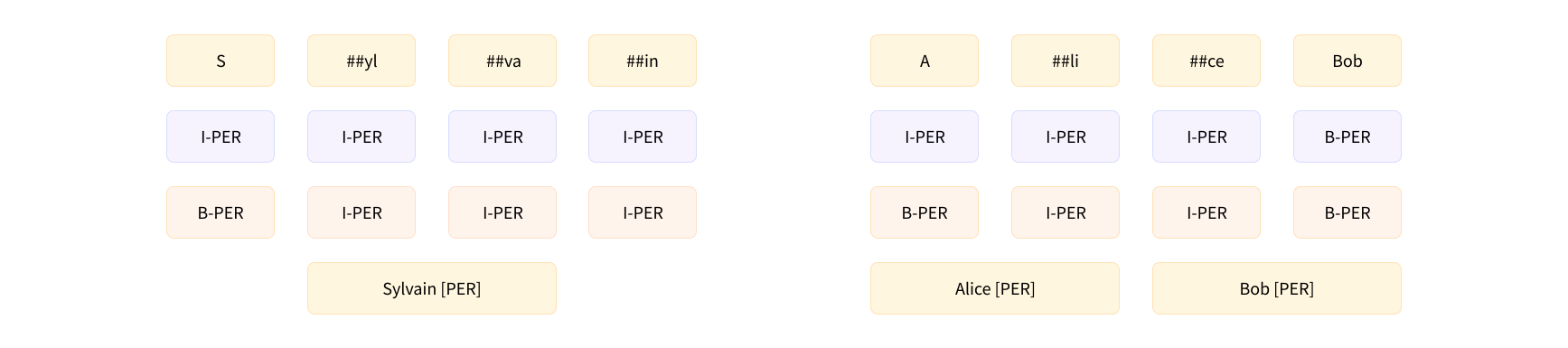
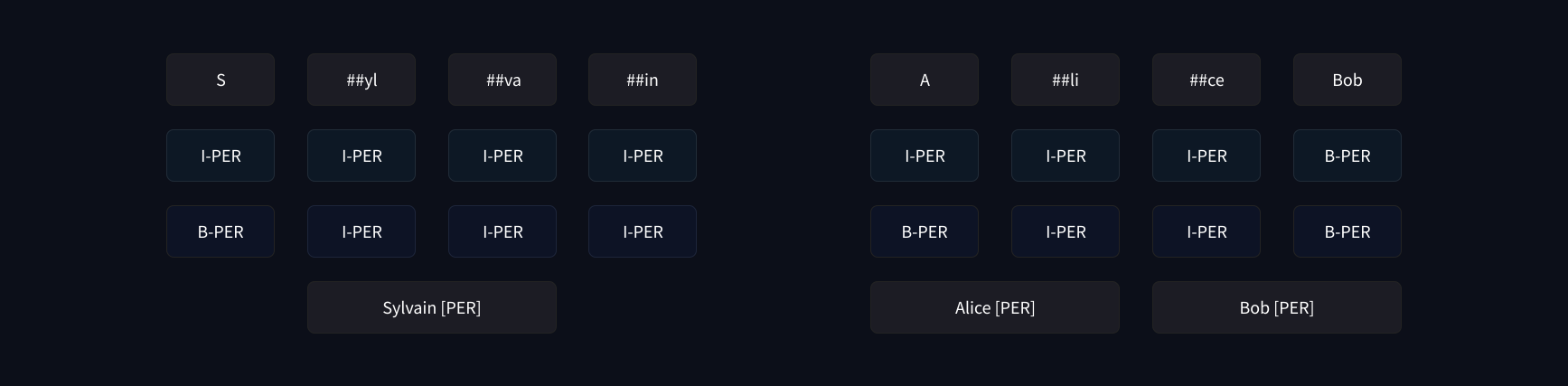
With this map, we are ready to reproduce (almost entirely) the results of the first pipeline — we can just grab the score and label of each token that was not classified as O:
IOB1 VS IOB2格式IOB1 VS IOB2格式使用此映射,我们准备好重现(几乎全部)第一个管道的结果-我们只需获取未归类为`O‘的每个令牌的分数和标签:
1 | |
1 | |
This is very similar to what we had before, with one exception: the pipeline also gave us information about the start and end of each entity in the original sentence. This is where our offset mapping will come into play. To get the offsets, we just have to set return_offsets_mapping=True when we apply the tokenizer to our inputs:
这与我们以前拥有的非常相似,但有一个例外:管道还给我们提供了关于原始句子中每个实体的start和end‘的信息。这就是我们的偏移贴图将发挥作用的地方。要获得偏移量,我们只需在对输入应用记号赋值器时设置Return_Offsets_map=True`:
1 | |
1 | |
Each tuple is the span of text corresponding to each token, where (0, 0) is reserved for the special tokens. We saw before that the token at index 5 is ##yl, which has (12, 14) as offsets here. If we grab the corresponding slice in our example:
每个元组是每个令牌对应的文本范围,其中(0,0)是为特殊令牌保留的。我们在前面看到,索引5处的标记是##yl,这里有(12,14)作为偏移量。如果我们获取示例中的相应切片:
1 | |
we get the proper span of text without the ##:
我们得到了不带##的正确文本跨度:
1 | |
Using this, we can now complete the previous results:
使用这一点,我们现在可以完成之前的结果:
1 | |
1 | |
This is the same as what we got from the first pipeline!
这和我们从第一条管道得到的是一样的!
Grouping entities
对实体进行分组
Using the offsets to determine the start and end keys for each entity is handy, but that information isn’t strictly necessary. When we want to group the entities together, however, the offsets will save us a lot of messy code. For example, if we wanted to group together the tokens Hu, ##gging, and Face, we could make special rules that say the first two should be attached while removing the ##, and the Face should be added with a space since it does not begin with ## — but that would only work for this particular type of tokenizer. We would have to write another set of rules for a SentencePiece or a Byte-Pair-Encoding tokenizer (discussed later in this chapter).
使用偏移量来确定每个实体的起始键和结束键很方便,但该信息并不是必须的。然而,当我们想要将实体组合在一起时,偏移量将为我们节省大量杂乱的代码。例如,如果我们想要将hu、##gging和Face组合在一起,我们可以制定特殊的规则,在移除##的同时应该附加前两个令牌,并且Face应该添加一个空格,因为它不是以##开头的-但这只适用于这种特定类型的标记器。我们必须为SentencePiess或字节对编码标记器(在本章后面讨论)编写另一组规则。
With the offsets, all that custom code goes away: we just can take the span in the original text that begins with the first token and ends with the last token. So, in the case of the tokens Hu, ##gging, and Face, we should start at character 33 (the beginning of Hu) and end before character 45 (the end of Face):
有了偏移量,所有的定制代码都消失了:我们只需要从第一个令牌开始到最后一个令牌结束的原始文本中的跨度。因此,对于hu、##gging和Face这三个令牌,我们应该从第33个字符(Hu的开头)开始,到第45个字符(Face的结尾)结束:
1 | |
1 | |
To write the code that post-processes the predictions while grouping entities, we will group together entities that are consecutive and labeled with I-XXX, except for the first one, which can be labeled as B-XXX or I-XXX (so, we stop grouping an entity when we get a O, a new type of entity, or a B-XXX that tells us an entity of the same type is starting):
为了编写在对实体进行分组时对预测进行后处理的代码,我们将把连续的、标有I-XXX的实体分组在一起,但第一个除外,它可以被标记为B-XXX或I-XXX(因此,当我们得到一个O‘、一个新的实体类型或一个B-XXX时,我们停止对一个实体分组,该B-XXX`告诉我们一个相同类型的实体正在开始):
1 | |
And we get the same results as with our second pipeline!
我们得到了与我们的第二条管道相同的结果!
1 | |
Another example of a task where these offsets are extremely useful is question answering. Diving into that pipeline, which we’ll do in the next section, will also enable us to take a look at one last feature of the tokenizers in the 🤗 Transformers library: dealing with overflowing tokens when we truncate an input to a given length.
这些偏移量非常有用的任务的另一个例子是问题回答。深入该管道(我们将在下一节中进行)还将使我们能够了解🤗Transformer库中的记号器的最后一个特性:当我们将输入截断到给定长度时,处理溢出的记号。