K10-Unit_7-Introduction_to_Multi_Agents_and_AI_vs_AI-E4-AI)
中英文对照学习,效果更佳!
原课程链接:https://huggingface.co/deep-rl-course/unitbonus1/conclusion?fw=pt
Hands-on
亲身实践
Now that you learned the bases of multi-agents. You’re ready to train our first agents in a multi-agent system: a 2vs2 soccer team that needs to beat the opponent team.
现在你已经了解了多智能体的基础。您已经准备好在多代理系统中训练我们的第一批代理:一支需要击败对手的2vs2足球队。
And you’re going to participate in AI vs. AI challenges where your trained agent will compete against other classmates’ agents every day and be ranked on a new leaderboard.
你将参加AI VS AI挑战,在那里你训练有素的代理将每天与其他同学的代理竞争,并在新的排行榜上排名。
To validate this hands-on for the certification process, you just need to push a trained model. There are no minimal results to attain to validate it.
要验证认证流程的实际操作,您只需推送一个经过培训的模型。没有最低限度的结果来验证它。
For more information about the certification process, check this section 👉 https://huggingface.co/deep-rl-course/en/unit0/introduction#certification-process
有关认证过程的更多信息,请查看https://huggingface.co/deep-rl-course/en/unit0/introduction#certification-process👉这一节
This hands-on will be different since to get correct results you need to train your agents from 4 hours to 8 hours. And given the risk of timeout in Colab, we advise you to train on your computer. You don’t need a supercomputer: a simple laptop is good enough for this exercise.
此操作将有所不同,因为要获得正确的结果,您需要对您的工程师进行4小时至8小时的培训。考虑到在Colab超时的风险,我们建议你在电脑上训练。你不需要超级计算机:对于这个练习来说,一台简单的笔记本电脑就足够了。
Let’s get started! 🔥
让我们开始吧!🔥
What is AI vs. AI?
什么是人工智能与人工智能?
AI vs. AI is an open-source tool we developed at Hugging Face to compete agents on the Hub against one another in a multi-agent setting. These models are then ranked in a leaderboard.
AI Vs.AI是我们在Huging Face开发的一个开源工具,用于在多代理环境中竞争Hub上的代理。然后,这些模型会被排在排行榜上。
The idea of this tool is to have a robust evaluation tool: by evaluating your agent with a lot of others, you’ll get a good idea of the quality of your policy.
这个工具的想法是拥有一个健壮的评估工具:通过与许多其他人一起评估您的代理,您将对您的策略的质量有一个很好的了解。
More precisely, AI vs. AI is three tools:
更准确地说,AI VS AI是三个工具:
- A matchmaking process defining the matches (which model against which) and running the model fights using a background task in the Space.
- A leaderboard getting the match history results and displaying the models’ ELO ratings: https://huggingface.co/spaces/huggingface-projects/AIvsAI-SoccerTwos
- A Space demo to visualize your agents playing against others: https://huggingface.co/spaces/unity/ML-Agents-SoccerTwos
In addition to these three tools, your classmate cyllum created a 🤗 SoccerTwos Challenge Analytics where you can check the detailed match results of a model: https://huggingface.co/spaces/cyllum/soccertwos-analytics
定义匹配(哪个模型对哪个)并使用空间中的后台任务运行模型战斗的配对过程。获取比赛历史结果并显示模型的ELO评级的排行榜:https://huggingface.co/spaces/huggingface-projects/AIvsAI-SoccerTwosA空间演示以可视化您的代理人与他人比赛:https://huggingface.co/spaces/unity/ML-Agents-SoccerTwosIn除了这三个工具,您的同学Cyllum还创建了https://huggingface.co/spaces/cyllum/soccertwos-analytics🤗足球两个挑战分析,您可以在其中查看模型的详细匹配结果:
We’re going to write a blog post to explain this AI vs. AI tool in detail, but to give you the big picture it works this way:
我们将写一篇博客文章来详细解释这个人工智能与人工智能的对比工具,但为了让你大体了解它的工作原理:
- Every four hours, our algorithm fetches all the available models for a given environment (in our case ML-Agents-SoccerTwos).
- It creates a queue of matches with the matchmaking algorithm.
- We simulate the match in a Unity headless process and gather the match result (1 if the first model won, 0.5 if it’s a draw, 0 if the second model won) in a Dataset.
- Then, when all matches from the matches queue are done, we update the ELO score for each model and update the leaderboard.
Competition Rules
每隔四个小时,我们的算法就会获取给定环境(在我们的例子中是ML-Agents-SoccerTwos)的所有可用模型。它使用匹配算法创建一个匹配队列。我们在一个统一无头过程中模拟比赛,并在数据集中收集匹配结果(如果第一个模型获胜,则为1;如果是平局,则为0.5;如果第二个模型获胜,则为0)。然后,当匹配队列中的所有匹配完成时,我们更新每个模型的ELO分数并更新排行榜。竞赛规则
This first AI vs. AI competition is an experiment: the goal is to improve the tool in the future with your feedback. So some breakups can happen during the challenge. But don’t worry
all the results are saved in a dataset so we can always restart the calculation correctly without losing information.
这场AI VS AI的第一场比赛是一场实验:目标是在未来通过您的反馈来改进工具。因此,在挑战过程中可能会发生一些分手。但不用担心,所有结果都保存在一个数据集中,因此我们始终可以正确地重新开始计算,而不会丢失信息。
In order that your model to get correctly evaluated against others you need to follow these rules:
为了使您的模型能够针对其他模型进行正确评估,您需要遵循以下规则:
- You can’t change the observation space or action space of the agent. By doing that your model will not work during evaluation.
- You can’t use a custom trainer for now, you need to use Unity MLAgents ones.
- We provide executables to train your agents. You can also use the Unity Editor if you prefer , but to avoid bugs, we advise you to use our executables.
What will make the difference during this challenge are the hyperparameters you choose.
你不能改变代理人的观察空间或行动空间。如果这样做,您的模型在评估期间将不起作用。您目前不能使用自定义培训程序,您需要使用Unity MLAgents培训程序。我们提供可执行文件来培训您的代理。如果你愿意,你也可以使用统一编辑器,但为了避免错误,我们建议你使用我们的可执行文件。在这个挑战中,你选择的超级参数将会有所不同。
The AI vs AI algorithm will run until April the 30th, 2023.
AI VS AI算法将运行到2023年4月30日。
We’re constantly trying to improve our tutorials, so if you find some issues in this notebook, please open an issue on the GitHub Repo.
我们一直在努力改进我们的教程,因此,如果您在此笔记本中发现了一些问题,请在GitHub Repo上打开一个问题。
Exchange with your classmates, share advice and ask questions on Discord
与同学交流,分享意见,就不和谐提出问题
- We created a new channel called
ai-vs-ai-challengeto exchange advice and ask questions. - If you didn’t joined yet the discord server you can join here
Step 0: Install MLAgents and download the correct executable
我们创建了一个名为`ai-vs-ai-challenge‘的新频道来交换建议和提问。如果您还没有加入Discorde服务器,您可以在这里加入步骤0:安装MLAgents并下载正确的可执行文件
⚠ We’re going to use an experimental version of ML-Agents which allows you to push and load your models to/from the Hub. You need to install the same version.
⚠我们将使用一个实验性版本的ML-Agents,它允许您将模型推送到Hub或从Hub加载模型。您需要安装相同的版本。
⚠ ⚠ ⚠ We’re not going to use the same version than for the Unit 5: Introduction to ML-Agents ⚠ ⚠ ⚠
⚠⚠⚠我们不会使用与第5单元相同的版本:ML-Agents⚠⚠⚠简介
We advise you to use conda as a package manager and create a new environment.
我们建议您使用Conda作为包管理器并创建一个新的环境。
With conda, we create a new environment called rl with Python 3.9:
使用Conda,我们使用Python3.9创建了一个名为rl的新环境:
1 | |
To be able to train correctly our agents and push to the Hub, we need to install an experimental version of ML-Agents (the branch aivsai from Hugging Face ML-Agents fork)
为了能够正确地培训我们的代理并推送到Hub,我们需要安装一个实验版本的ML-Agents(来自Hugging FaceML-Agents fork的分支aivsai)
1 | |
When the cloning is done (it takes 2.63 GB), we go inside the repository and install the package
克隆完成后(需要2.63 GB),我们进入存储库并安装包
1 | |
We also need to install pytorch with:
我们还需要安装带有以下各项的pytorch:
1 | |
Finally, you need to install git-lfs: https://git-lfs.com/
最后,您需要安装git-lfs:https://git-lfs.com/
Now that it’s installed, we need to add the environment training executable. Based on your operating system you need to download one of them, unzip it and place it in a new folder inside ml-agents that you call training-envs-executables
现在已经安装好了,我们需要添加环境培训可执行文件。根据您的操作系统,您需要下载其中一个,将其解压缩,并将其放置在ml-agents内的一个新文件夹中,该文件夹称为`Training-envs-Executable‘。
At the end your executable should be in mlagents/training-envs-executables/SoccerTwos
最后,您的可执行文件应该是mlagents/training-envs-executables/SoccerTwos格式的
Windows: Download this executable
Windows:下载此可执行文件
Linux (Ubuntu): Download this executable
Linux(Ubuntu):下载此可执行文件
Mac: Download this executable
⚠ For Mac you need also to call this xattr -cr training-envs-executables/SoccerTwos/SoccerTwos.app to be able to run SoccerTwos
Training-envs-executables/SoccerTwos/SoccerTwos.app:下载这个适用于Mac的可执行⚠您还需要调用这个xattr-cr Mac才能运行SoccerTwos
Step 1: Understand the environment
第一步:了解环境
The environment is called SoccerTwos. The Unity MLAgents Team made it. You can find its documentation here
该环境称为SoccerTwos。联合MLAGENTS团队成功晋级。您可以在此处找到它的文档
The goal in this environment is to get the ball into the opponent’s goal while preventing the ball from entering its own goal.
在这种环境下,目标是让球进入对手的球门,同时防止球进入自己的球门。
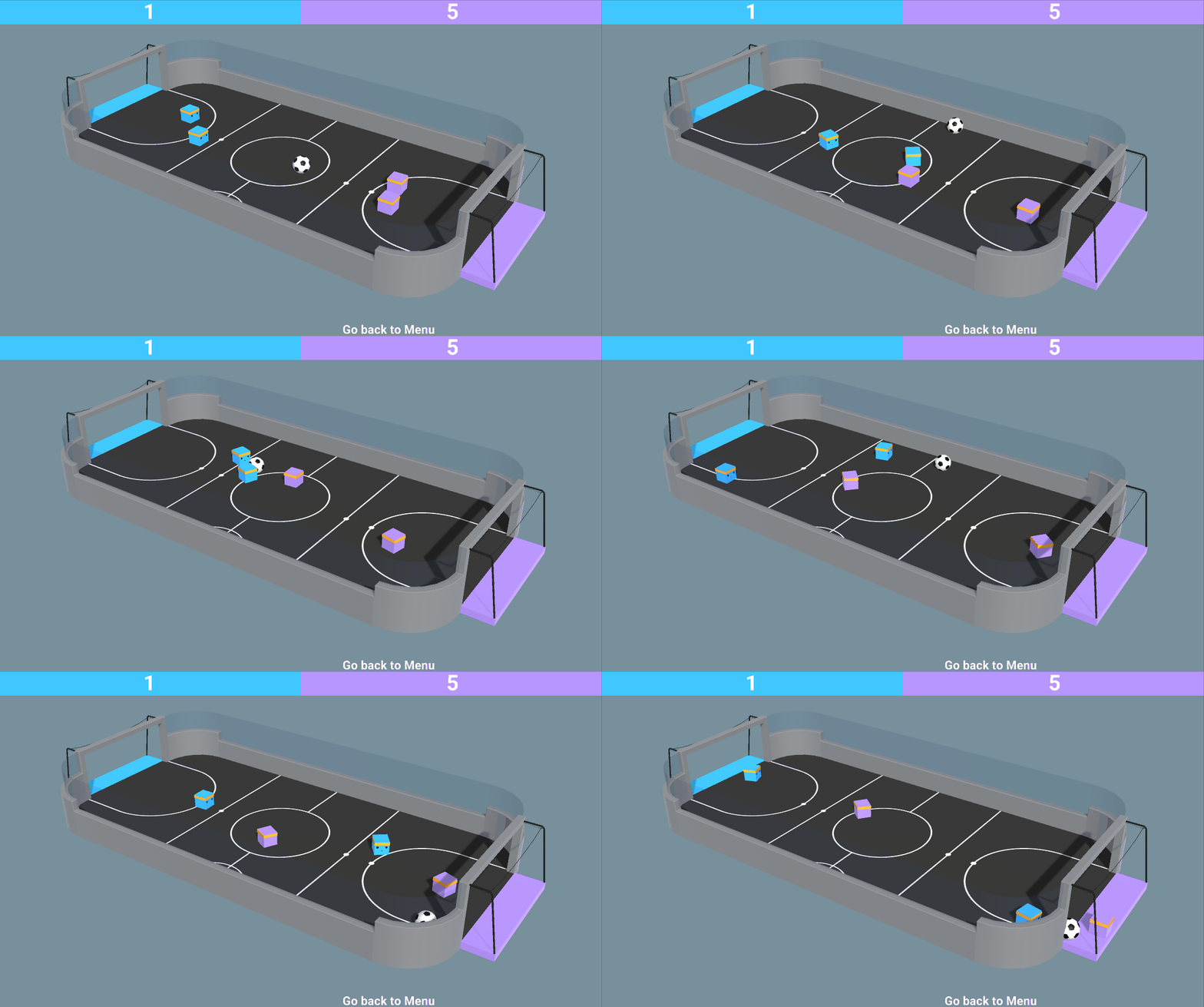
This environment was made by the Unity MLAgents Team
SoccerTwos这个环境是由Unity MLAgents团队制作的
The reward function
奖励函数
The reward function is:
奖励功能为:
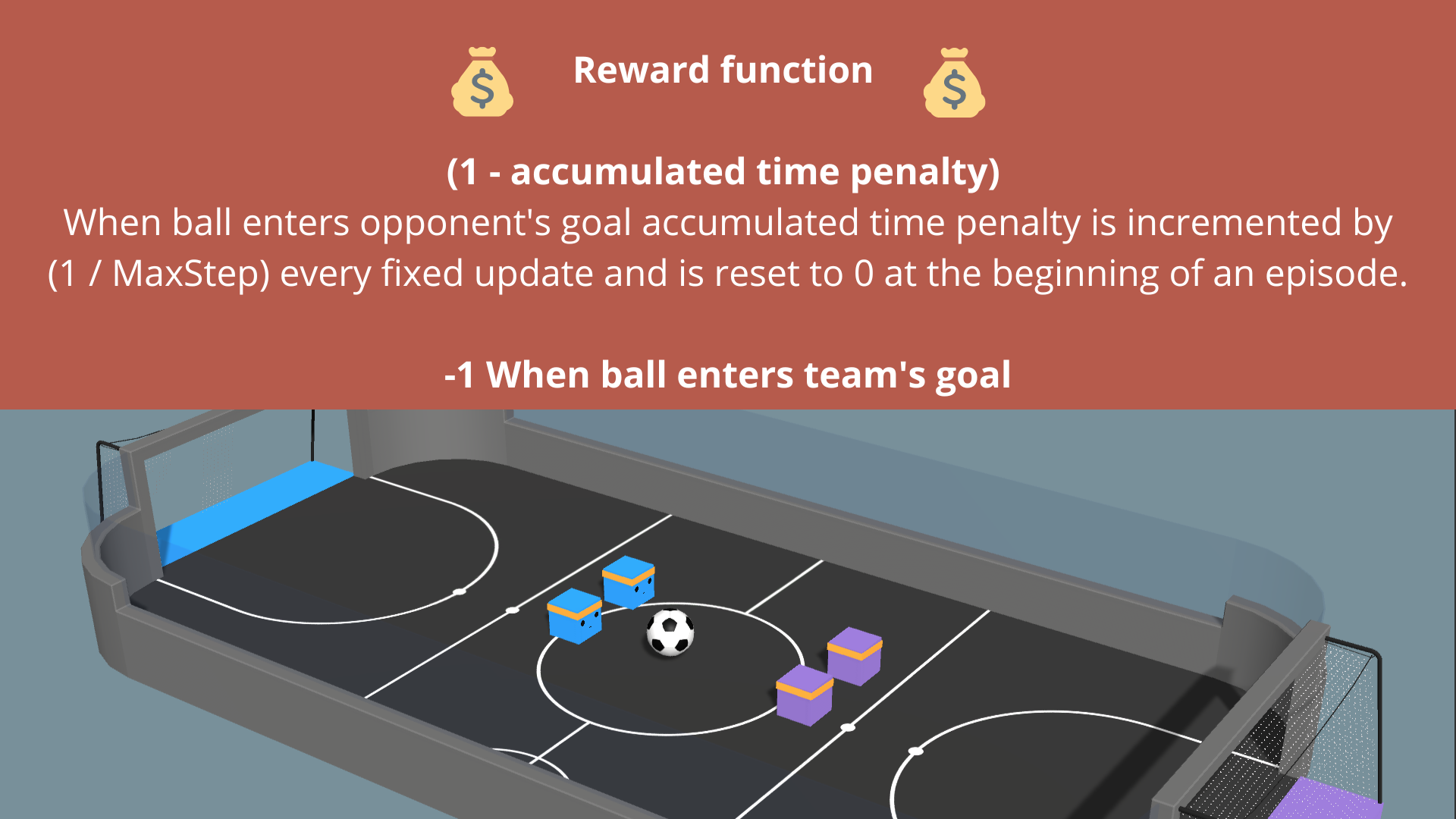
SoccerTwos奖励
The observation space
观察空间
The observation space is composed vector size of 336:
观测空间由336的矢量大小组成:
- 11 ray-casts forward distributed over 120 degrees (264 state dimensions)
- 3 ray-casts backward distributed over 90 degrees (72 state dimensions)
- Both of these ray-casts can detect 6 objects:
- Ball
- Blue Goal
- Purple Goal
- Wall
- Blue Agent
- Purple Agent
The action space
11个向前分布在120度(264个状态维度)的光线投射3个向后分布在90度(72个状态维度)的光线投射这两个光线投射都可以检测到6个对象:球蓝球门紫色球门墙蓝代理紫色代理动作空间
The action space is three discrete branches:
动作空间由三个不连续的分支组成:
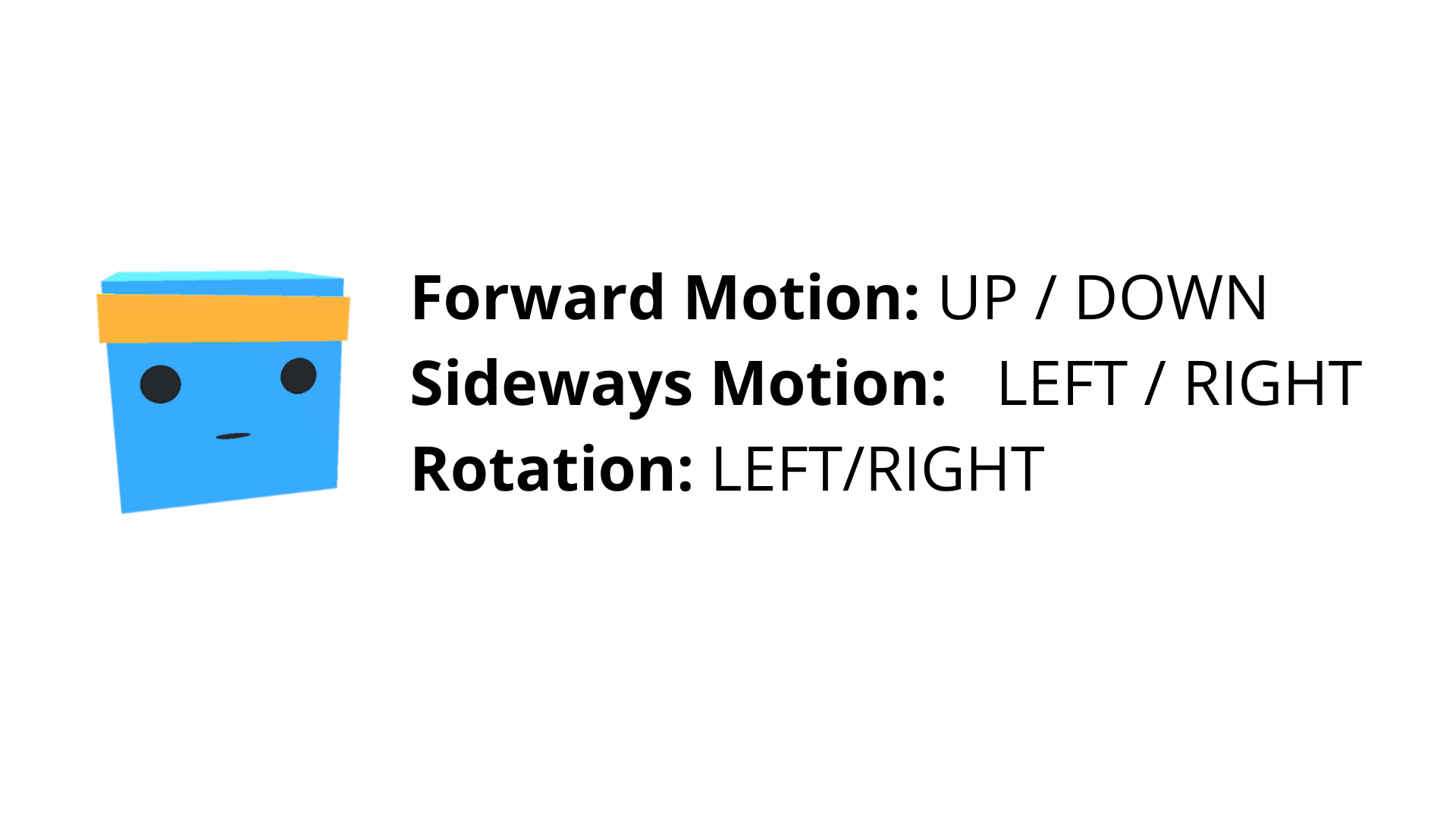
SoccerTwos操作
Step 2: Understand MA-POCA
第2步:了解MA-POCA
We know how to train agents to play against others: we can use self-play. This is a perfect technique for a 1vs1.
我们知道如何训练代理人与他人对抗:我们可以使用自我发挥。对于1vs1的比赛,这是一个完美的技巧。
But in our case we’re 2vs2, and each team has 2 agents. How then we can train cooperative behavior for groups of agents?
但在我们的情况下,我们是2vs2,每个团队有2个代理。那么,我们如何才能训练代理人群体的合作行为呢?
As explained in the Unity Blog, agents typically receive a reward as a group (+1 - penalty) when the team scores a goal. This implies that every agent on the team is rewarded even if each agent didn’t contribute the same to the win, which makes it difficult to learn what to do independently.
正如Unity博客中所解释的那样,当球队进球时,代理通常会得到集体奖励(+1-点球)。这意味着,团队中的每个代理都会得到奖励,即使每个代理对胜利的贡献并不相同,这使得学习独立做什么变得困难。
The Unity MLAgents team developed the solution in a new multi-agent trainer called MA-POCA (Multi-Agent POsthumous Credit Assignment).
Unity MLAgents团队在一种名为MA-POCA(多代理死后信用分配)的新多代理培训器中开发了该解决方案。
The idea is simple but powerful: a centralized critic processes the states of all agents in the team to estimate how well each agent is doing. Think of this critic as a coach.
这个想法很简单,但很强大:一个集中的批评者处理团队中所有代理的状态,以评估每个代理做得有多好。把这位评论家想象成一位教练。
This allows each agent to make decisions based only on what it perceives locally, and simultaneously evaluate how good its behavior is in the context of the whole group.
这允许每个代理仅根据其在本地的感知做出决策,并同时评估其行为在整个团队的背景下有多好。
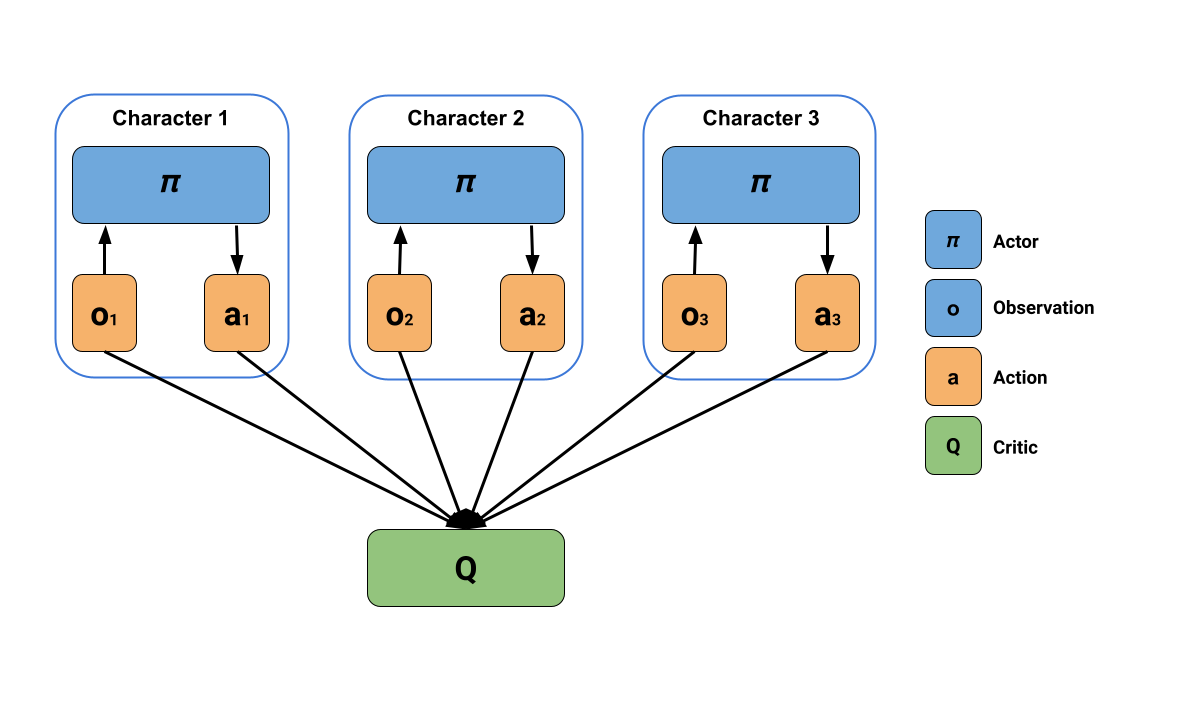
This illustrates MA-POCA’s centralized learning and decentralized execution. Source: MLAgents Plays Dodgeball
The solution then is to use Self-Play with an MA-POCA trainer (called poca). The poca trainer will help us to train cooperative behavior and self-play to get an opponent team.
MA-POCA这说明了MA-POCA的集中学习和分散执行。来源:MLAgents玩躲避球解决方案是使用MA-POCA训练师(称为POCA)的自我发挥。POCA训练师将帮助我们训练合作行为和自我发挥,以获得对手团队。
If you want to dive deeper into this MA-POCA algorithm, you need to read the paper they published here and the sources we put on the additional readings section.
如果你想更深入地研究MA-POCA算法,你需要阅读他们在这里发表的论文和我们在额外阅读部分提供的资源。
Step 3: Define the config file
步骤3:定义配置文件
We already learned in Unit 5 that in ML-Agents, you define the training hyperparameters into config.yaml files.
我们已经在单元5中了解到,在ML-Agents中,您将训练超参数定义到config.yaml文件中。
There are multiple hyperparameters. To know them better, you should check for each explanation with the documentation
有多个超参数。为了更好地了解它们,您应该检查文档中的每个解释
The config file we’re going to use here is in ./config/poca/SoccerTwos.yaml it looks like this:
我们将在这里使用的配置文件位于./config/poca/SoccerTwos.yaml中,如下所示:
1 | |
Compared to Pyramids or SnowballTarget, we have new hyperparameters with a self-play part. How you modify them can be critical in getting good results.
与金字塔或雪球目标相比,我们有了新的超参数,具有自我发挥的部分。如何修改它们对于获得好的结果至关重要。
The advice I can give you here is to check the explanation and recommended value for each parameters (especially self-play ones) with the documentation.
我可以在这里给你的建议是,在文档中检查每个参数(特别是自玩参数)的解释和推荐值。
Now that you’ve modified our config file, you’re ready to train your agents.
既然您已经修改了我们的配置文件,您就可以培训您的代理了。
Step 4: Start the training
第四步:开始培训
To train the agents, we need to launch mlagents-learn and select the executable containing the environment.
要培训代理,我们需要启动mlAgents-学习并选择包含环境的可执行文件。
We define four parameters:
我们定义了四个参数:
mlagents-learn <config>: the path where the hyperparameter config file is.-env: where the environment executable is.-run_id: the name you want to give to your training run id.-no-graphics: to not launch the visualization during the training.
Depending on your hardware, 5M timesteps (the recommended value but you can also try 10M) will take 5 to 8 hours of training. You can continue using your computer in the meantime, but I advise deactivating the computer standby mode to prevent the training from being stopped.
`mlAgents-Learning:超参数配置文件所在的路径。-env:环境可执行文件所在的位置。-run_id:训练运行id的名称。-no-raphics`:不启动训练过程中的可视化。根据您的硬件,5M时间步(推荐值,但也可以尝试10M)需要5到8个小时的训练时间。你可以在此期间继续使用你的电脑,但我建议停用电脑待机模式,以防止培训停止。
Depending on the executable you use (windows, ubuntu, mac) the training command will look like this (your executable path can be different so don’t hesitate to check before running).
根据您使用的可执行文件(Windows、ubuntu、Mac),训练命令将如下所示(您的可执行文件路径可能不同,因此在运行之前请毫不犹豫地进行检查)。
1 | |
The executable contains 8 copies of SoccerTwos.
可执行文件包含8个SoccerTwos副本。
⚠️ It’s normal if you don’t see a big increase of ELO score (and even a decrease below 1200) before 2M timesteps, since your agents will spend most of their time moving randomly on the field before being able to goal.
⚠️如果你在2M时间步数之前没有看到ELO得分的大幅增加(甚至下降到1200分以下),这是正常的,因为你的经纪人在能够进球之前会花大部分时间在球场上随机移动。
⚠️ You can stop the training with Ctrl + C but beware of typing only once this command to stop the training since MLAgents needs to generate a final .onnx file before closing the run.
⚠️您可以使用Ctrl+C停止训练,但请注意仅键入一次此命令来停止训练,因为MLAgents需要在关闭运行之前生成最终的.onnx文件。
Step 5: Push the agent to the Hugging Face Hub
步骤5:将代理推到Hugging Face中心
Now that we trained our agents, we’re ready to push them to the Hub to be able to participate in the AI vs. AI challenge and visualize them playing on your browser🔥.
现在我们已经培训了我们的代理,我们已经准备好将他们推到中心,以便能够参与AI与AI的挑战,并在您的浏览器🔥上可视化他们的比赛。
To be able to share your model with the community, there are three more steps to follow:
为了能够与社区共享您的模型,还需要遵循三个步骤:
1️⃣ (If it’s not already done) create an account to HF ➡ [https://huggingface.co/join\](https://huggingface.co/join\](https://huggingface.co/join%5D(https://huggingface.co/join)
2️⃣ Sign in and store your authentication token from the Hugging Face website.
2️⃣登录并存储来自Hugging Face网站的身份验证令牌。
Create a new token (https://huggingface.co/settings/tokens)) with write role
创建具有写入角色的新令牌(https://huggingface.co/settings/tokens))
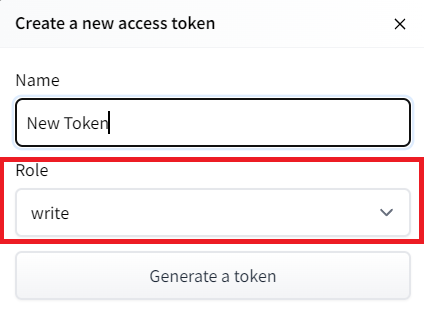
Copy the token, run this, and paste the token
创建高频令牌复制令牌,运行此命令,然后粘贴令牌
1 | |
Then, we need to run mlagents-push-to-hf.
然后,我们需要运行mlAgents-ush-to-hf。
And we define four parameters:
我们定义了四个参数:
-run-id: the name of the training run id.-local-dir: where the agent was saved, it’s results/<run_id name>, so in my case results/First Training.-repo-id: the name of the Hugging Face repo you want to create or update. It’s always/
If the repo does not exist it will be created automatically--commit-message: since HF repos are git repository you need to define a commit message.
In my case
`-run-id:训练跑的名称id。-local-dir:代理保存的位置,结果/<run_id name>,所以在我的案例中,结果/First Training.-repo-id:您要创建或更新的Hugging Facerepo的名称。它总是/如果repo不存在,它将被自动创建–Commit-Message`:因为HF repos是git存储库,所以您需要定义一个提交消息。
1 | |
1 | |
If everything worked you should have this at the end of the process(but with a different url 😆) :
如果一切正常,您应该在过程结束时看到以下内容(但使用不同的URL😆):
Your model is pushed to the Hub. You can view your model here: https://huggingface.co/ThomasSimonini/poca-SoccerTwos
您的模型将被推送到中心。您可以在此处查看您的模型:https://huggingface.co/ThomasSimonini/poca-SoccerTwos
It’s the link to your model. It contains a model card that explains how to use it, your Tensorboard, and your config file. What’s awesome is that it’s a git repository, which means you can have different commits, update your repository with a new push, etc.
这是与你的模型的链接。它包含解释如何使用它的模型卡、您的Tensorboard和您的配置文件。最棒的是它是一个Git存储库,这意味着你可以有不同的提交,用新的推送来更新你的存储库,等等。
Step 6: Verify that your model is ready for AI vs AI Challenge
第6步:验证您的模型是否已准备好迎接AI VS AI挑战
Now that your model is pushed to the Hub, it’s going to be added automatically to the AI vs AI Challenge model pool. It can take a little bit of time before your model is added to the leaderboard given we do a run of matches every 4h.
现在你的模型被推到了中心,它将被自动添加到AI VS AI挑战模型池中。考虑到我们每4小时进行一次比赛,可能需要一点时间才能将您的模型添加到排行榜上。
But in order that everything works perfectly you need to check:
但是,为了使一切正常运行,您需要检查:
- That you have this tag in your model: ML-Agents-SoccerTwos. This is the tag we use to select models to be added to the challenge pool. To do that go to your model and check the tags

If it’s not the case you just need to modify readme and add it
您的模型中有这个标签:ML-Agents-SoccerTwos。这是我们用来选择要添加到挑战池的型号的标签。为此,请转到您的模型并检查标记验证是否不是这样,您只需修改自述文件并添加它
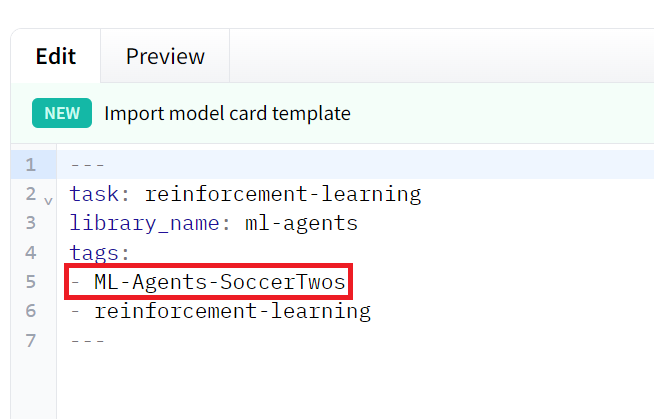
2. That you have a SoccerTwos.onnx file
验证2.您是否有一个SoccerTwos.onnx文件
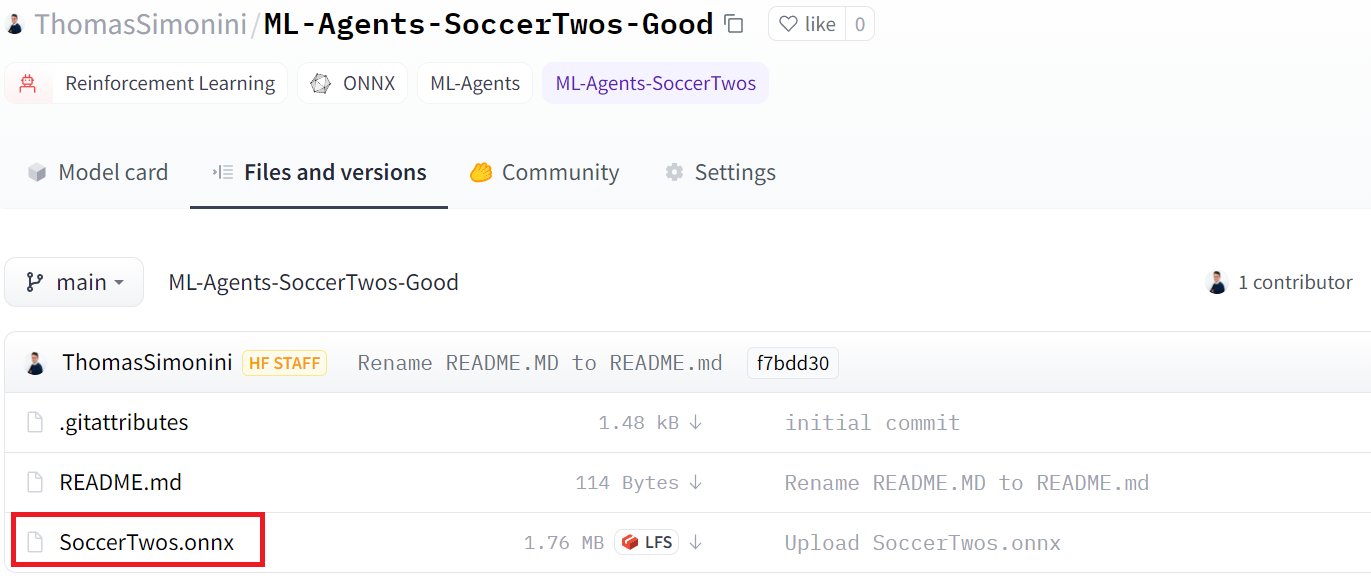
We strongly suggest that you create a new model when you push to the Hub if you want to train it again or train a new version.
验证我们强烈建议您在推送到中心时创建一个新模型,如果您想要再次培训它或培训一个新版本。
Step 7: Visualize some match in our demo
步骤7:在我们的演示中可视化一些匹配
Now that your model is part of AI vs AI Challenge, you can visualize how good it is compared to others: https://huggingface.co/spaces/unity/ML-Agents-SoccerTwos
现在你的模型是AI VS AI挑战赛的一部分,你可以想象它与其他人相比有多好:https://huggingface.co/spaces/unity/ML-Agents-SoccerTwos
In order to do that, you just need to go on this demo:
要做到这一点,您只需进行此演示:
- Select your model as team blue (or team purple if you prefer) and another. The best to compare your model is either with the one who’s on top of the leaderboard. Or use the baseline model as opponent
This matches you see live are not used to the calculation of your result but are good way to visualize how good your agent is.
将您的模型选择为团队蓝色(或团队紫色,如果您愿意),然后选择另一个。最好是将你的模特与排行榜上的那个模特进行比较。或者使用基线模型作为对手这场比赛你看到的现场不是用来计算你的结果,但是可视化你的代理有多好的好方法。
And don’t hesitate to share the best score your agent gets on discord in #rl-i-made-this channel 🔥
并毫不犹豫地分享您的代理在#rl-i-Made-This Channel🔥中因不和谐而获得的最佳分数