I8-Unit_5-Introduction_to_Unity_ML_Agents-F5-on
中英文对照学习,效果更佳!
原课程链接:https://huggingface.co/deep-rl-course/unitbonus3/rlhf?fw=pt
Hands-on
亲身实践


在Colab中公开提问
We learned what ML-Agents is and how it works. We also studied the two environments we’re going to use. Now we’re ready to train our agents!
我们了解了ML-Agents是什么以及它是如何工作的。我们还研究了将要使用的两个环境。现在我们准备好训练我们的特工了!
The ML-Agents integration on the Hub is still experimental. Some features will be added in the future. But for now, to validate this hands-on for the certification process, you just need to push your trained models to the Hub.
There are no minimum results to attain to validate this Hands On. But if you want to get nice results, you can try to reach the following:
环境集线器上的ML-Agents集成仍处于试验阶段。一些功能将在未来添加。但目前,要验证认证流程的实际操作,您只需将经过培训的模型推送到中心即可。没有最低限度的结果来验证这一点。但如果你想获得好的结果,你可以试着达到以下几点:
- For Pyramids: Mean Reward = 1.75
- For SnowballTarget: Mean Reward = 15 or 30 targets shoot in an episode.
For more information about the certification process, check this section 👉 https://huggingface.co/deep-rl-course/en/unit0/introduction#certification-process
对于金字塔:平均奖励=1.75对于雪球目标:平均奖励=一集射击15或30个目标。有关认证过程的详细信息,请查看https://huggingface.co/deep-rl-course/en/unit0/introduction#certification-process👉本节
To start the hands-on, click on Open In Colab button 👇 :
要开始动手操作,请单击在Colab中打开按钮👇:
在Colab开业
Unit 5: An Introduction to ML-Agents
单元5:ML-Agents简介
In this notebook, you’ll learn about ML-Agents and train two agents.
在本笔记本中,您将了解ML-Agents并培训两个代理。
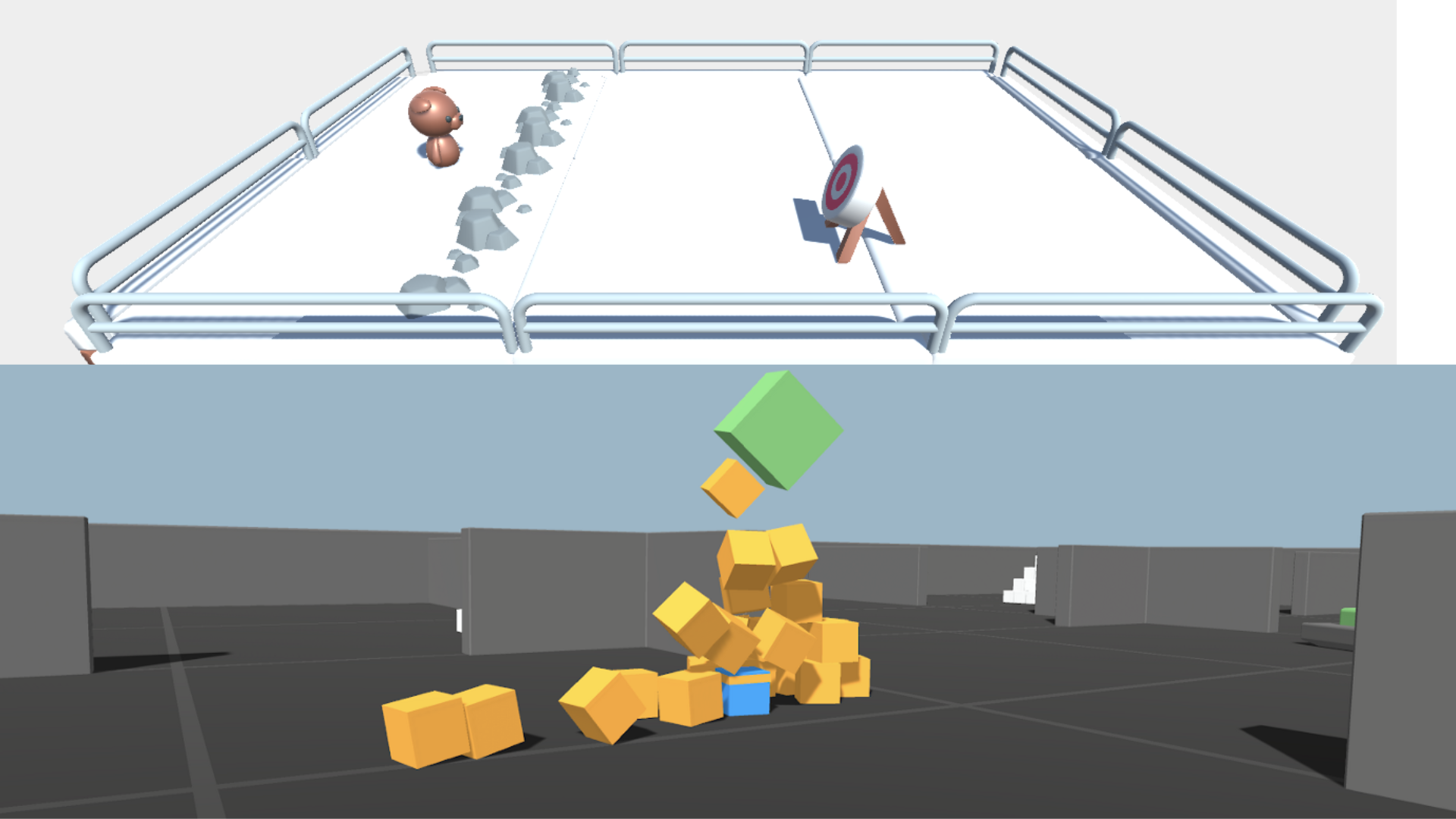
- The first one will learn to shoot snowballs onto spawning targets.
- The second need to press a button to spawn a pyramid, then navigate to the pyramid, knock it over, and move to the gold brick at the top. To do that, it will need to explore its environment, and we will use a technique called curiosity.
After that, you’ll be able to watch your agents playing directly on your browser.
第一个人将学会向产卵的目标发射雪球。第二个人需要按下按钮来产生金字塔,然后导航到金字塔,把它打翻,然后移动到顶部的金砖上。要做到这一点,它需要探索它的环境,我们将使用一种名为好奇的技术。在此之后,您将能够直接在浏览器上观看您的代理播放。
For more information about the certification process, check this section 👉 https://huggingface.co/deep-rl-course/en/unit0/introduction#certification-process
有关认证过程的更多信息,请查看https://huggingface.co/deep-rl-course/en/unit0/introduction#certification-process👉这一节
⬇️ Here is an example of what you will achieve at the end of this unit. ⬇️
⬇️这里是您在本单元结束时将实现的一个示例。⬇️


金字塔雪球目标
🎮 Environments:
🎮环境:
- Pyramids
- SnowballTarget
📚 RL-Library:
金字塔雪球目标📚RL-库:
⚠ We’re going to use an experimental version of ML-Agents where you can push to Hub and load from Hub Unity ML-Agents Models you need to install the same version
ML-Agents(HuggingFace实验版)⚠我们将使用ML-Agents的试验版,在该版本中,您可以推送到集线器并从集线器Unity ML-Agents型号加载您需要安装相同版本的ML-Agents
We’re constantly trying to improve our tutorials, so if you find some issues in this notebook, please open an issue on the GitHub Repo.
我们一直在努力改进我们的教程,所以如果你在这个笔记本上发现了一些问题,请在GitHub Repo上打开一个问题。
Objectives of this notebook 🏆
此笔记本电脑🏆的目标
At the end of the notebook, you will:
在笔记本结尾处,您将:
- Understand how works ML-Agents, the environment library.
- Be able to train agents in Unity Environments.
Prerequisites 🏗️
了解ML-Agents,环境库的工作原理。能够在统一环境中培训代理。Prerequisites🏗️
Before diving into the notebook, you need to:
🔲 📚 Study what is ML-Agents and how it works by reading Unit 5 🤗
在深入了解笔记本之前,您需要:🔲📚通过阅读单元5🤗来研究什么是ML-Agents以及它是如何工作的
Let’s train our agents 🚀
让我们培训我们的特工🚀
Set the GPU 💪
设置图形处理器💪
- To accelerate the agent’s training, we’ll use a GPU. To do that, go to
Runtime > Change Runtime type
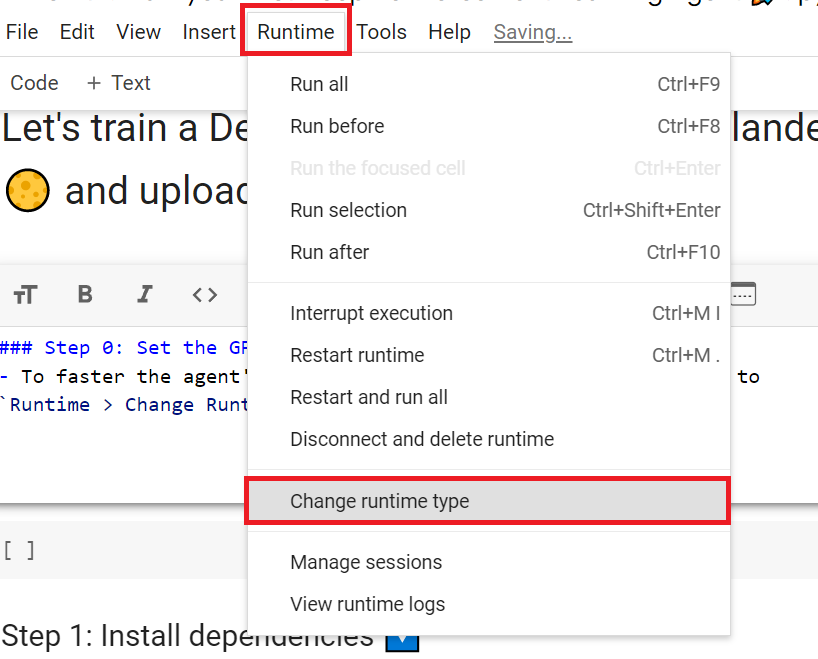
为了加快工程师的培训,我们将使用GPU。为此,请转到运行时>更改运行时类型GPU步骤1
Hardware Accelerator > GPU
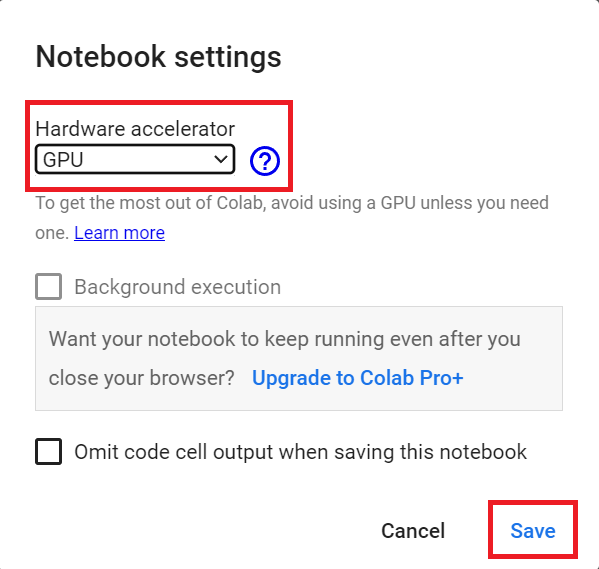
`硬件加速器>GPU`GPU步骤2
Clone the repository and install the dependencies 🔽
克隆存储库并安装依赖项🔽
- We need to clone the repository that contains the experimental version of the library that allows you to push your trained agent to the Hub.
1 | |
1 | |
SnowballTarget ⛄
我们需要克隆包含实验版本的库的存储库,该库允许您将训练有素的代理推送到集线器。Snowball目标⛄
If you need a refresher on how this environment works check this section 👉
https://huggingface.co/deep-rl-course/unit5/snowball-target
如果您需要了解此环境的工作原理,请查看https://huggingface.co/deep-rl-course/unit5/snowball-target👉这一节
Download and move the environm ent zip file in ./training-envs-executables/linux/
将环境压缩文件下载并移动到./Training-envs-Executes/linux/中
- Our environment executable is in a zip file.
- We need to download it and place it to
./training-envs-executables/linux/ - We use a linux executable because we use colab, and colab machines OS is Ubuntu (linux)
1 | |
Download the file SnowballTarget.zip from https://drive.google.com/file/d/1YHHLjyj6gaZ3Gemx1hQgqrPgSS2ZhmB5 using wget.
我们的环境可执行文件在一个压缩文件中,我们需要将其下载到./Training-envs-Executes/linux/我们使用的是linux可执行文件,因为我们使用的是CoLab,而CoLab Machines操作系统是Ubuntu(Linux)使用wget从https://drive.google.com/file/d/1YHHLjyj6gaZ3Gemx1hQgqrPgSS2ZhmB5下载文件Snowball Target.zip。
Check out the full solution to download large files from GDrive here
点击此处查看从GDrive下载大型文件的完整解决方案
1 | |
We unzip the executable.zip file
我们解压可执行文件.压缩文件
1 | |
Make sure your file is accessible
确保您的文件可访问
1 | |
Define the SnowballTarget config file
定义Snowball Target配置文件
- In ML-Agents, you define the training hyperparameters into config.yaml files.
There are multiple hyperparameters. To know them better, you should check for each explanation with the documentation
You need to create a SnowballTarget.yaml config file in ./content/ml-agents/config/ppo/
在ML-Agents中,您可以将训练超参数定义到config.yaml文件中。有多个超参数。为了更好地了解它们,您应该检查文档中的每个解释您需要在./Content/ml-Agents/CONFIG/PPO/中创建一个Snowball Target.yaml配置文件
We’ll give you here a first version of this config (to copy and paste into your SnowballTarget.yaml file), but you should modify it.
我们将在这里为您提供此配置的第一个版本(以复制并粘贴到您的Snowball Target.yaml文件中),但您应该对其进行修改。
1 | |
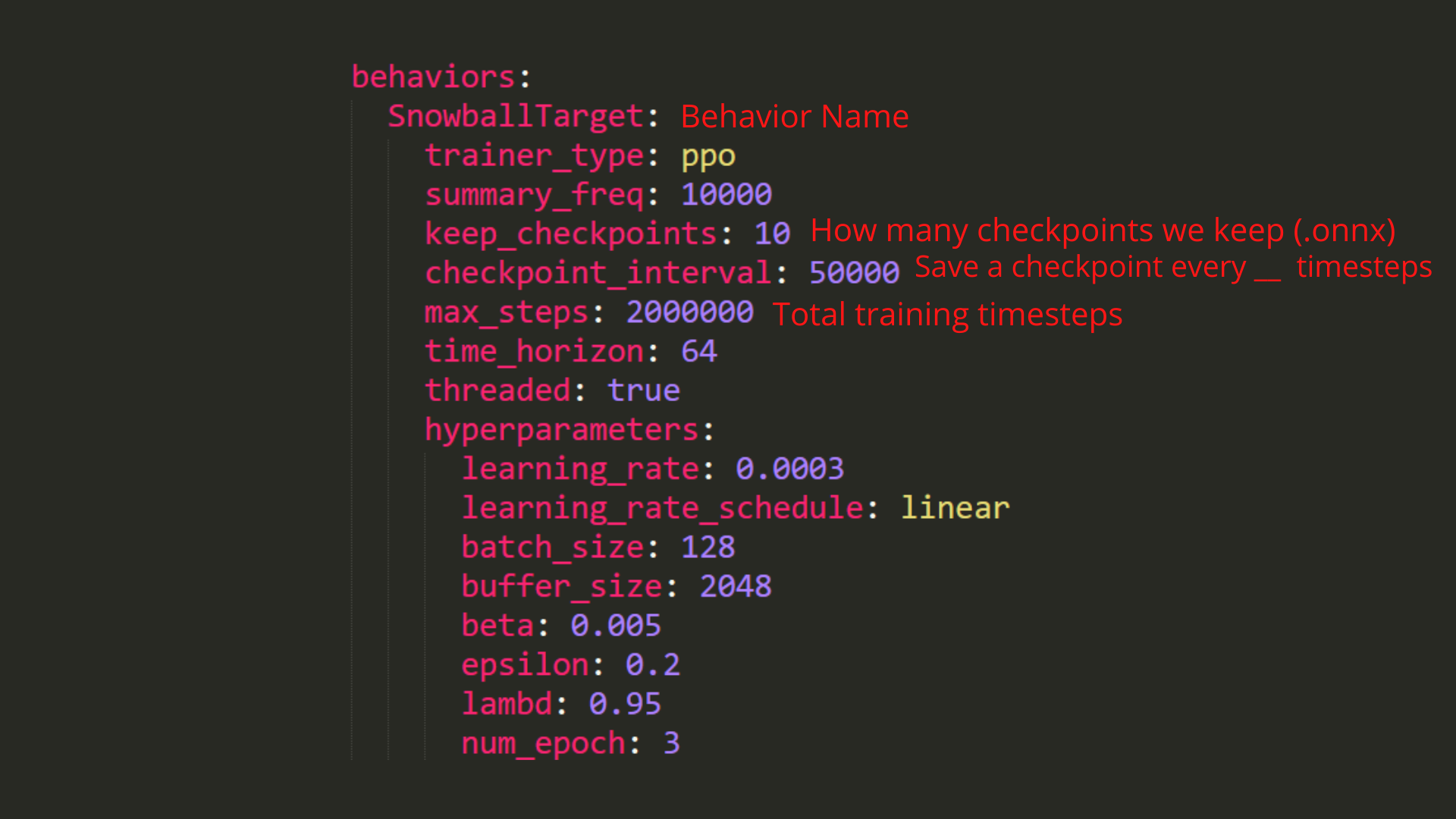
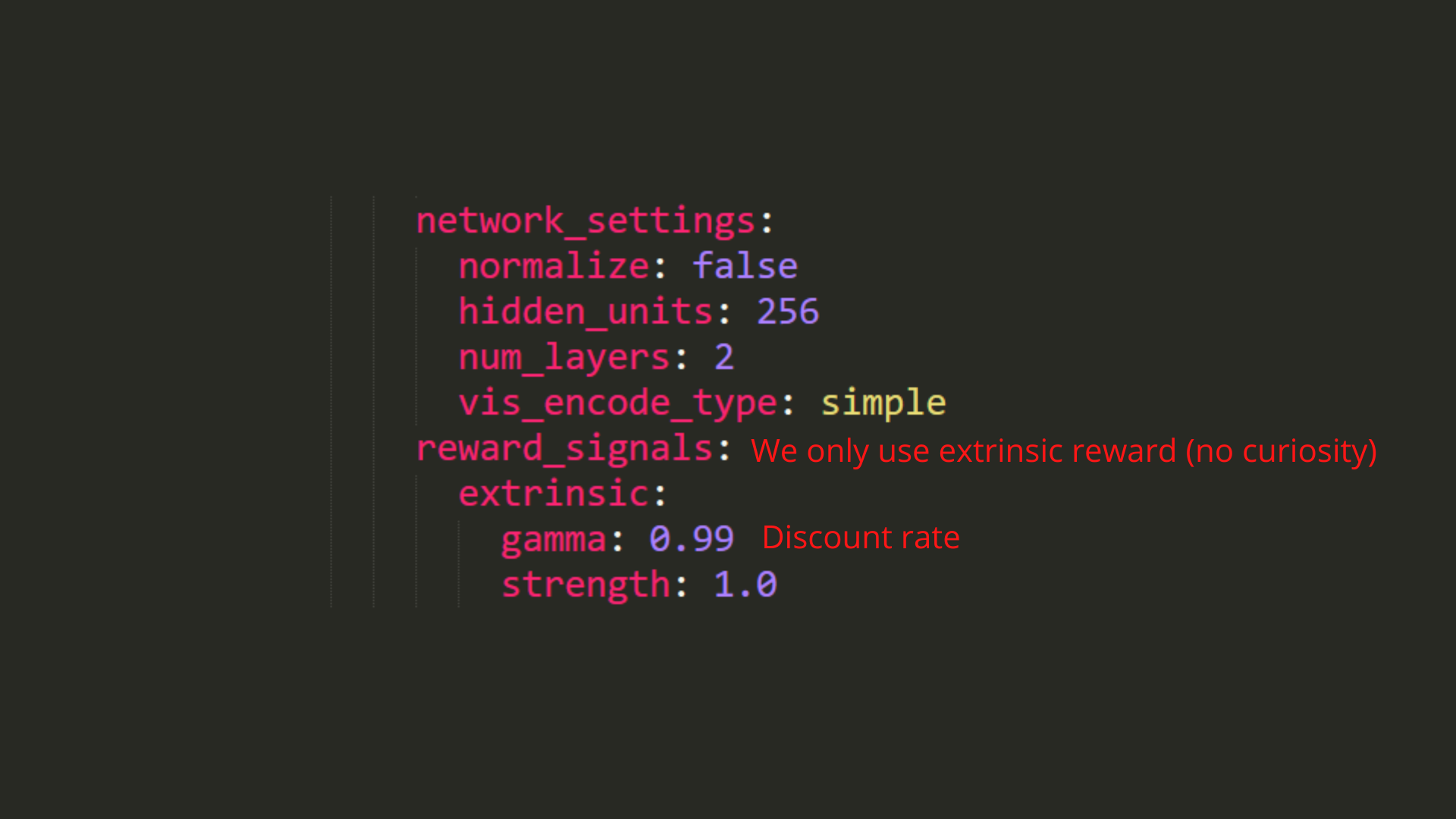
As an experiment, try to modify some other hyperparameters. Unity provides very good documentation explaining each of them here.
配置雪球目标配置雪球目标作为一项实验,尝试修改其他一些超参数。Unity在这里提供了非常好的文档来解释它们。
Now that you’ve created the config file and understand what most hyperparameters do, we’re ready to train our agent 🔥.
既然您已经创建了配置文件并了解了大多数超参数的作用,我们就可以培训我们的代理🔥了。
Train the agent
培训代理
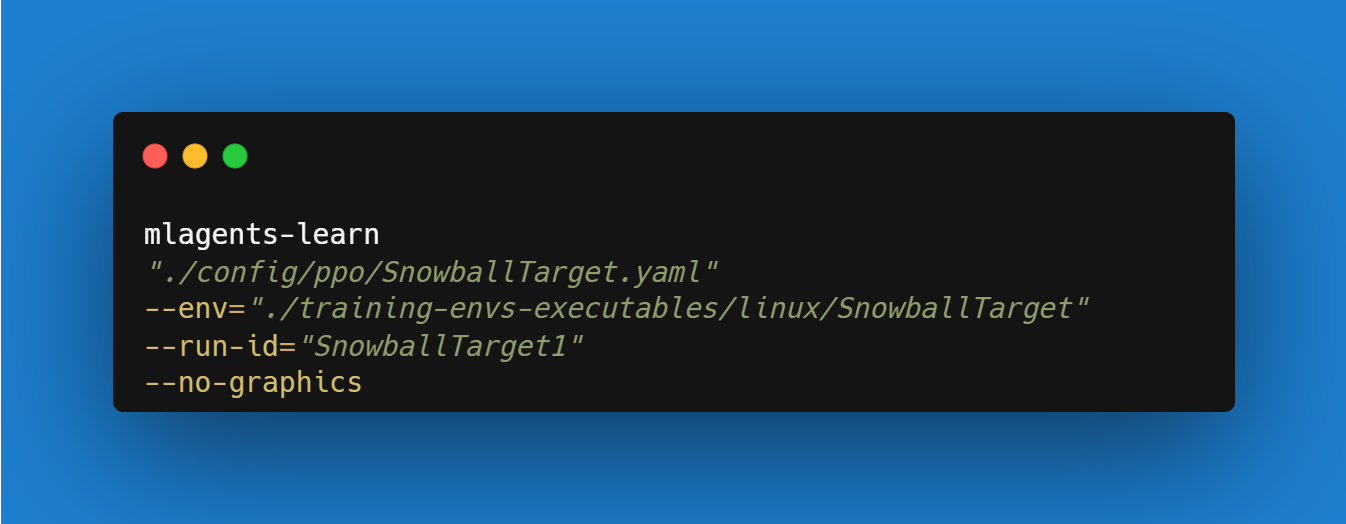
To train our agent, we need to launch mlagents-learn and select the executable containing the environment.
要培训我们的代理,我们需要启动mlAgents–学习并选择包含环境的可执行文件。
We define four parameters:
我们定义了四个参数:
mlagents-learn <config>: the path where the hyperparameter config file is.--env: where the environment executable is.--run_id: the name you want to give to your training run id.--no-graphics: to not launch the visualization during the training.
Train the model and use the --resume flag to continue training in case of interruption.
`mlAgents-学习:超参数配置文件所在的路径。–env:环境可执行文件所在的位置。–run_id:训练运行id的名称。–no-raphics:在训练过程中不启动可视化。MlAgents学习训练模型,并在训练中断时使用-Resume`标志继续训练。
It will fail the first time if and when you use
--resume. Try rerunning the block to bypass the error.当您使用
--Resume时,第一次会失败。尝试重新运行该块以绕过错误。
The training will take 10 to 35min depending on your config. Go take a ☕️you deserve it 🤗.
培训将需要10到35分钟,具体取决于您的配置。去拿个☕️吧,这是你应得的🤗。
1 | |
Push the agent to the Hugging Face Hub
将代理推到Hugging Face中心
- Now that we trained our agent, we’re ready to push it to the Hub to be able to visualize it playing on your browser🔥.
To be able to share your model with the community, there are three more steps to follow:
现在我们培训了我们的代理,我们准备将其推送到中心,以便能够在您的浏览器🔥上可视化播放。要能够与社区共享您的模型,还需要执行三个步骤:
1️⃣ (If it’s not already done) create an account to HF ➡ https://huggingface.co/join
1到HF https://huggingface.co/join的️➡⃣(如果尚未完成)创建帐户
2️⃣ Sign in and store your authentication token from the Hugging Face website.
2️⃣登录并存储来自Hugging Face网站的身份验证令牌。
- Create a new token (https://huggingface.co/settings/tokens) with write role
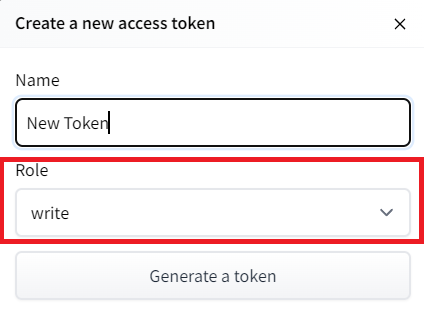
创建新令牌(具有写角色的https://huggingface.co/settings/tokens)创建HF令牌
- Copy the token
- Run the cell below and paste the token
1 | |
If you don’t want to use a Google Colab or a Jupyter Notebook, you need to use this command instead: huggingface-cli login
复制令牌运行下面的单元格并粘贴令牌如果您不想使用Google Colab或Jupyter Notebook,则需要使用以下命令:huggingfacecli login
Then, we need to run mlagents-push-to-hf.
然后,我们需要运行mlAgents-ush-to-hf。
And we define four parameters:
我们定义了四个参数:
--run-id: the name of the training run id.--local-dir: where the agent was saved, it’s results/<run_id name>, so in my case results/First Training.--repo-id: the name of the Hugging Face repo you want to create or update. It’s always/
If the repo does not exist it will be created automatically--commit-message: since HF repos are git repository you need to define a commit message.
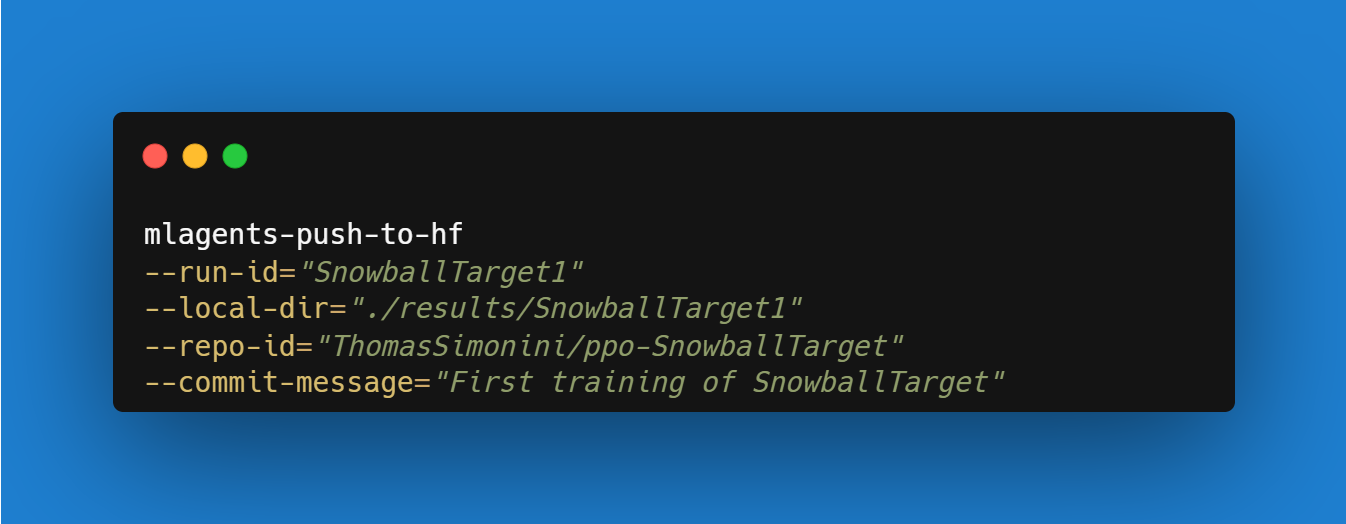
For instance:
`–run-id:训练跑的名称id.–local-dir:代理保存的位置,结果/<run_id name>,所以在我的案例中,结果/First Training.–repo-id:您要创建或更新的Hugging Facerepo的名称。总是/如果repo不存在,会自动创建–Commit-Message`:因为hf repos是git仓库,所以需要定义一个提交消息。例如Push to Hub:
!mlagents-push-to-hf --run-id="SnowballTarget1" --local-dir="./results/SnowballTarget1" --repo-id="ThomasSimonini/ppo-SnowballTarget" --commit-message="First Push"
`!mlAgents-Push-to-hf–run-id=“Snowball Target1”–local-dir=“./Results/Snowball Target1”–repo-id=“ThomasSimonini/PPO-Snowball Target”–Commit-Message=“First Push”`
1 | |
Else, if everything worked you should have this at the end of the process(but with a different url 😆) :
否则,如果一切正常,您应该在过程结束时看到以下内容(但使用不同的URL😆):
1 | |
It’s the link to your model. It contains a model card that explains how to use it, your Tensorboard, and your config file. What’s awesome is that it’s a git repository, which means you can have different commits, update your repository with a new push, etc.
这是与你的模型的链接。它包含解释如何使用它的模型卡、您的Tensorboard和您的配置文件。最棒的是它是一个Git存储库,这意味着你可以有不同的提交,用新的推送来更新你的存储库,等等。
But now comes the best: being able to visualize your agent online 👀.
但现在最好的事情来了:能够可视化您的代理在线👀。
Watch your agent playing 👀
观看你的经纪人打👀
This step it’s simple:
这一步很简单:
- Remember your repo-id
- Go here: https://singularite.itch.io/snowballtarget
- Launch the game and put it in full screen by clicking on the bottom right button
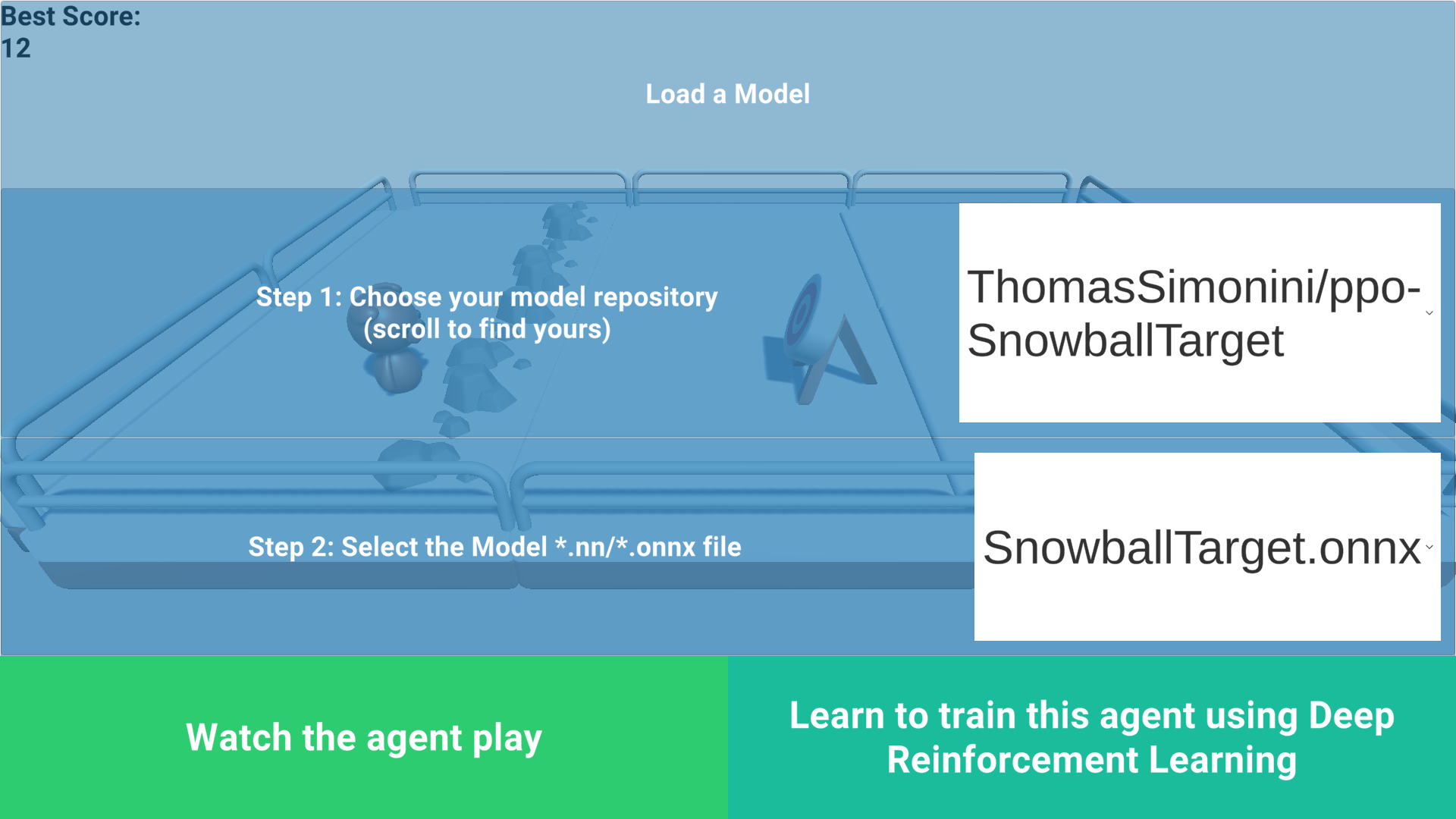
记住您的回购-id转到这里:https://singularite.itch.io/snowballtargetLaunch游戏,并把它放在全屏通过点击右下角按钮雪球目标加载
- In step 1, choose your model repository, which is the model id (in my case ThomasSimonini/ppo-SnowballTarget).
- In step 2, choose what model you want to replay:
- I have multiple ones since we saved a model every 500000 timesteps.
- But if I want the more recent I choose
SnowballTarget.onnx
👉 What’s nice is to try different models steps to see the improvement of the agent.
在步骤1中,选择您的模型存储库,它是模型ID(在我的例子中是Thomas Simonini/ppo-Snowball Target)。在步骤2中,选择您想要重放的模型:我有多个模型,因为我们每500000次保存一个模型。但如果我想要更新的模型,我选择Snowball Target.onnx👉。最好的是尝试不同的模型步骤,看看代理的改进。
And don’t hesitate to share the best score your agent gets on discord in #rl-i-made-this channel 🔥
并毫不犹豫地分享您的代理在#rl-i-Made-This Channel🔥中因不和谐而获得的最佳分数
Let’s now try a more challenging environment called Pyramids.
现在让我们尝试一种更具挑战性的环境,称为金字塔。
Pyramids 🏆
金字塔🏆
Download and move the environment zip file in ./training-envs-executables/linux/
将环境压缩文件下载并移动到./Training-envs-Executes/linux/中
- Our environment executable is in a zip file.
- We need to download it and place it to
./training-envs-executables/linux/ - We use a linux executable because we use colab, and colab machines OS is Ubuntu (linux)
Download the file Pyramids.zip from https://drive.google.com/uc?export=download&id=1UiFNdKlsH0NTu32xV-giYUEVKV4-vc7H usingwget. Check out the full solution to download large files from GDrive here
1 | |
Unzip it
我们的环境可执行文件在一个压缩文件中,我们需要将其下载到./Training-envs-Executes/linux/我们使用的是linux可执行文件,因为我们使用的是CoLab,而CoLab Machines操作系统是Ubuntu(Linux)使用wget从https://drive.google.com/uc?export=download&id=1UiFNdKlsH0NTu32xV-giYUEVKV4-vc7H下载文件。查看完整的解决方案以从GDrive此处下载大文件解压缩
1 | |
Make sure your file is accessible
确保您的文件可访问
1 | |
Modify the PyramidsRND config file
修改金字塔sRND配置文件
Contrary to the first environment, which was a custom one, Pyramids was made by the Unity team.
So the PyramidsRND config file already exists and is in ./content/ml-agents/config/ppo/PyramidsRND.yaml
You might ask why “RND” is in PyramidsRND. RND stands for random network distillation it’s a way to generate curiosity rewards. If you want to know more about that, we wrote an article explaining this technique: https://medium.com/data-from-the-trenches/curiosity-driven-learning-through-random-network-distillation-488ffd8e5938
For this training, we’ll modify one thing:The total training steps hyperparameter is too high since we can hit the benchmark (mean reward = 1.75) in only 1M training steps.
👉 To do that, we go to config/ppo/PyramidsRND.yaml,and modify these to max_steps to 1000000.

As an experiment, you should also try to modify some other hyperparameters. Unity provides very good documentation explaining each of them here.
与第一个环境相反,第一个环境是一个定制的环境,金字塔是由Unity团队创建的。因此,金字塔RND配置文件已经存在并且在./content/ml-agents/config/ppo/PyramidsRND.yamlYou中,它可能会问为什么“RND”在金字塔RND中。RND代表随机网络蒸馏,它是一种产生好奇心奖励的方式。如果你想了解更多,我们写了一篇文章解释这项技术:https://medium.com/data-from-the-trenches/curiosity-driven-learning-through-random-network-distillation-488ffd8e5938对于这个训练,我们将修改一件事:总训练步数超参数太高了,因为我们只需要1百万个训练步数就可以达到基准(平均奖励=1.75)。要做到这一点,我们转到👉/ppo/金字塔RND.yaml,并将它们修改为max_Steps为1000000。作为一个实验,您还应该尝试修改一些其他超参数。Unity在这里提供了非常好的文档来解释它们。
We’re now ready to train our agent 🔥.
我们现在准备好培训我们的代理🔥了。
Train the agent
培训代理
The training will take 30 to 45min depending on your machine, go take a ☕️you deserve it 🤗.
培训将需要30到45分钟,根据您的机器,去参加☕️你应得的它🤗。
1 | |
Push the agent to the Hugging Face Hub
将代理推到Hugging Face中心
- Now that we trained our agent, we’re ready to push it to the Hub to be able to visualize it playing on your browser🔥.
1 | |
Watch your agent playing 👀
现在我们培训了我们的代理,我们准备将其推送到集线器,以便能够在您的浏览器🔥上可视化播放。观看您的代理播放👀
The temporary link for the Pyramids demo is: https://singularite.itch.io/pyramids
金字塔演示的临时链接是:https://singularite.itch.io/pyramids
🎁 Bonus: Why not train on another environment?
🎁的好处:为什么不在另一个环境中训练呢?
Now that you know how to train an agent using MLAgents, why not try another environment?
MLAgents provides 18 different and we’re building some custom ones. The best way to learn is to try things of your own, have fun.
既然您已经知道如何使用MLAgents培训代理,为什么不尝试其他环境呢?MLAgents提供了18种不同的版本,我们正在构建一些定制版本。学习的最好方法是尝试自己的东西,享受乐趣。
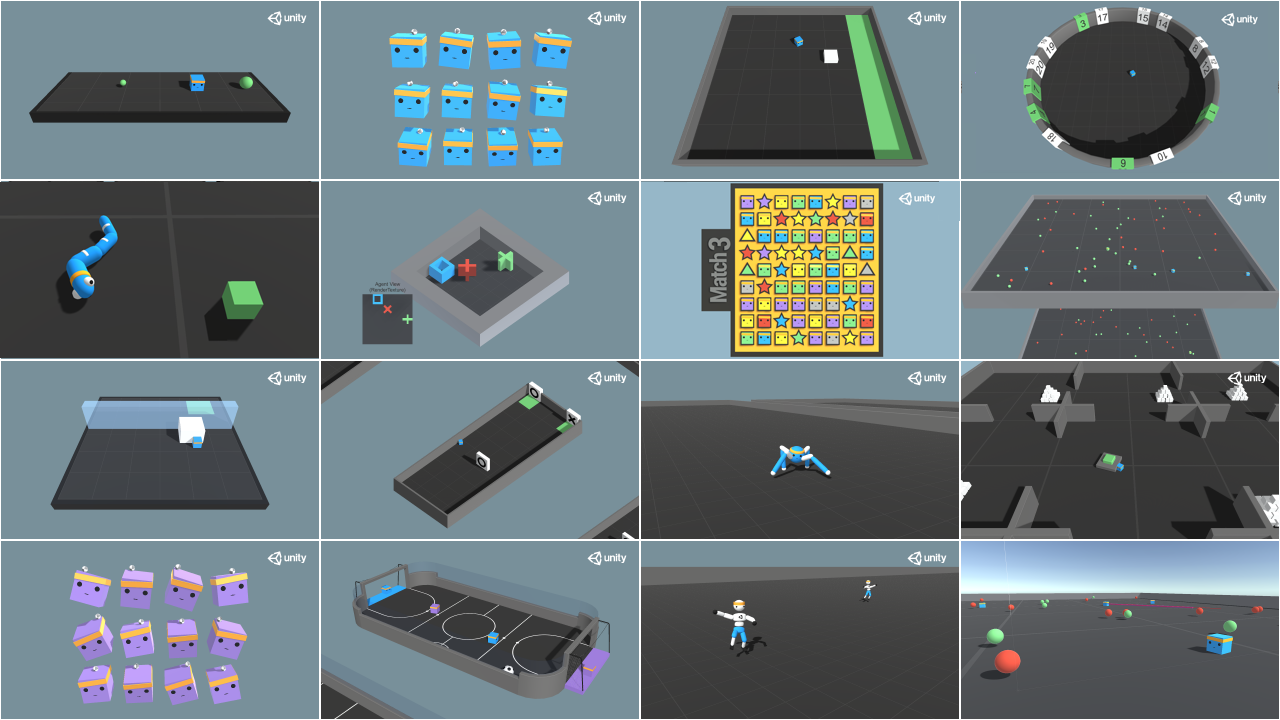
盖子
You have the full list of the one currently available on Hugging Face here 👉 https://github.com/huggingface/ml-agents#the-environments
你有目前在Hugging Facehttps://github.com/huggingface/ml-agents#the-environments👉上可用的完整列表
For the demos to visualize your agent, the temporary link is: https://singularite.itch.io (temporary because we’ll also put the demos on Hugging Face Space)
要让演示可视化您的代理,临时链接是:https://singularite.itch.io(临时的,因为我们还会将演示放在Hugging Face空间上)
For now we have integrated:
目前,我们已经整合了:
- Worm demo where you teach a worm to crawl.
- Walker demo where you teach an agent to walk towards a goal.
If you want new demos to be added, please open an issue: https://github.com/huggingface/deep-rl-class 🤗
您教蠕虫爬行的蠕虫演示。教代理走向目标的Walker演示。如果您想添加新的演示,请打开一个问题:https://github.com/huggingface/deep-rl-class🤗
That’s all for today. Congrats on finishing this tutorial!
今天就到这里吧。祝贺你完成了这篇教程!
The best way to learn is to practice and try stuff. Why not try another environment? ML-Agents has 18 different environments, but you can also create your own? Check the documentation and have fun!
学习的最好方法就是练习和尝试。为什么不尝试另一个环境呢?ML-Agents有18个不同的环境,但你也可以创建自己的环境?查看文档,玩得开心!
See you on Unit 6 🔥,
第六单元🔥再见,