F5-Unit_3-Deep_Q_Learning_with_Atari_Games-F5-on
中英文对照学习,效果更佳!
原课程链接:https://huggingface.co/deep-rl-course/unit6/additional-readings?fw=pt
Hands-on
亲身实践


在Colab中公开提问
Now that you’ve studied the theory behind Deep Q-Learning, you’re ready to train your Deep Q-Learning agent to play Atari Games. We’ll start with Space Invaders, but you’ll be able to use any Atari game you want 🔥
现在你已经学习了深度Q-学习背后的理论,你已经准备好训练你的深度Q-学习代理玩Atari游戏了。我们将从太空入侵者开始,但你将能够使用任何你想要的雅达利游戏🔥
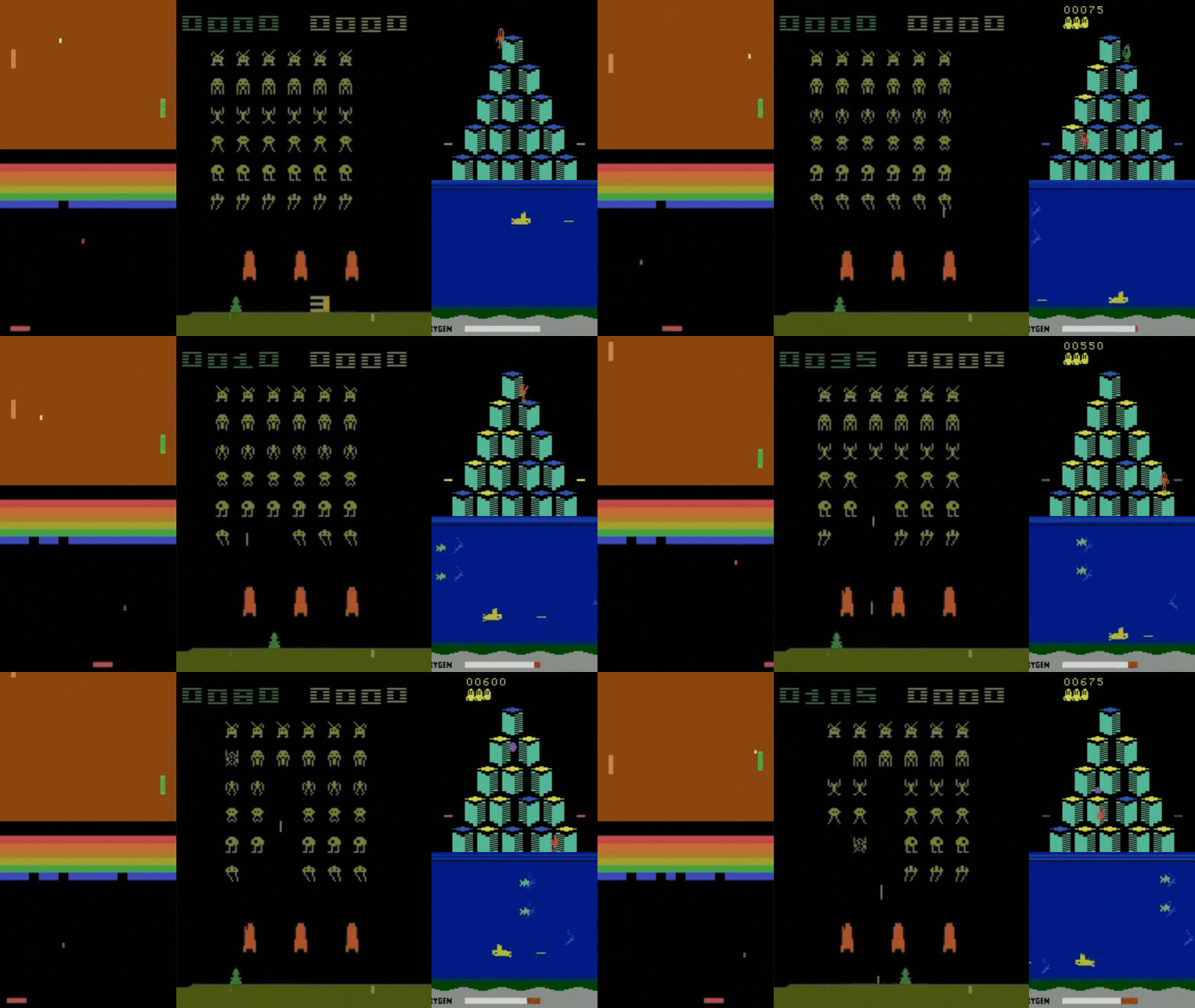
We’re using the RL-Baselines-3 Zoo integration, a vanilla version of Deep Q-Learning with no extensions such as Double-DQN, Dueling-DQN, or Prioritized Experience Replay.
环境我们正在使用RL-Baseline-3 Zoo集成,这是一个普通的深度Q-学习版本,没有扩展,如Double-DQN、Dueling-DQN或优先体验重播。
Also, if you want to learn to implement Deep Q-Learning by yourself after this hands-on, you definitely should look at CleanRL implementation: https://github.com/vwxyzjn/cleanrl/blob/master/cleanrl/dqn_atari.py
此外,如果您想在此实践之后自己学习实现深度Q-Learning,您肯定应该查看CleanRL实现:https://github.com/vwxyzjn/cleanrl/blob/master/cleanrl/dqn_atari.py
To validate this hands-on for the certification process, you need to push your trained model to the Hub and get a result of >= 200.
要验证认证流程的实际操作,您需要将经过培训的模型推送到中心,并获得>=200的结果。
To find your result, go to the leaderboard and find your model, the result = mean_reward - std of reward
要找到您的结果,请转到排行榜并找到您的模型,结果=均值_奖励-奖励的标准
If you don’t find your model, go to the bottom of the page and click on the refresh button.
如果您没有找到您的模型,请转到页面底部并单击刷新按钮。
For more information about the certification process, check this section 👉 https://huggingface.co/deep-rl-course/en/unit0/introduction#certification-process
有关认证过程的更多信息,请查看https://huggingface.co/deep-rl-course/en/unit0/introduction#certification-process👉这一节
And you can check your progress here 👉 https://huggingface.co/spaces/ThomasSimonini/Check-my-progress-Deep-RL-Course
您可以在https://huggingface.co/spaces/ThomasSimonini/Check-my-progress-Deep-RL-Course👉此处查看您的进度
To start the hands-on click on Open In Colab button 👇 :
要开始动手操作,请单击以可乐打开按钮👇:
在Colab开业
Unit 3: Deep Q-Learning with Atari Games 👾 using RL Baselines3 Zoo
单元3:使用RL Baselines3 Zoo使用Atari Games👾进行深度Q学习
In this notebook, you’ll train a Deep Q-Learning agent playing Space Invaders using RL Baselines3 Zoo, a training framework based on Stable-Baselines3 that provides scripts for training, evaluating agents, tuning arameters, plotting results and recording videos.
单元3缩略图在本笔记本中,您将使用RL Baselines3 Zoo训练一个深度Q-Learning代理扮演太空入侵者,这是一个基于稳定Baselines3的培训框架,提供培训、评估代理、调整参数、绘制结果和录制视频的脚本。
We’re using the RL-Baselines-3 Zoo integration, a vanilla version of Deep Q-Learning with no extensions such as Double-DQN, Dueling-DQN, and Prioritized Experience Replay.
我们正在使用RL-Baseline-3 Zoo集成,这是一个普通的深度Q-学习版本,没有扩展,如Double-DQN,Dueling-DQN,以及优先体验重播。
⬇️ Here is an example of what you will achieve ⬇️
⬇️这里是一个示例,说明您将实现什么⬇️
1 | |
🎮 Environments:
🎮环境:
- SpacesInvadersNoFrameskip-v4
📚 RL-Library:
SpacesInvadersNoFramekip-v4📚RL库:
Objectives 🏆
RL-基线3-动物对象🏆
At the end of the notebook, you will:
在笔记本结尾处,您将:
- Be able to understand deeper how RL Baselines3 Zoo works.
- Be able to push your trained agent and the code to the Hub with a nice video replay and an evaluation score 🔥.
Prerequisites 🏗️
能够更深入地了解RL Baselines3动物园的工作原理。能够通过良好的视频回放和评估分数🔥将您训练有素的代理和代码推送到中心。Preequisites🏗️
Before diving into the notebook, you need to:
🔲 📚 Study Deep Q-Learning by reading Unit 3 🤗
在深入研究笔记本之前,您需要:🔲📚通过阅读单元3🤗来研究深度Q学习
We’re constantly trying to improve our tutorials, so if you find some issues in this notebook, please open an issue on the Github Repo.
我们一直在努力改进我们的教程,所以如果你在这个笔记本上发现了一些问题,请在Github Repo上打开一个问题。
Let’s train a Deep Q-Learning agent playing Atari’ Space Invaders 👾 and upload it to the Hub.
让我们训练一个深度Q-学习代理,扮演雅达利的太空入侵者👾,并上传到中心。
Set the GPU 💪
设置图形处理器💪
- To accelerate the agent’s training, we’ll use a GPU. To do that, go to
Runtime > Change Runtime type
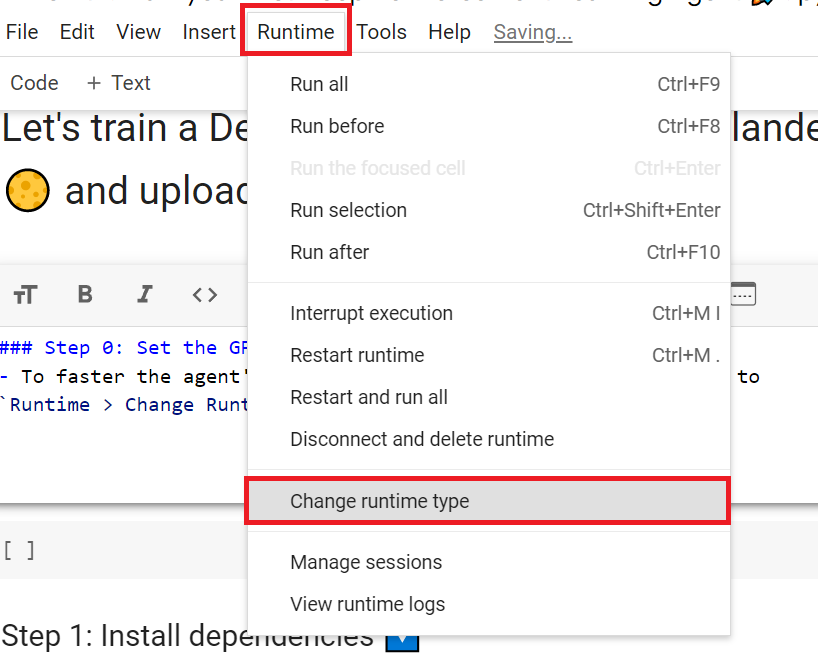
为了加快工程师的培训,我们将使用GPU。为此,请转到运行时>更改运行时类型GPU步骤1
Hardware Accelerator > GPU
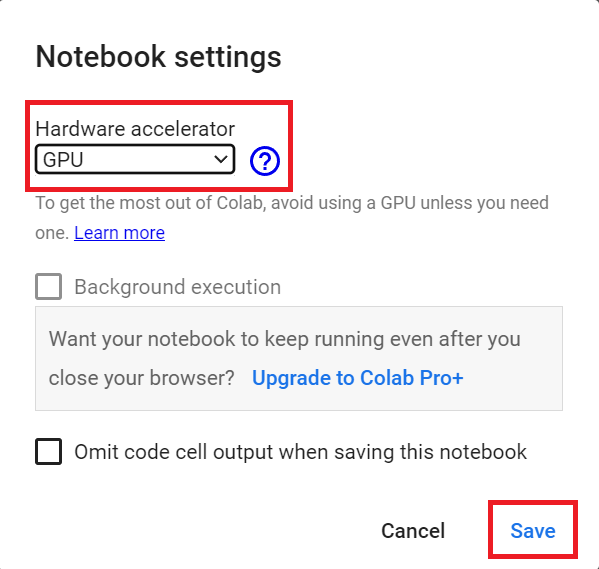
`硬件加速器>GPU`GPU步骤2
Create a virtual display 🔽
创建虚拟显示🔽
During the notebook, we’ll need to generate a replay video. To do so, with colab, we need to have a virtual screen to be able to render the environment (and thus record the frames).
在笔记本期间,我们需要生成一个回放视频。要做到这一点,使用CoLab,我们需要一个虚拟屏幕来渲染环境(并因此记录帧)。
Hence the following cell will install the librairies and create and run a virtual screen 🖥
因此,下面的单元将安装库并创建和运行虚拟屏幕🖥
1 | |
1 | |
1 | |
1 | |
Clone RL-Baselines3 Zoo Repo 📚
克隆RL-Baselines3动物园回购📚
You could directly install from the Python package (pip install rl_zoo3), but since we want the full installation with extra environments and dependencies, we’re going to clone the RL-Baselines3-Zoo repository and install from source.
您可以直接从Python包(pip Install rl_zoo3)安装,但由于我们希望完整安装包含额外的环境和依赖项,所以我们将克隆RL-Baselines3-Zoo存储库并从源安装。
1 | |
Install dependencies 🔽
安装依赖项🔽
We can now install the dependencies RL-Baselines3 Zoo needs (this can take 5min ⏲)
我们现在可以安装RL-Baselines3动物园需要的依赖项(这可能需要5分钟的⏲)
1 | |
1 | |
Train our Deep Q-Learning Agent to Play Space Invaders 👾
训练我们的深度Q-学习代理来扮演太空入侵者👾
To train an agent with RL-Baselines3-Zoo, we just need to do two things:
要用RL-Baselines3-Zoo培训一名特工,我们只需要做两件事:
- We define the hyperparameters in
/content/rl-baselines3-zoo/hyperparams/dqn.yml

Here we see that:
我们在/content/rl-baselines3-zoo/hyperparams/dqn.ymlDQN超级参数中定义超级参数,如下所示:
- We use the
Atari Wrapperthat does the pre-processing (Frame reduction, grayscale, stack four frames), - We use
CnnPolicy, since we use Convolutional layers to process the frames. - We train the model for 10 million
n_timesteps. - Memory (Experience Replay) size is 100000, i.e. the number of experience steps you saved to train again your agent with.
💡 My advice is to reduce the training timesteps to 1M, which will take about 90 minutes on a P100. !nvidia-smi will tell you what GPU you’re using. At 10 million steps, this will take about 9 hours, which could likely result in Colab timing out. I recommend running this on your local computer (or somewhere else). Just click on: File>Download.
我们使用Atari Wrapper来做预处理(降帧、灰度、堆叠四帧),我们使用CnnPolicy,因为我们使用卷积层来处理帧。我们训练了1000万n_TimeSteps的模型。Memory(经验回放)大小为100000,即您为再次训练您的代理而节省的经验步数。💡我的建议是将训练时间步数减少到1M,这在P100上大约需要90分钟。!NVIDIA-SMI会告诉您使用的是哪种图形处理器。在1000万步的速度下,这将需要大约9个小时,这可能会导致Colab超时。我建议在您的本地计算机(或其他地方)上运行此程序。只需点击:文件>下载。
In terms of hyperparameters optimization, my advice is to focus on these 3 hyperparameters:
在超参数优化方面,我的建议是重点关注这3个超参数:
learning_ratebuffer_size (Experience Memory size)batch_size
As a good practice, you need to check the documentation to understand what each hyperparameters does: https://stable-baselines3.readthedocs.io/en/master/modules/dqn.html#parameters
`Learning_rateBuffer_Size(体验内存大小)Batch_Size`作为一种良好的做法,您需要查看文档以了解每个超参数的作用:https://stable-baselines3.readthedocs.io/en/master/modules/dqn.html#parameters
- We run
train.pyand save the models onlogsfolder 📁
1 | |
Solution
我们运行📁.py并将模型保存在logs文件夹中
1 | |
Let’s evaluate our agent 👀
让我们评估一下我们的👀探员
- RL-Baselines3-Zoo provides
enjoy.py, a python script to evaluate our agent. In most RL libraries, we call the evaluation scriptenjoy.py. - Let’s evaluate it for 5000 timesteps 🔥
1 | |
Solution
RL-Baselines3-Zoo提供了一个用来评估我们的代理的Python脚本enjoy.py。在大多数RL库中,我们将评估脚本称为enjoy.py。让我们为5000个时间步长的🔥解决方案进行评估
1 | |
Publish our trained model on the Hub 🚀
在中心🚀上发布我们训练过的模型
Now that we saw we got good results after the training, we can publish our trained model on the Hub with one line of code.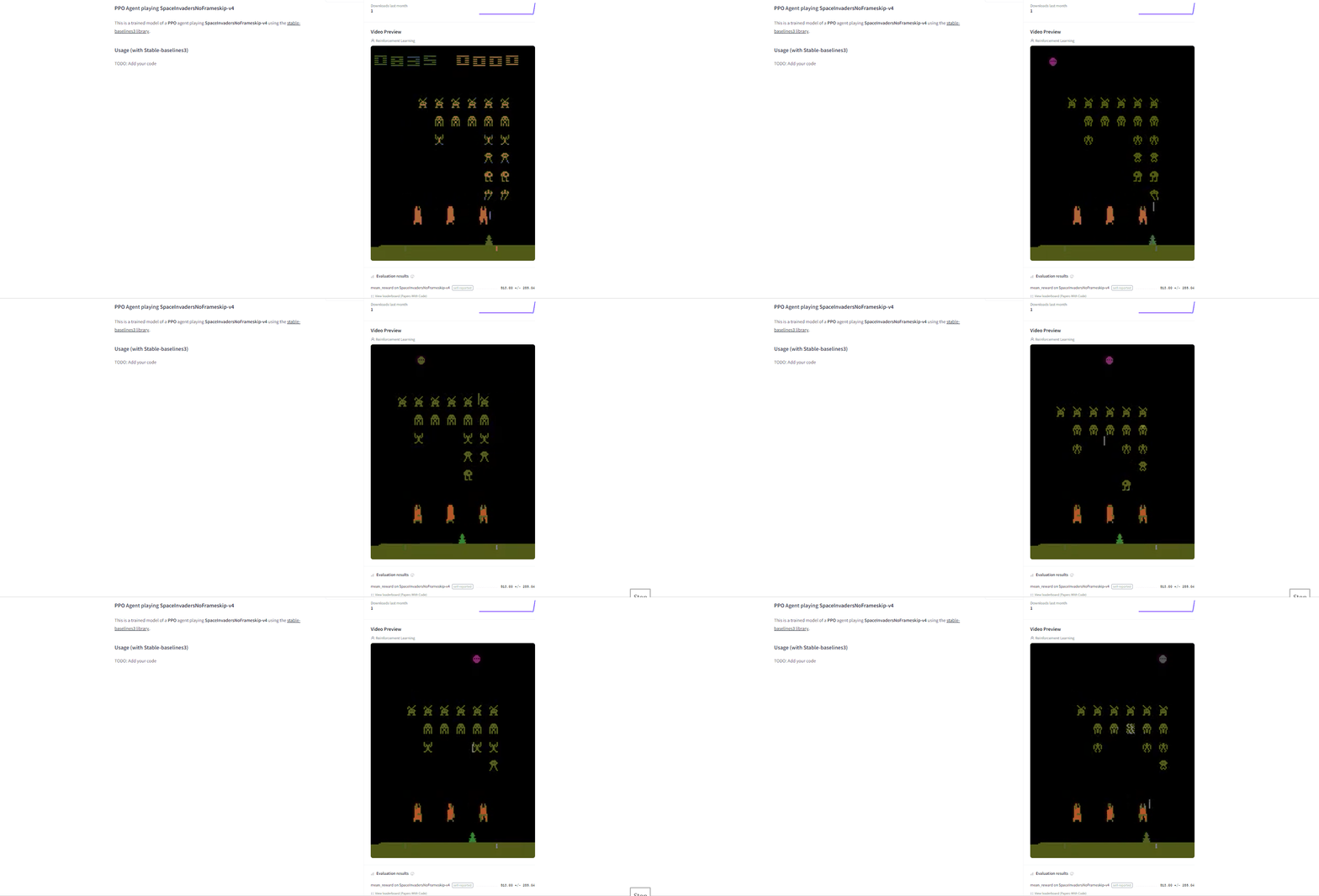
By using rl_zoo3.push_to_hub.py, you evaluate, record a replay, generate a model card of your agent, and push it to the Hub.
现在我们看到培训后取得了很好的结果,我们可以用一行代码在Hub上发布我们训练过的模型。空间入侵者模型通过使用rl_zoo3.ush_to_hub.py,您评估、录制回放,生成您的经纪人的模型卡,并将其推送到Hub。
This way:
这条路:
- You can showcase our work 🔥
- You can visualize your agent playing 👀
- You can share with the community an agent that others can use 💾
- You can access a leaderboard 🏆 to see how well your agent is performing compared to your classmates 👉 https://huggingface.co/spaces/huggingface-projects/Deep-Reinforcement-Learning-Leaderboard
To be able to share your model with the community, there are three more steps to follow:
您可以展示我们的工作🔥您可以可视化您的代理玩👀您可以与社区共享其他人可以使用的代理💾您可以访问排行榜🏆以查看您的代理与您的同学相比表现如何👉您可以与社区共享您的模型,还有三个步骤需要遵循:
1️⃣ (If it’s not already done) create an account in HF ➡ https://huggingface.co/join
1在HF https://huggingface.co/join️➡⃣中创建帐户(如果尚未完成)
2️⃣ Sign in and then, you need to store your authentication token from the Hugging Face website.
2️⃣登录,然后,您需要存储来自Hugging Face网站的身份验证令牌。
- Create a new token (https://huggingface.co/settings/tokens) with write role
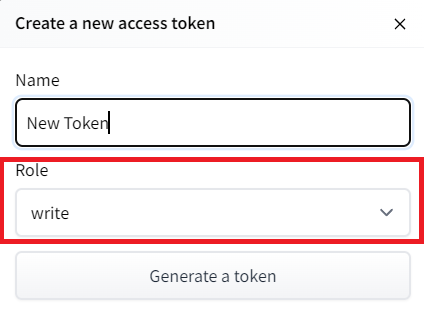
创建新令牌(具有写角色的https://huggingface.co/settings/tokens)创建HF令牌
- Copy the token
- Run the cell below and past the token
1 | |
If you don’t want to use a Google Colab or a Jupyter Notebook, you need to use this command instead: huggingface-cli login
复制令牌运行下面的单元格并传递令牌如果您不想使用Google Colab或Jupyter Notebook,则需要使用以下命令:huggingfacecli login
3️⃣ We’re now ready to push our trained agent to the Hub 🔥
3️Hub我们现在已经准备好将我们训练有素的代理推向🔥⃣
Let’s run push_to_hub.py file to upload our trained agent to the Hub. There are two important parameters:
让我们运行ush_to_hub.py文件,将我们训练好的代理上传到Hub。有两个重要参数:
--repo-name: The name of the repo-orga: Your Hugging Face username
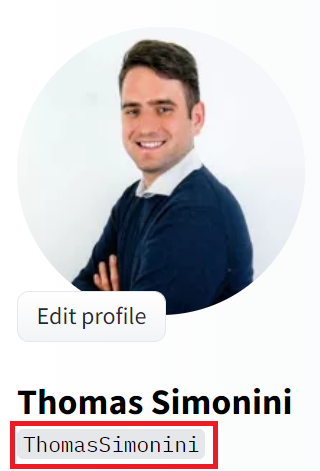
`–repo-name:联系人的名字-orga`:您的Hugging Face用户名选择ID
1 | |
Solution
解
1 | |
Congrats 🥳 you’ve just trained and uploaded your first Deep Q-Learning agent using RL-Baselines-3 Zoo. The script above should have displayed a link to a model repository such as https://huggingface.co/ThomasSimonini/dqn-SpaceInvadersNoFrameskip-v4. When you go to this link, you can:
祝贺🥳,您刚刚使用RL-Baseline-3 Zoo培训并上传了您的第一个深度Q-学习代理。上面的脚本应该显示一个指向模型存储库(如https://huggingface.co/ThomasSimonini/dqn-SpaceInvadersNoFrameskip-v4.)的链接当您转到此链接时,您可以:
- See a video preview of your agent at the right.
- Click “Files and versions” to see all the files in the repository.
- Click “Use in stable-baselines3” to get a code snippet that shows how to load the model.
- A model card (
README.mdfile) which gives a description of the model and the hyperparameters you used.
Under the hood, the Hub uses git-based repositories (don’t worry if you don’t know what git is), which means you can update the model with new versions as you experiment and improve your agent.
在右侧查看代理的视频预览。单击“文件和版本”查看存储库中的所有文件。单击“在稳定基线中使用3”以获取显示如何加载模型的代码片段。模型卡(Readme.md文件)提供对模型和您使用的超参数的描述。在幕后,Hub使用基于Git的存储库(如果您不知道Git是什么也不用担心),这意味着您可以在试验和改进代理时使用新版本更新模型。
Compare the results of your agents with your classmates using the leaderboard 🏆
使用排行榜🏆将您的代理结果与您的同学进行比较
Load a powerful trained model 🔥
加载功能强大的训练有素的模型🔥
The Stable-Baselines3 team uploaded more than 150 trained Deep Reinforcement Learning agents on the Hub. You can download them and use them to see how they perform!
稳定基线3团队在中心上传了150多个训练有素的深度强化学习代理。您可以下载它们并使用它们来查看它们的表现!
You can find them here: 👉 https://huggingface.co/sb3
你可以在这里找到它们:https://huggingface.co/sb3👉
Some examples:
下面是一些示例:
- Asteroids: https://huggingface.co/sb3/dqn-AsteroidsNoFrameskip-v4
- Beam Rider: https://huggingface.co/sb3/dqn-BeamRiderNoFrameskip-v4
- Breakout: https://huggingface.co/sb3/dqn-BreakoutNoFrameskip-v4
- Road Runner: https://huggingface.co/sb3/dqn-RoadRunnerNoFrameskip-v4
Let’s load an agent playing Beam Rider: https://huggingface.co/sb3/dqn-BeamRiderNoFrameskip-v4
1 | |
- We download the model using
rl_zoo3.load_from_hub, and place it in a new folder that we can callrl_trained
1 | |
- Let’s evaluate if for 5000 timesteps
1 | |
Why not trying to train your own Deep Q-Learning Agent playing BeamRiderNoFrameskip-v4? 🏆.
我们使用rl_zoo3.load_from_hub下载模型,并将其放置在一个新文件夹中,我们可以将其命名为rl_Trained,让我们评估5000个时间步长为什么不尝试训练您自己的深度Q-学习代理来玩BeamRiderNoFraMeskip-v4?🏆。
If you want to try, check https://huggingface.co/sb3/dqn-BeamRiderNoFrameskip-v4#hyperparameters. There, in the model card, you have the hyperparameters of the trained agent.
如果您想尝试一下,请查看https://huggingface.co/sb3/dqn-BeamRiderNoFrameskip-v4#hyperparameters.在模型卡中,您有训练有素的特工的超参数。
But finding hyperparameters can be a daunting task. Fortunately, we’ll see in the next bonus Unit, how we can use Optuna for optimizing the Hyperparameters 🔥.
但寻找超参数可能是一项艰巨的任务。幸运的是,我们将在下一个奖励单元中看到如何使用OpTuna来优化超级参数🔥。
Some additional challenges 🏆
🏆面临的一些额外挑战
The best way to learn is to try things by your own!
学习的最好方法就是自己去尝试!
In the Leaderboard you will find your agents. Can you get to the top?
在排行榜上,你会找到你的代理人。你能爬到山顶吗?
Here’s a list of environments you can try to train your agent with:
以下是您可以尝试培训您的工程师的环境列表:
- BeamRiderNoFrameskip-v4
- BreakoutNoFrameskip-v4
- EnduroNoFrameskip-v4
- PongNoFrameskip-v4
Also, if you want to learn to implement Deep Q-Learning by yourself, you definitely should look at CleanRL implementation: https://github.com/vwxyzjn/cleanrl/blob/master/cleanrl/dqn_atari.py
BeamRiderNoFrameskip-v4BreakoutNoFrameskip-v4EnduroNoFrameskip-v4PongNoFrameskip-v4Also,如果你想自己学习实现深度Q-学习,你绝对应该看看CleanRL的实现:https://github.com/vwxyzjn/cleanrl/blob/master/cleanrl/dqn_atari.py
环境
Congrats on finishing this chapter!
祝贺你读完了这一章!
If you’re still feel confused with all these elements…it’s totally normal! This was the same for me and for all people who studied RL.
如果你仍然对所有这些元素感到困惑,…这完全是正常的!这对我和所有研究RL的人来说都是一样的。
Take time to really grasp the material before continuing and try the additional challenges. It’s important to master these elements and having a solid foundations.
在继续学习和尝试其他挑战之前,花点时间真正掌握这些材料。掌握这些要素并拥有坚实的基础是很重要的。
In the next unit, we’re going to learn about Optuna. One of the most critical task in Deep Reinforcement Learning is to find a good set of training hyperparameters. And Optuna is a library that helps you to automate the search.
在下一单元中,我们将学习欧普金枪鱼。深度强化学习中最关键的任务之一就是找到一组好的训练超参数。而OpTuna是一个帮助您自动搜索的库。
See you on Bonus unit 2! 🔥
奖金单元2再见!🔥