C2-Bonus_Unit_1-Introduction_to_Deep_Reinforcement_Learning_with_Huggy-D3-Play_with_Huggy
中英文对照学习,效果更佳!
原课程链接:https://huggingface.co/deep-rl-course/unitbonus2/hands-on?fw=pt
Play with Huggy
和Huggy一起玩
Now that you’ve trained Huggy and pushed it to the Hub. You will be able to play with him ❤️
现在你已经训练了Huggy并把它推给了Hub。你将能够和他一起玩❤️
For this step it’s simple:
这一步很简单:
- Open the game Huggy in your browser: https://huggingface.co/spaces/ThomasSimonini/Huggy
- Click on Play with my Huggy model
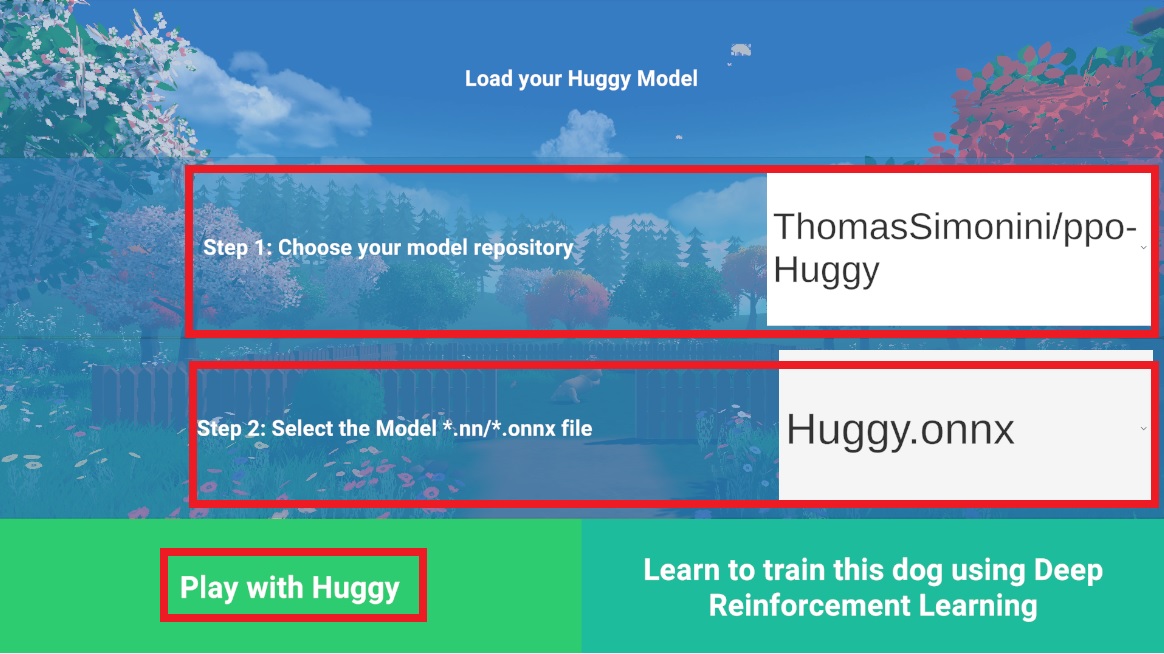
在浏览器中打开游戏Huggy:https://huggingface.co/spaces/ThomasSimonini/HuggyClick on Play With My Huggy Model Load-Huggy
- In step 1, choose your model repository which is the model id (in my case ThomasSimonini/ppo-Huggy).
- In step 2, choose what model you want to replay:
- I have multiple one, since we saved a model every 500000 timesteps.
- But if I want the more recent I choose Huggy.onnx
👉 What’s nice is to try with different models step to see the improvement of the agent.
在步骤1中,选择您的模型存储库,它是模型ID(在我的例子中是Thomas Simonini/ppo-huggy)。在步骤2中,选择您想要重放的模型:我有多个模型,因为我们每500000次保存一个模型。但如果我想要更新的,我选择Huggy.onnx👉什么是尝试与不同的模型步骤,以查看代理的改进。